Shooting a Computer Monitor??

sagedrummer

Active member
HI
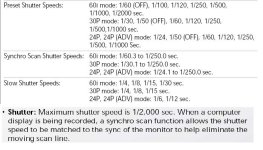
I have been hired to film a video for a software company that needs some close-ups of computer monitors. I have tried changing the Syncro Scan settings and turning the shutter speed on and off, but even at 1/60.3 there is still a subtle flurry evident on the screen which is not going to cut it. Does anyone have any recommendations? Thanks
 
You need to synchro scan down to 1/48 or less, I don't remember exact setting but just keep adjusting 'til it works. i would have to look to make sure what it is......
 
maverickstunts said:
You need to synchro scan down to 1/48 or less, I don't remember exact setting but just keep adjusting 'til it works. i would have to look to make sure what it is......
The DVX100 only goes down to 1/60.3, do I have any other options?
Thanks
 
If I may... I really want to throw this out there...

I've always had great luck white balancing to the monitor itself...
It seems to be most accurate... as long as you stay tight on the screen.
At times when I needed to show the monitor in a wider shot, I've always added correction to the light to make it match... sorta like the screen is daylight and everthing else goes tungsten.

Good luck...
 
You, may want to check the refresh rate of your monitor, since you are still getting flicker when the camera is set at 1/60th of a second, then your monitor's refresh rate is most likely set at a higher rate, such as 70Hz, 72Hz, 85Hz.
 
Back
Top