FS7: Severe Pixelation in Center Crop Mode

basspig

Veteran
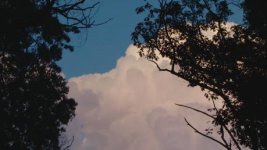
I shot some timelapse and some normal frame rate footage of cloud formations this evening and when I imported it into the NLE, I noticed that it looked like SD upscaled to 1080, rather than 1080. I also noticed some horizontal magenta lines in some of the frames.
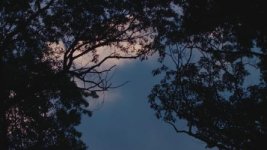
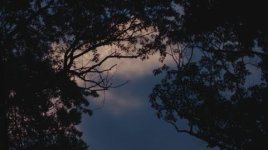
NotSnQStill003.jpgDigitalNoiseStill002.jpgDigitalNoiseStill001.jpg

I've shot beautiful timelapse in the past with the FS7, but this is the first time I attempted it with center crop mode. What it looks like is a crop of a JPEG image, in terms of quality. The first thing I noticed was jaggies on the cloud edges. The second was the magenta "noise" lines against the blue areas.

At first, I thought it was an artifact of using S&Q mode, but even the normal 23.98 FPS footage I shot has the same artifacts.

Does the CODEC compress first, then crop the image before saving? Because that's what it looks like to me. I've only seen macroblocking this bad on XAVC footage, zoomed in 400%.

I know at least one other member of the forum has reported this same artifact under similar shooting conditions, so it may be a limitation of center crop mode.
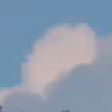
 
The forum scaled the other images to invisibility, so here's a crop of what I'm talking about. It's very obvious on a 31" display:

Pixellation/JPEG block artifacts in crop mode:
CropStill004.png
 
I've shot countless high quality time lapses with the FS7 and never once did I consider shooting in anything other than UHD Full Scan.

You have got trees with loads of detail soaking up bitrate, I have posted several times that XAVC favours detail and will heavily compress areas of similar colour and Luma i.e. the sky/clouds to ensure most of the bitrate is used on the detail.

The compression artefacts can be made more obvious by poor quality LUTs and putting too much contrast back in during grading. Burning a more contrasty LUT or in Custom Mode Hypergamma can help as contrast is added before compression.
 
Last edited:
Doesn't have to be time lapse, as I mentioned--even the normal frame rate video has these artifacts.

But your idea about the detail from the trees soaking up bandwidth for the compression sounds reasonable. The quality loss is much greater than I expected though. I've seen artifacts this bad on HDV footage, but up til now, not from my FS7.

I guess there's no way around shooting with an external recorder to Prores HQ. My other FS7 have a Atomos Shogun permanently attached to the rails and I use that most of the time and rarely ingest the XAVC version.

Normally, I get great looking center crop images with other types of subjects.

Areas of solid blue, coupled with the detail of the trees apparently finds a weakness in the XAVC CODEC. Duly noted.

Now I have to do my research and find an external recorder capable of DCI 4K from the HDMI port, at least at 23.98 FPS. Waiting to hear whether Atomos will break with it's long love affair of UHD only HDMI, or whether I need to look at SoundDevices PIX series or wait for Convergent Design to come out with a new model with a better, full HD screen.
 
I did some more shooting today and I discovered something: this artifact has nothing to do with center crop. It is doing it in 4K and it is also doing it on my other FS7, not just the new one.

Today I think I found a common thread to it all: LUTs. Specifically, newer LUTs that I made in the latest version of LUTCalc. I found out that if I use LUTs that I created in earlier versions of LUTCalc, the artifact vanishes.

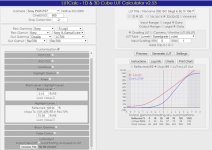
Even a simple SLot3 to REC709 LUT does this:

LUTCalc.jpg


I wish I could test against the older version of LUTCalc to be certain, but all of my LUTs that predate the last version or two don't show the horizontal lines and macroblocks on blue skies.

So it is a dodgy LUT that is responsible for the artifact, not the camera and not the CODEC.
 
Dodgy LUTs are capable of 'enhancing' the XAVC macroblocking and certainly a LUT with a reasonable amount of contrast can expose the compression posterisation in the sky.

I use 64x64x64 LUTs where possible.

There are some very popular LUTs available online that are horrendous, I downloaded a free set from one author and they were just unusable and the whole image turned to a noisy blocky mess.

LUTs can be a real issue but I've never had a bad experience with any LUT output from LUTCalc.
 
basspig,

could you send me a link to some of your LUTs. The identically set up ones from old and recent LUTCalc that you used to A/B test would be great please. Obviously I'm very keen to look into this. I have to admit that I haven't personally experienced this in my own camerawork, but if this is happening for you it's important to figure out the source and possible remedies.

In defence of LUTCalc (and LUTs in general), a LUT can emphasise codec limitations with things like heavy saturation or very high contrast, and I have come across LUTs which lay layers of linear interpolation upon linear interpolation and can produce banding effects even without extreme contrast, but a LUT fundamentally can't create any effects which are spatial, i.e. it can't of itself create horizontal lines which aren't there initially, or square blocks.

The reason for this is that a LUT takes in a value (or set of RGB values) pixel by pixel, then spits out a value (or set of RGB values) for the input pixel position alone.

I struggle to see how any LUT could be the source of the specific effects you highlight, from LUTCalc or elsewhere. It is pretty easy to create a LUT which will emphasise artefacts which are already present, bringing noise and blocks front and centre.

With all that in mind, hardware and software all have their own methods for decoding the frame, then applying the LUT calculations. Considering also the programming optimisations used then it is possible for sensitivities or limitations to come in. The main one I have come across is in handling values above clip, whether white itself or colours which go beyond the output gamut. Lots of software (e.g. Resolve) cope fine with their internal floating point calculations, but I have seen weird effects on software which is a bit more picky. I'm endlessly trying to find out about software in common use to confirm or change the preset settings.

On your screenshot you have 'Rec709' chosen as the output gamut and the preset is for Lumetri / Speedgrade. This is the basic matrix from the ITU paperwork, and has plenty of potential to colour clip when fed wide gamut picture data (though the gamma knee should mitigate this). It could be worth just clicking 'Hard Clip 0-1.0' and see if that makes a difference to Lumetri. Alternatively, you could try a slightly less saturated Rec709 option, or fine tune the saturation with 'ASC-CDL' or more subtly, feather off saturation in the highlights with the 'Multitone' option.

Thanks,

Ben
 
Hi Ben,

Thank you for your response. I was thinking the LUT may have affected color subsampling resolution, given that with a year old LUT, there is no trace of the artifacts, even under magnification, and I can't make it pop out by using Lumetri's tools to increase contrast. Then there's the LUTs I created this summer, and all have this artifact, including "nuclear" greens. It appears that the saturation at low luminance levels is boosted greatly with the LUTs I created this year, while last year's LUTs have natural colors and seem a little low on saturation.

I've uploaded last year's LUT and a recent LUT to my Dropbox account which is here:

https://www.dropbox.com/sh/qv0cy19kzxundu9/AAC6FJS6RWHVsVtUGdc5Ckuea?dl=0

"Sony_FS7_500_ISO" is last year's LUT; it has no artifacts.

"500_ISO_Slog3_to_REC709", is one of the trouble LUTs I created this summer.

No matter how much I twist, push and pull on the images with the old LUT, I cannot get horizontal magenta lines to appear. It is only when I use the newer LUTs that these lines pop out.

Have a look and see if you have any idea what's causing it. Even with default settings, I'm getting super high saturation with the newer version of LUTCalc.
 
Hi basspig,

just had a quick look and will put them both in a have a deeper play, but the immediate thing which strikes me comes from opening them in a text editor and checking the notes.

Cube files can include notes by starting a line with #. I have LUTCalc output a whole string of things which can be useful in deciding what the setup and intended use was for the LUTs it generates.

In this case, the first crucial thing I see on the colour side of things is that the old LUT inputs S-Gamut3.cine and outputs S-Gamut3.cine whilst the new one inputs S-Gamut3.cine but then outputs basic Rec709. A bit of apples and oranges (very bright oranges ;-) ).

As I mentioned before, that basic Rec709 option itself is a pure matrix operation. It is also a much reduced gamut than S-Gamut3.cine. The prime consequence of that is that colours look much more saturated than in S-Gamut3.cine recording, and that since the camera can capture across the S-Gamut3.cine gamut you may well find colours pushing beyond the Rec709 gamut. Particularly with something high saturation and relatively high luminance such as a bright blue sky.

This is always a major question when going from a wide gamut recording to a narrow gamut display - how vibrant do you go, and what do you do with the colours you recorded which go beyond that?

As I also mentioned, the gamma choice may serve to mitigate the issue, but a better option would be to put a lid on the saturation as you approach chroma clip. My basic preference is to choose a different Rec709-based gamut. I tend to go with LC709A and then play around with the saturation a bit (I like it a little stronger) just using the saturation slider in the ASC-CDL tool.

Alternatively, you can use the Rec709 matrix as a base and then limit saturation against luminance using the 'Multitone' tool. As I say, I would personally start by trying a different output gamut option. You could even go with S-Gamut3.cine as your older, preferred LUT does, but then dial up saturation to taste using tools like Multitone, ASC-CDL or PSST-CDL.

The 'pure' Rec709 (and by extension sRGB) gamut options are unusual in being much smaller gamuts, or at least much more prone to over saturation than any of the other options in LUTCalc, including the Rec709-based ones. I don't tend to work from the basic Rec709 myself, and I suspect that that is the case with most other people, so I haven't come across a problem where a LUT pushes codec artefacts so front and centre. I have had one other person show me a shot with odd colours on a bright, saturated high-vis jacket which this has got me thinking about. I'll have a good mull about how best to implement some kind of simple 'chroma limiter' option for use with the 'pure' Rec709 and sRGB options.

The other big differences I see between your two LUTs is that the old one was Rec709(800%) gamma-based, i.e. extended range, whilst the new one is LC709A gamma-based, so designed to stay within legal range. The old one is also Data In to Legal Out, whilst the new one Data In to Data Out (the latter makes sense if you are a Lumetri / Speedgrade user). I don't think that either of those factors should have a significant effect colour-wise, but thought I'd let you know in case you wanted to replicate the base setup.

One other thing from your mention of colour subsampling. LUTs as a rule are RGB-based, so whatever the encoding on the video file they are applied after conversion to RGB for display. As such, I can't offhand see any way that a LUT can introduce block or line artefacts, but could certainly emphasise whatever the codec includes.

Thanks for giving me links to your LUTs, it has given me some ideas to look into to make the control options a bit more bulletproof. I would politely say though that LUTCalc is fundamentally pretty robust; I do inevitably continue to make mistakes or find bugs, but subject to trying out your LUTs further I don't think that this shows a bug so much as a change in the options your are choosing. Again, I'll look into how to make the unconstrained narrow gamut matrix options more bulletproof in a future update,

Ben
 
Last edited:
Very interesting. I think I'd inadvertently left S-Gamut3.cine as the output format in my earlier LUTs. Lately, I've been setting everything by destination purpose, ie., displays, so I found myself setting everything to REC709 on the output side, thinking that was the correct choice. But that was what was giving me 'nuclear' greens and artifacts in the blue skies.

My intent was to make a wide range LUT that could capture all 14 f-stops and present that data to Premiere. Sometimes I seem to succeed on the highlights, but turn the shadows to muck. Other times I get good shadow detail, but lost the top 3 stops of highlights.

The other thing I'm trying to figure out is how I managed to make some of my earlier LUTs go beyond 100 IRE whites. Even using "Data" instead of "Legal" and using Extended Knee settings, no matter how I set the "exposure" slider in Lumetri, it hits a ceiling at 100 IRE. Earlier LUTs I created have a 109 IRE ceiling. What setting determines that ceiling? The "logical" ones don't have that control. You mentioned my old LUT was REC709 (800%). But even if I use that output gamma, my whites still plateau at IRE 100. That may be desirable for broadcast, but for computer playback and for 0-255 RGB devices, it would be nice to have that extra range on the top end. Which setting enables that?
 
It's not simple anymore like in the days of film. LUTCalc has a gazillion parameters and without a good understanding of what each one does and how it affects the final image, the user is left to guess and experiment, often with unexpected results.
 
I've never heard colour timing of film referred to as 'simple' before.

Was it "simple" in terms of how easily you could achieve the desired effect? No, because you could only see a simulation of the effect on an analyzer, manipulation of saturation required chemical processes (or combination on set and post techniques), you could not control curve of individual colors, etc, etc, etc. But in regards to the numbers of parameters available to the colorist, yes, it can be said that the film timing was simple because all it was offering was 50 levels of intensity of copier lights per primary color (in most cases a Bell and Howell copier was used).
 
And just to be clear to its inventor... while LutCalc may have "a gazillion parameters" - it is a much appreciated app by nearly all who have experimented with it. Please remember, without it, you would be left with only those LUTs from Sony and other manufacturers - or would buying them to experiment with.
 
Just thought I'd pipe in, here. My experience has led me to avoid the REC709 output gamma, completely. Using LC709A is a step in the right direction, but, I've found V709 to be the best. My own variation on this theme is to use a V709 gamma with a REC709 gamut. This does eliminate the elevated black levels of the REC709 gamma. I believe Art Adams wrote a piece on this a while back. In contrast(no pun intended) to your experience, Ben, I've found most of my LUTS work best with L-L I/O range. This is for slog3 footage coming from a PMW-F5.

Let me add, also, that images with blowing leaves are particularly difficult stressors on codec compression. The old XDCAM codec is horrible with trees and blowing leaves. XAVC-I works much better. My experience is, primarily, with landscape footage. In frame micro motion with a lot of fine detail is a killer...leaves, surf, panoramic pams, etc.
 
Last edited:
Just thought I'd pipe in, here. My experience has led me to avoid the REC709 output gamma, completely. Using LC709A is a step in the right direction, but, I've found V709 to be the best. My own variation on this theme is to use a V709 gamma with a REC709 gamut. This does eliminate the elevated black levels of the REC709 gamma. I believe Art Adams wrote a piece on this a while back. In contrast(no pun intended) to your experience, Ben, I've found most of my LUTS work best with L-L I/O range. This is for slog3 footage coming from a PMW-F5.

Let me add, also, that images with blowing leaves are particularly difficult stressors on codec compression. The old XDCAM codec is horrible with trees and blowing leaves. XAVC-I works much better. My experience is, primarily, with landscape footage. In frame micro motion with a lot of fine detail is a killer...leaves, surf, panoramic pams, etc.

XAVC in my experience does a great job of fine and moving detail but at a cost to static low detail and similar colour areas such as Sky. It chunks the sky quite heavily, an e.g. would be a 50/50 split sea/sky scene where the sea would be relatively free of compression artefacts but the blue sky areas would be compressed heavily, similar with trees and sky.

Many scenes do not need SLog3 DR and I have found burning a LUT in camera with a good amount of contrast with nice highlight roll off is preferable in these circumstances as the contrast gets added before compression and you end up with a more robust image. I also recommend REC709 instead of LC709A for landscapes and skies because it's saturated right up to 100% luma and if you want a nice rich blue sky REC709 does a better job than LC709A as it desats the roll off. Even if I've shot slog3 and I'll use a LUT with the REC709 gamut on most skies unless the Sun is in shot then I'll use the LC709A gamut so not to get yellow donuts.
 
The worst CODEC killer I have seen in all my years, even worse than a closeup of flames, is sun glare on ocean surface. In July, I shot a whaling tour off the coast of Maine and recorded in Prores HQ. The master footage looked great. But no matter how high a bitrate I chose for the h.264 encode, the few seconds of a scene with the sun glaring off the water in thousands of bright points of light, caused the sky to turn blocky. In fact, it looked like a GIF file for those few seconds. Normal choppy water is bad, but today's CODECs can handle it respectably. But the highlight clipping in thousands of points is too much for any LongGOP CODEC.

Getting back to LUTs.. I have one LUT that allows 109 IRE throughput. From the notes, I can see it's Data In > Legal Out, and HG7. I just tried making a new LUT with those parameters, but it hard clips my whites at 100 IRE. There must be something else that controls this, but what?
 
How did you conclude that it was hard clipping at 100%? If you imported the file into an NLE, then looked at a histogram, that is not a conclusive test. Many NLE's, like Resolve, for example, work in 16 bit float. Which means that, while it will clip the display, the data still exists in digital space. If you have resolve, try inserting a node before the node in which you apply the LUT. Then, in that first node, reduce the gain while observing the histogram. If the clipped data is recovered, you know that data really wasn't lost. If, OTOH, the histogram remains clipped, no matter what the gain is set at, then you know it has really been clipped.

That's one of the misconceptions about LUTs. They have finite limits that clip the data when those limits are exceeded. That doesn't mean the data isn't there. It only means the LUT can't handle the data outside of the normal ranges.
 
Back
Top