Serious Problem (help ASAP)

I have a short to shoot 2 weeks from today and I need this fixed.

I bought a Azden Sgm 1x a couple days ago. I bought it to attach it to my zoom H1 which only supports a 3.5mm plug. I got some Hosa XLR to 3.5mm 1foot adapter so I could use it with that type of recorder.

Now this is the problem... If I record audio directly from the Zoom H1's build in mic it sounds great. Once I use that adapter with the Azden mic it sounds like it has no bass and the trieble sounds high. The exact sound of like a clock radio or something. Its terrible and Im really pissed. I read online about something being unblanced or whatever but it was to much for me to understand


So what I am asking is... Is it a better Adapter I should be buying? is it the mic? If its a better cable can you guys please post a link?
Thanks in Advance

~ Ken
 
It sounds like the adaptor is the problem it is probably a balanced / mono adaptor and you are then trying to hook up a mono mic to a stereo input and the earth and ring signal pins are shorting and cancelling out.

Does the 3.5mm jack have two or three connectors on its plug?

What you need is a cable that feeds the mono signal from the balanced XLR mic output to both the stereo inputs.

It may also be that the impedance is wrong and looking at the B&H web site is shows this adaptor listed alongside the mic you have: http://www.bhphotovideo.com/c/product/589872-REG/Pearstone_8111240_LMT100_Low_to.html
 
Last edited:
In addition to Gary's comments, the Zoom's external mic jack outputs "plug-in power" voltage as required to power cheap consumer mics. This can degrade the performance of mics such as your Azden that do not require it, so the adapter ideally has a DC blocking capacitor to stop that voltage from getting to the mic. One frustration with consumer recorders like the H1 is that the manufacturer's documentation is woefully inadequate so I can't find it for sure but I'm betting that the external mic input on the Zoom is designed for low impedance mics so I'm not convinced an impedance mis-match per se is actually the issue. You didn't give a model number or part number for your adapter so I can't tell exactly what you have but I'm with Gary betting that it's not wired properly for this application. It should be wired XLR pin 2 -> blocking cap -> TRS tip & ring connected together, XLR pins 3 & 1 together ->TRS sleeve. Here's a link to an example of a properly wired adapter that I happen to have in my kit http://www.trewaudio.ca/store/product.php?productid=146&cat=21&page=1
 
Last edited:
Yes, it appears that you got a "XLR3F to 3.5mm TRS" adapter cable. What you need is a "XLR3F to 3.5mm TS" cable since you are using a single microphone into a stereo mic jack.

Impedance is not an issue here. Modern solid-state products like your Azden shotgun mic have pretty low output impedances, and inputs like your Zoom H1 are designed to those modern standards. In this specific case, the Azden has an output impedance of 1.5K ohms and the Zoom has an input impedance of 2K. This is pretty much an optimal match.

The problem here is that you are feeding the balanced output of the Azden microphone into the stereo input so that the positive phase is going into the left channel, and the negative phase into the right channel. This has the effect of cancelling the sound, particularly at lower frequencies, which is exactly how you are describing your symptoms.

One solution would be to return your Hosa adapter cable and get the other one. The other solution could be to re-wire the adapter. You could take both inner wires from the 3.5mm cable and solder both of them to pin 2 of the XLR connector, and then connect pin 3 over to pin 1 (ground). That would take the balanced output of the Azden microphone and feed it to BOTH the left and right inputs of your Zoom recorder. That is actually an improvement over using the Hosa "XLR3F to 3.5mm TS" adapter which will feed only the left channel and leave the right channel silent.

Gratuitous Tech Humor: Since this is used to connect your Azden microphone to your Zoom recorder, you could call it an "A to Z cable" :cheesy:
 
Gary I just bought this cable... costed me 20 with shipping. I got it and its still doin the samething as the other one omg!

It sounds like the adaptor is the problem it is probably a balanced / mono adaptor and you are then trying to hook up a mono mic to a stereo input and the earth and ring signal pins are shorting and cancelling out.

Does the 3.5mm jack have two or three connectors on its plug?

What you need is a cable that feeds the mono signal from the balanced XLR mic output to both the stereo inputs.

It may also be that the impedance is wrong and looking at the B&H web site is shows this adaptor listed alongside the mic you have: http://www.bhphotovideo.com/c/product/589872-REG/Pearstone_8111240_LMT100_Low_to.html
 
I got that cable and its still not working. ITs doing the samething as the other one. The zoom h1 works great! without that cable.... with it the sound has no bass and sounds like a clock radio. Btw, everything is new!! mic just came in the mail a week ago and so did everything else. Is there anything else I can do???

Yes, it appears that you got a "XLR3F to 3.5mm TRS" adapter cable. What you need is a "XLR3F to 3.5mm TS" cable since you are using a single microphone into a stereo mic jack.

Impedance is not an issue here. Modern solid-state products like your Azden shotgun mic have pretty low output impedances, and inputs like your Zoom H1 are designed to those modern standards. In this specific case, the Azden has an output impedance of 1.5K ohms and the Zoom has an input impedance of 2K. This is pretty much an optimal match.

The problem here is that you are feeding the balanced output of the Azden microphone into the stereo input so that the positive phase is going into the left channel, and the negative phase into the right channel. This has the effect of cancelling the sound, particularly at lower frequencies, which is exactly how you are describing your symptoms.

One solution would be to return your Hosa adapter cable and get the other one. The other solution could be to re-wire the adapter. You could take both inner wires from the 3.5mm cable and solder both of them to pin 2 of the XLR connector, and then connect pin 3 over to pin 1 (ground). That would take the balanced output of the Azden microphone and feed it to BOTH the left and right inputs of your Zoom recorder. That is actually an improvement over using the Hosa "XLR3F to 3.5mm TS" adapter which will feed only the left channel and leave the right channel silent.

Gratuitous Tech Humor: Since this is used to connect your Azden microphone to your Zoom recorder, you could call it an "A to Z cable" :cheesy:
 
I never plug an external mic directly into the H1. If I'm going to use a separate mic, I'll use something like the H4n or DR100.
 
I got that cable and its still not working. ITs doing the samething as the other one. The zoom h1 works great! without that cable.... with it the sound has no bass and sounds like a clock radio. Btw, everything is new!! mic just came in the mail a week ago and so did everything else. Is there anything else I can do???

Are you SURE you got the right cable? Are you hearing sound from both sides (Left and Right)?
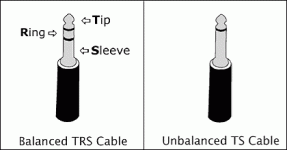
Does the cable truly have only tip and sleeve, and not tip/ring/sleeve like most 3.5mm plugs?
Exactly how is your cable wired? (You cannot answer this without using an ohm-meter or other continuity checking gadget.)

The one on the left below has Tip/Ring/Sleeve
The plug on the right below has only Tip and Sleeve

TipsTricks02.gif

All XLR to TRS cables/adapters are assumed to be wired INCORRECTLY for the kind of application you are trying.
That is to say, that they usually come with XLR pin 1 connected to the sleeve (ground) properly.
But then they typicaly have XLR pins 2 and 3 connected to the tip and the ring (or the ring and the tip).
This will NOT work with what you are trying to do. It will produce a weak signal with no low-end. Exactly as your symptoms.

You have a STEREO input jack, and a MONO source. You cannot feed the signal deferentially into the left and right inputs.
 
There are also conversion cables that have 1/8" TRS connections, yet are wired to convert the XLR balanced signal to an unbalanced signal and send it to both left and right channels of a stereo 1/8" input. Read specs carefully.

Your better bet may be to get something like a Juicedlink or Beachtek adapter, made for connecting XLR mics to 1/8" mic inputs of camcorders and other small recorders. There's a problem with the balanced>unbalanced conversion here, and the cables aren't fixing it. The other benefit of one of those external boxes: better level control on the fly.
 
There are also conversion cables that have 1/8" TRS connections, yet are wired to convert the XLR balanced signal to an unbalanced signal and send it to both left and right channels of a stereo 1/8" input. Read specs carefully..

Exactly, and I explained how to wire an adapter that way.

Alas, I fear that many (most?) of the people who WRITE the specs don't even understand what they are talking about.
Another reason I would rather make my own cables than to play games with clueless mass-market manufacturers and retailers.
 
Well, I didn't know much about TS or TRS before I read this. People kept telling me to buy that pearstone cable like they were sure it was right... I bought it and its the same... I was thinking maybe the mic just sucked. BTW the cable I have is TRS and according to you its wrong. I paid 30 expecting it to work for a shoot I am doing Saturday. But since its wrong... Im basically screwed.

Are you SURE you got the right cable? Are you hearing sound from both sides (Left and Right)?
Does the cable truly have only tip and sleeve, and not tip/ring/sleeve like most 3.5mm plugs?
Exactly how is your cable wired? (You cannot answer this without using an ohm-meter or other continuity checking gadget.)

The one on the left below has Tip/Ring/Sleeve
The plug on the right below has only Tip and Sleeve

View attachment 48491

All XLR to TRS cables/adapters are assumed to be wired INCORRECTLY for the kind of application you are trying.
That is to say, that they usually come with XLR pin 1 connected to the sleeve (ground) properly.
But then they typicaly have XLR pins 2 and 3 connected to the tip and the ring (or the ring and the tip).
This will NOT work with what you are trying to do. It will produce a weak signal with no low-end. Exactly as your symptoms.

You have a STEREO input jack, and a MONO source. You cannot feed the signal deferentially into the left and right inputs.
 
So you're saying even with this TRS transformer I have... it should still work considering they make cables that work like that? So my best bet is to get one of those adapters... Whats ur opinion on this Azden mics? do you think they are any good?
 
So you're saying even with this TRS transformer I have... it should still work considering they make cables that work like that? So my best bet is to get one of those adapters... Whats ur opinion on this Azden mics? do you think they are any good?

Azden doesn't have a great reputation around here. Most of what they make is cheap, sub-par gear. Don't even think about their wireless systems. However, you shouldn't be having the problem you're having even with Azden, unless you somehow ended up with a bum unit. Have you tried connecting it to another device (mixer or recorder) that has XLR inputs, just to be sure?

There's also that pesky power output that Steve mentioned earlier... and if your adapter doesn't block it, that may be the problem. The converter boxes will block that voltage. But again, hook the mic up to another device that takes XLR mic input and see if the signal is better there.
 
Last edited:
I forgot the mention this sorry. I connected it to the canon t2i directly with this cable and it worked. Weird tho because i turned the analog signal up to 32 in magic lantern with agc off and the mic didn't work at all. I turned agc on and it worked... This kind of stuff really makes me mad. But if it means anything...it did sound good in the t2i despite what I just said.

Azden doesn't have a great reputation around here. Most of what they make is cheap, sub-par gear. Don't even think about their wireless systems. However, you shouldn't be having the problem you're having even with Azden, unless you somehow ended up with a bum unit. Have you tried connecting it to another device (mixer or recorder) that has XLR inputs, just to be sure?

There's also that pesky power output that Steve mentioned earlier... and if your adapter doesn't block it, that may be the problem. The converter boxes will block that voltage. But again, hook the mic up to another device that takes XLR mic input and see if the signal is better there.
 
Since you never actually cited the exact model number of the cable you are having problems with, we are all really just guessing here.
You could still open up the XLR connector and wire it properly. It takes less than a minute with a hot soldering iron.
Else you are truly stuck at the mercy of clueless vendors.
 
The model is the [h=1]Pearstone LMT100[/h]

Since you never actually cited the exact model number of the cable you are having problems with, we are all really just guessing here.
You could still open up the XLR connector and wire it properly. It takes less than a minute with a hot soldering iron.
Else you are truly stuck at the mercy of clueless vendors.
 
I forgot the mention this sorry. I connected it to the canon t2i directly with this cable and it worked. Weird tho because i turned the analog signal up to 32 in magic lantern with agc off and the mic didn't work at all. I turned agc on and it worked... This kind of stuff really makes me mad. But if it means anything...it did sound good in the t2i despite what I just said.

Okay, but what I'm asking is that you eliminate any kind of adapter between the mic and ___ to try and narrow down the likely culprit. Your experiment straight into the T2i makes is sound more and more like the cable... if it only works with AGC on, that makes no sense. However, please also try this: connect back to the T2i and try again with AGC off. This time, double-check also that after disabling AGC the audio input in ML is set to external stereo. You shouldn't have to crank the input gain up that much.
 
did that a thousand times. Ill try it again now tho. To answer your other question, I have no way to connect the azden to anything other then with the adapter.


Okay, but what I'm asking is that you eliminate any kind of adapter between the mic and ___ to try and narrow down the likely culprit. Your experiment straight into the T2i makes is sound more and more like the cable... if it only works with AGC on, that makes no sense. However, please also try this: connect back to the T2i and try again with AGC off. This time, double-check also that after disabling AGC the audio input in ML is set to external stereo. You shouldn't have to crank the input gain up that much.
 
That Pearstone LMT100 is a prime example of an extremely poorly-described piece of gear.
It says it is a "transformer", which implies a little iron-core device with two windings (primary/input and secondary/output).
And, indeed, the XLR connector is extra-long which might be to accommodate a real transformer.
But there is ZERO mention of what THEY mean by "low-impedance" and "high-impedance".

What is worse, no modern microphone with an XLR connector is "high impedance".
And no modern 3.5mm mic input is "high-impedance", either, so not only is it poorly described, but it appears to be poorly designed, as well. Of course, they don't describe which end is "high" impedance and which end is "low" impedance. Perhaps they don't think that is important.

You don't NEED an impedance transformer in this application. Indeed, if it REALLY IS a high-impedance transformer, that could very well be the CAUSE of the trouble.

It also is not even clear to me that the Pearstone people know what "transformer" means. It seems likely that their copy-writers grew up thinking that "transformers" were some magical mechanical creations that could turn a semi-truck into a 100 foot tall robot monster. Or maybe they think that "transformer" means some cable that "transforms" one connector type into a different one (i.e. what we used to call "adapters")

My opinion of Pearstone wasn't stellar before, and now it is roughly on a par with Azden. :angry:
 
Back
Top