Sennheiser EW 300 and EW 100

droliff

Active member
Hi all,

I am helping out my church with doing some research on wireless audio equipment. We have just purchased a Sennheiser Sennheiser EW 300 G4-ME2-RC Wireless Omni Lavalier Microphone System (GW1: 558 to 608 MHz) and are quite satisfied with it.
They would like to add a second wireless system so that a second person can be wired for wireless on the sanctuary. In the interest of cost effectiveness and the church's budgetary parameters, would a Sennheiser EW 100 G4-ME2 Wireless Omni Lavalier Microphone System (G: 566 to 608 MHz) work for this setup? I'm by no means a pro so come here for expert advice. I just want to make sure we're making the right choice and that the 300 series and 100 series are compatible.
I have been using the Sennheiser EW 100 ENG G4 Camera-Mount Wireless Combo Microphone System (G: 566 to 608 MHz) for my video work and have really been impressed with Sennheiser's quality. I can see why it is so highly regarded in pro audio circles.

Any constructive input would be well appreciated.

I've been to some forums where linked signatures aren't allowed so if that's the case, let me know. This is my go to forum for expert advice on all things filmmaking.

Thanks.

Dennis
 
The G4 100, 300, and 500 series are all cross-compatible.

You should be fine either way, but if it were me I would buy a matching system for uniform performance. The system you have features a transmitter that operates at a selectable 10/30/50mW. The ew100 system will max out at 30mW. That may or may not be an issue in your specific building, but I prefer to have matching anything when I’m building a multi-channel wireless system. Again, both systems will operate just fine side-by-side, and like any multi-channel wireless system you’ll just need to make sure you tune the two systems to frequencies that don’t fight with each other.
 
The G4 100, 300, and 500 series are all cross-compatible.
You should be fine either way, but if it were me I would buy a matching system for uniform performance. The system you have features a transmitter that operates at a selectable 10/30/50mW. The ew100 system will max out at 30mW. That may or may not be an issue in your specific building, but I prefer to have matching anything when I’m building a multi-channel wireless system. Again, both systems will operate just fine side-by-side, and like any multi-channel wireless system you’ll just need to make sure you tune the two systems to frequencies that don’t fight with each other.

Hi @Alex H ,

Thanks so much for your expert input. As always, I get great professional advice on this forum and appreciate it very much. I will take this into thoughtful consideration. Right now, the church ( one of the oldest in Northeast Ohio... St. Vincent DePaul in Akron, Ohio ) is
being renovated inside so services are being held in the school's gymnasium. I haven't seen the audio setup in the back for the gym, but the wireless audio is being run from, what appears to be a Soundcraft EFX8 mixer which is hardwired into the system in the back via xlr cable ( that's as much as I know at this point about how things are set up, again, haven't seen the audio setup in the back ). We have gotten the wireless audio
workflow working pretty well through this temporary solution. The, so far, one Sennheiser EW 300 G4-ME2-RC Wireless Omni Lavalier Microphone System (GW1: 558 to 608 MHz) kit was easy enough to set up and connect to the mixer.

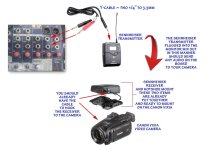
We have a fellow who videotapes the sermons with a Canon Vixia GH4 handheld camera ( a great little unit for the price ). I acquired a Sennheiser EW 100 ENG G4 Camera-Mount Wireless Combo Microphone System (G: 566 to 608 MHz) so that he can get a monitor mix of the audio directly into his camera. I want to make sure I am creating the correct solution for him to do that. I see a monitor out L and R 1/4" jacks on
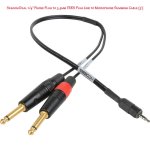
the Soundcraft board. I got a Y-cable with two 1/4" plugs that converge into one 3.5mm plug that will go into the Sennheiser G4 transmitter. Since I see a 1 to 10 levels knob for this channel, do I still need a line to mic attenuation cable between Y-cable and transmitter (see attached jpeg for reference )?. Or would the Sescom Dual 1/4" Phone Plug to 3.5mm TRRS Plug Line to Microphone Summing Cable (3') be the right solution here?

Thanks as always.

Dennis

wireless_audio_workflow.jpg

sescom_summing_cable.jpg
 
Last edited:
If you use the console's line level out, to feed a SK 100 series bodypack transmitter, you will need some kind of custom cable or pad, since the Tx's input is mic level (-60dB) and the console's main output is line level (+4 dB). A huge mismatch
Option 1: Rewire the cable so the L&R 'hot' wires are connected to the 3.5mm TRS plug's Ring terminal; the cable shield/ground is connected to the plug's Tip and Sleeve. I would use the consoles RCA (phono jacks output as well. The 1/4" main output jacks are +4Bb and could distort the Tx input stage on high peaks if the console is 'cranked' i.e., loud
Option 2: Get an in-line, line level to mic level attenuator (aka, pad)
Option 3: Get a passive DI (direct input) box like the under $30 Rolls DB25) and a XLR-F to 3.5mm adapter cable. The DI outputs mic level.
Alternately, you could try taking a feed from one of the the console's 'Auxiliary' or 'FX' sends, having the channel sends and Aux master set very low.
 
Last edited:
Option 2: Get an in-line, line level to mic level attenuator (aka, pad)

Hi Rick,

Is the Sescom summing cable that I edited into my reply above considered an inline attenuator that would work in this situation? I definitely don't want to ruin the Sennheiser transmitter.

Thanks.

Dennis
 
Hi Rick,

Is the Sescom summing cable that I edited into my reply above considered an inline attenuator that would work in this situation? I definitely don't want to ruin the Sennheiser transmitter.

Thanks.

Dennis

A couple of things:

First, yes. That Sescom cable has the inline attenuation from line-level to mic-level. This is clearly stated in the product name and the listing.

Second, it will work just fine, though you don’t necessarily need the attenuation. I use a G3 ew112 transmitter as a camera hop, straight out of my Sound Devices mixer with a 3.5mm stereo line output, though it should be noted that line-level in that case is -10dB. Simply, go into the transmitter menu and drop the signal attenuation way down until you have a signal that is not peaking. Using the Sescom cable, you’ll still want to calibrate the transmitter’s sensitivity to a proper level from the mixer.

Third, you may be better off using a 1/4” TS > 3.5mm TRS cable and using the Aux 1 out from the mixer. This allows you to create a custom mix for the camera without affecting or being strapped to the main mix that goes to the house. If you aren’t sure, call the folks down at Remote Audio in Nashville... they can custom-build the cable you need.

Last, please keep this discussion to one thread.
 
Last, please keep this discussion to one thread.

Hi @Alex H,

I wasn't getting any answers about the attenuation cable and I needed to take action on acquiring that today if necessary so I thought I'd go 'off piste' and post that question in a different topic (if you haven't already, please remove that topic/thread thanks). I'll try to stay in the same lane in the future.

Thanks for the excellent advice on the attenuation cable. The Sennheiser body pack transmitters are by default ( I believe ) set at -30db . I guess having a pad from line to mic would give me more flexibility in adjustment. I'm going to go ahead and get that Sescom summing cable so
we can configure things for this Sundays service.

Thanks again for the input.

Dennis
 
Last edited:
Yes, the Sescom cable does have attenuation. I did not see that yesterday. I am not sure it will work with the SK100 Tx though, since it looks like it is made for smart phones, which are wired totally different than a typical audio recorder 3.5mm input (at least my iPhone 6s was) .. Try it, maybe it will work.
Otherwise I concur with Alex, using the console aux sends or a DI.
<rant> damn, that Sescom cable is expensive! </end rant> Much cheaper alternatives, especially if you can solder.
 
I am not sure it will work with the SK100 Tx though, since it looks like it is made for smart phones, which are wired totally different than a typical audio recorder 3.5mm input (at least my iPhone 6s was) ..

I completely missed that it’s 3.5mm TRRS instead of TRS. Whoops.

THIS cable from Sescom will work with the mixer’s RCA outputs (REC Out)... but it doesn’t have the locking 3.5mm connector for the Sennheiser TX.

In that case, I’d look to this attenuating cable from Remote Audio, and then add a 1/4”>XLR adapter to use the Aux 1 output from the mixer.
 
Yes, the Sescom cable does have attenuation. I did not see that yesterday. I am not sure it will work with the SK100 Tx though, since it looks like it is made for smart phones, which are wired totally different than a typical audio recorder 3.5mm input (at least my iPhone 6s was) .. Try it, maybe it will work.
Otherwise I concur with Alex, using the console aux sends or a DI.
<rant> damn, that Sescom cable is expensive! </end rant> Much cheaper alternatives, especially if you can solder.

Hi Rick,

Thanks for coming through on this. I ordered, unfortunately, the attenuator made for cell phones this morning based on info I received here. I needed to have it for this Sunday's service. I did kind of wonder about the TRS vs TRRS 3.5mm plugs but wasn't sure, as
I'm not an audio pro. Glad you caught that and alerted me. I'll return that cable. I just ordered the following, which, fingers crossed.... will work alright connected to the monitor mix out on the Soundcraft mixer.

Y-cable

Sescom -35db line to mic attenuation cable

Let me know what you think.

I should have both by Saturday if Amazon Prime keeps it's promise Lol.

Thanks again for your generous and detail oriented expert advice.

Best,

Dennis
 
Both links go to the "Y" cable. A 35db attenuation cable should work if it's made for traditional 3.5mm audio inputs (tip= hot) or specifically for the Sennheiser 100 series body pack Tx.
 
Both links go to the "Y" cable. A 35db attenuation cable should work if it's made for traditional 3.5mm audio inputs (tip= hot) or specifically for the Sennheiser 100 series body pack Tx.

Hi Rick,

Thanks for the input. I downloaded the Soundcraft EFX12/8 user manual which has a diagram of the board and indications of all the elements. After considering your and Alex's input, it seems like plugging the Sennheiser Tx into the Aux 1 out would give
me the most flexibility in sending a good mix to the Canon Vixia GH4 video camera. I painstakingly ( Lol ) put together a diagram of what I will have for this Sunday's service and how I plan to put things together. If you could take a look and let
me know if this seems like it will work that would be great. The image was too large for this forum thread so here's a link:

soundcraft_mixer_wireless_audio_workflow_proposal.

Thanks as always.

Dennis
 
I painstakingly ( Lol ) put together a diagram of what I will have for this Sunday's service and how I plan to put things together. If you could take a look and let me know if this seems like it will work that would be great.

You should be just fine with that setup. As I mentioned earlier in the thread, pad isn’t absolutely necessary. I use my G4 systems quite frequently as wireless hops for all sorts of things, and even as IEMs for stage musicians (in a pinch). That CL-2 cable is made just for this kind of thing. You’ll just need to go into the “Sensitivity” setting in the transmitter’s menu and drop it down a bit to make sure the signal isn’t clipping.
 
I don't know about the G4, but with the G2/3 SK100, the input stage can be clipped even with -10 dB line, (regardless of the sensitivity setting). Maybe Sennheiser increased the max input level for more headroom.
The TA3 tape output on a SD 302 is -15dBu, so Alex may not have experienced clipping at that lower level. The outputs on most consoles are +4dB, which will certainly clip at a nominal input/output gain structure.
 
I don't know about the G4, but with the G2/3 SK100, the input stage can be clipped even with -10 dB line, (regardless of the sensitivity setting). Maybe Sennheiser increased the max input level for more headroom.
The TA3 tape output on a SD 302 is -15dBu, so Alex may not have experienced clipping at that lower level. The outputs on most consoles are +4dB, which will certainly clip at a nominal input/output gain structure.

To speak from direct experience:

The monitor outs on a Behringer X32 Compact are balanced, XLR, +4dB. I have used G3 and G4 systems to send wireless mixes to cameras, to jump to auxiliary speakers for overflow rooms, and even with my ew512 systems as performer IEMs. The CL-2 cable from Sennheiser is designed specifically for sending a balanced, line-level output to a G3 or G4 transmitter, and that’s the cable I use in all these situations.
 
Sorry Alex. I thought you were referring to a mic level cable configuration (Tip=hot). The CL-2 cable is wired for line level (Ring=hot), and that is what I use with no problems. Input stage clipping occurs when one feeds line level using the mic level configuration (Tip=hot). Typical of an off-the-shelf 3.5mm TRS cable.
 
Back
Top