Sell FS700 for a FS7?

imax

Active member
Hi all,
I'm using an FS700, I bought it 2 years ago.
I never did the Sony firmware upgrade (500 €) and I don't have an external recorder like CD 7Q.

What I don't like of the Sony FS700 is the poor quality internal compression, I saw that with CD Odyssey the FS700 became a new camera but is quite heavy and non very easy to use in a run and gun situation so I never did the upgrade.

Now I saw this new Sony FS7..I like very much the internal codec..It's a very high jump from the fs700..but if I'd would get RAW or prores for a work with a crew (like a commercial) I need to have the expansion unit (+ 2500 $) and the CD Odyssey 7Q (near 4500$ with license, card..etc)..
Usually when I did a commercial I rent a RED..but I understand is quite silly to have this type of potentially power and then don't use it..

What do you think?

Thanks!
 
If you worked all time up to now with internal recording without RAW - why do you worry whether it's important or too expensive for the FS7? It should be a huge step from AVCHD to XAVC.
 
I sure would. Just the nice shoulder mount design would move me toward the FS7. The internal codecs certainly would seal the deal for me. I'm debating switching from my almost new PMW-300 for the FS7. And the price of a brand new FS700 has dropped to $6,000, $6,500 with a 18-200 power zoom lens.
 
Sony should offer a decent trade up program.
Makes no sense on a camera this cheap when they sell so many of them. A company like RED can do this with the RED ONE because the price was high and the market was small.

Honestly, I'm tempted to just keep my FS700 alongside the FS7 as a backup/secondcam/rental unit. I actually get a decent number of rentals for the FS700 and it will be great to not have to worry about whether or not I have a shoot conflicting with a rental request!
 
The expansion unit gives you HD ProRes, not 4K.

Of course.

For 4k ProRes you need all the expansion stuff or at least and best: expansion unit + O7Q.

But still: A camera at this price point still delivers 4k 10bit XAVC internal. If you really need RAW
or ProRes in 4k the FS700 + O7Q is the bargain right now.
 
So is there any advantage of HD Prores 422 over XAVC, other than not having to transcode the footage to edit? I'm looking for a self contained upgrade from my FS700. Mainly want footage that can hold up under color grading. But don't care about 4K or RAW, and don't really want an extension unit for Prores if I don't need it.
 
I'm sure XAVC 422 10bit internal will work well for you. I honestly don't know the look or size difference between xavc and ProRes.
 
Many clients and post facilities require ProRes as a deliverable. If you don't have that requirement then the point is moot for you.
 
Unfortunately or fortunately, Pro-Res is king. Last year HGTV hired our crew to shoot a bunch of different and very elaborate b-roll for their winter themes and mobile devices campaign. We had a TON of AVCHD footage, easily took 2 extra full days for transcoding from AVCHD to Pro-Res.

I sure wished I had 4K2HD back then. Even if I get the FS7, the 7Q still stays.
 
But one only needs the little package on the back to record ProRes FS7, or?

FS7Q0 is very cumbersome to handle. Would love a smaller lighter package.
 
Unfortunately or fortunately, Pro-Res is king. Last year HGTV hired our crew to shoot a bunch of different and very elaborate b-roll for their winter themes and mobile devices campaign. We had a TON of AVCHD footage, easily took 2 extra full days for transcoding from AVCHD to Pro-Res.

I sure wished I had 4K2HD back then. Even if I get the FS7, the 7Q still stays.


Makes sense if you do a lot of freelance work (I do too, but still use the HVX for most of it as it's web bound). For shooting a feature for myself, transcoding is no big deal. The XAVC codec could be a lifesaver for me, assuming it is readily graded.
 
Unfortunately or fortunately, Pro-Res is king. Last year HGTV hired our crew to shoot a bunch of different and very elaborate b-roll for their winter themes and mobile devices campaign. We had a TON of AVCHD footage, easily took 2 extra full days for transcoding from AVCHD to Pro-Res.


Clip wrap would have been a faster and easier solution.

What did you gain by transcoding anyway?
 
Clip wrap would have been a faster and easier solution.

What did you gain by transcoding anyway?[/COLOR]
Sounds like they were transcoding for the HGTV editing team. In which case, it could be for sake of consistency or to eliminate potential issues. If every video clip is ProRes then that eliminates the codec as a possible issue with effects, editing platform, etc. (I know Premiere has a "generic error" that can sometimes be traced back to mixing filetypes.)
 
Unfortunately or fortunately, Pro-Res is king. Last year HGTV hired our crew to shoot a bunch of different and very elaborate b-roll for their winter themes and mobile devices campaign. We had a TON of AVCHD footage, easily took 2 extra full days for transcoding from AVCHD to Pro-Res.

I sure wished I had 4K2HD back then. Even if I get the FS7, the 7Q still stays.

you could have recorded ProRes on a Samurai - but you would have had GigaTons of ProRes instead ;-)
 
Clip wrap would have been a faster and easier solution.

What did you gain by transcoding anyway?[/COLOR]

You gain compatibility with most studios. Believe it or not, studios that switched from Avid to Final Cut years back are mostly still on FCP 7. Studios and networks, especially networks upgrade at a glacial pace. In fact, a majority of places I freelance (large or small) at are still on FCP7 which is crazy as the program is so dated. Unfortunately, FCP7 really just works with Pro-Res, so any other format has to be transcoded.

I noticed that with the jack of all trades people - those who shoot, edit, do graphics, etc... are pretty hip to upgrading. But most of the pure, long time, working editors I know are very reluctant to try new programs and just stick things they've know for a long time, either Avid or FCP7. It's actually very frustrating.

But yeah, for any type of B-Roll type jobs that we have to pass to network clients, it always has to end up as Pro-Res. XAVC or AVCHD might confuse them or not work on their systems.
 
I saw a pre-production FS7 the other day and sadly I was quite disappointed.

I can't speak for picture quality as it was set to 1080/2k and wasn't able to see 4k when we connected it to a 4k bravia. There was a bunch of ghosting but I think that's just the TV.

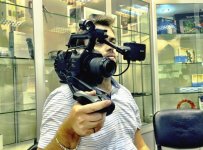
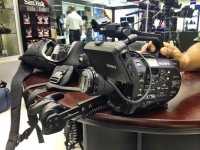
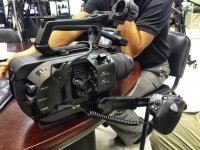
But no - my biggest issue was the ergonomics... I LOVE the new rocker.... but the fs7 is just too big and heavy. When seeing the photos, I thought it would be MUCH smaller. Picking it up, extending the handle and shoulder thing fully - it was not comfortable at all. (pic below).

They said there will be a shoulder mount accessory... but that's adding more weight. The LCD screen is still pretty poor (and that terrible loupe!), so i wouldn't say its useful for 4k shooting at all. So then we start adding the module to the back (would help counter balance) and then put the 7Q on it for proper monitoring and you have a camera that's much heavier and bigger. than the FS700+7Q combo.

I can only see the fs7 being useful if you need 4k out of the box and do a lot of handheld work. I don't think i'll be replacing my FS700+7Q combo for now.

Does anybody else understand the reasoning of the new 28-135mm lens which is FF coverage... making it a 42mm on this sensor? How is that a good pairing? I put the 28-70 FE lens on and I wouldn't want one lens like that. I can't understand why they wouldnt just put the great sensor of the A7s in this... tweaked for rolling shutter of course... but then you still have crop mode and its e-mount anyway opening you up to both native formats. boggles my mind.

Hopefully (though doubtfully) at least some of these will be fixed for the production model - but I seriously doubt it.

IMG_2301.jpgIMG_2303.jpgIMG_2302.jpg


And yeah - it's not gimbal friendly either.
 
Back
Top