GH5 SDR, HDR, HLG, color spaces, dynamic range

Vesku

Well-known member
HDR is coming and it causes confusion, fear and even anger in discussion forums. GH5 has a new HDR profile "HLG". It records more image data than normal profiles and even more than vlog-L.

How large color space it can record compared to rec709, DCI-P3 or rec2020?
Has someone used it with HDR TV? Can we play it with a LUT or curve to watch it with SDR TV without rendering a new file?
How to expose HLG if the goal is to use it unedited as Panasonic recommends with HLG compatible HDR TV?
How much DR GH5 can record with HLG, is it close to RAW photo 13 stops? How much more than cineD with idynamic? What is usable DR compared to seen DR?
 
- It doesn't record more than V-LOG L. It's simply a different curve, heavily weighting the available bandwidth towards the top half of the brightness curve.
- Just like V-LOG L, it's not a color space. It's a luminance curve.
- Expose as normal. Curve is the same up to the midpoint. Either 50% grey at 40 IRE, or ETTR.
- No, not RAW-like. Generously considered 12 stops, more conservatively, 10 clean stops.

PS. HLG is an open standard, info on it is widely available.
 
About GH5 color space I mean how vivid colors the GH5 sensor/HLG can see? For example Canon C500 can see more vivid colors than human eye and its captured color space expands even over the scales. Can GH5 HLG separate red braking light from vivid red car?

I think ETTR is not a good universal rule for HLG. If there is only reflected whites like a white skirt or wall it should be "gray" in HLG file. Only the light sources and speculars should go beyond white. There should be headroom for shiny very bright whites. When watching with SDR TV/monitor this kind of exposure is dark. Lifting gamma helps but I must add saturation too.
 
- The GH5's gamut is not related to HLG. As you said, it is largely a function of the sensor, and then secondarily the color space. Which in this case is either sRGB or Adobe RGB.
- ETTR is not intended for direct display, whether recording SDR or HDR. ETTR is a capture technique that necessitates post processing before display. Typically, you want to put the brightest true information (not specular highlights) at 95%. (Still true with HLG.)

If you want to go straight to display, then you should expose by the book, with 50% grey at 40 IRE. Because of the shape of the HLG curves, some people will prefer to just slightly overexpose this for a slightly brighter SDR image.

PS. I would take Canon's claims with a grain of salt. CMOS filter dyes have very little color saturation in order to block less light. The saturation is calculated (interpolated) back. While it might be better for certain colors, it is almost certain it is worse for some others.
 
So as not to only say no, no, no ;-) here are some truisms for capturing the richest "negative" for HLG specifically, but they're true for SDR, as well.

This assumes a professional workflow that involves post. If your are going straight to broadcast or display, then you have hard limits that I'm not interested in. This also assumes your NLE is up to the task. Similarly, if it is crippled, then you're on your own. ;-)

- Capture at the highest bit-depth you can. On the GH5, that's 10bit unless you need to shoot high speed.
- Capture with either the least amount of, or the most efficient, compression possible. On the GH5, that's h265.
- Use the AdobeRGB color space.
- Use the entirety of the bit bucket: full 0-255 range instead of the "safe" 16-235 range.
- Do not underexpose.
- Don't screw with the knee, shoulder, black level, etc.
- Don't go crazy reducing saturation. -1 or -2 to avoid channel clipping is fine, but don't arbitrarily slam to -5.
 
So as not to only say no, no, no ;-) here are some truisms for capturing the richest "negative" for HLG specifically, but they're true for SDR, as well..

- Capture at the highest bit-depth you can. On the GH5, that's 10bit unless you need to shoot high speed. *OK
- Capture with either the least amount of, or the most efficient, compression possible. On the GH5, that's h265. *ONLY POSSIBLE WITH 72MbsHLG, ANAMORPHIC OR 6K PHOTO
- Use the AdobeRGB color space. *NOT AVAILABLE IN VIDEO MODES
- Use the entirety of the bit bucket: full 0-255 range instead of the "safe" 16-235 range. *HLG USES ALWAYS 64-940
- Do not underexpose. *OK
- Don't screw with the knee, shoulder, black level, etc. ??
- Don't go crazy reducing saturation. -1 or -2 to avoid channel clipping is fine, but don't arbitrarily slam to -5. *HLG HAS ALREADY LOW SATURATION

So what is your recommendation with GH5. I think the best would be 6k photo 10bit 200Mbs HEVC 16:9 0-1024 HLG Adobe RGB :)

I wonder why GH5 HLG is not available with 8bit modes. It would be nice with 4k 60P. I can use 8bit 4k 30P HLG with a "magic trick". It is nice because it plays smoothly in any computer.
 
Last edited:
wonder why GH5 HLG is not available with 8bit modes. It would be nice with 4k 60P.
There just aren't enough "steps" to adequately represent all of the stops above 50% in an 8-bit signal. I mean, it could be done, but the amount of posterization in certain scenes could be quite bad. (Basically the same issues as 8-bit VLOG-L.)
 
There just aren't enough "steps" to adequately represent all of the stops above 50% in an 8-bit signal. I mean, it could be done, but the amount of posterization in certain scenes could be quite bad. (Basically the same issues as 8-bit VLOG-L.)

I think Sony is adding HLG 8bit in their coming cameras? GH5 4k 60P 8 bit HLG would be a poor mans HDR and still better in high contrast scenes than normal profiles. GH5 0-255 8bit is actually very good and can stand quite much heavy adjustments.

In fact I am not sure if the HLG has much more DR than 8bit iso200 cineD/Natural with idynamic. Panasonic said idynamic quality is improved in last update. I must test...
 
I think Sony is adding HLG 8bit in their coming cameras? GH5 4k 60P 8 bit HLG would be a poor mans HDR and still better in high contrast scenes than normal profiles. GH5 0-255 8bit is actually very good and can stand quite much heavy adjustments.

In fact I am not sure if the HLG has much more DR than 8bit iso200 cineD/Natural with idynamic. Panasonic said idynamic quality is improved in last update. I must test...
I agree that it would be nice to have the choice. Probably moot as Panny is big on standards, and I don't know of any standard that incorporates HLG that is not 10-bit.
 
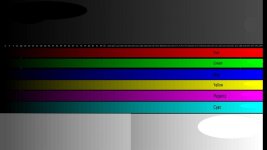
I made a simple test. I shooted a test image from my bright and vivid TV screen with GH5 10bit HLG and Natural contrast -5 / idynamic standard. Both recorded all the shades from black to white and primary colors from darkest to most vivid. HLG makes better image and less noise in shadows. My TV has contrast ratio with that test image and local dimming at max about 1:2000 - 1:4000 and HLG recorded it easily showing black bezels darker than darkest part of TV. There is noise in shadows but it cleans up with NR quite well.

I used this image.

test.jpg
 
That's because in reality your TV has nowhere near a 1:4000 contrast ratio - that's just a manufacturers marketing claim.

According to reviews many new TV has 1:2000 - 1:4000 ANSI contrast ratio meaning black and white in the screen at the same time. The marketing BS contrast ratio is more like 1:100 000- 1:1 000 000. It may be also true when measuring on/off contrast.

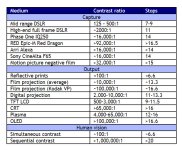
A new HDR OLED TV has more than 15 stops DR.
 
According to reviews many new TV has 1:2000 - 1:4000 ANSI contrast ratio meaning black and white in the screen at the same time. The marketing BS contrast ratio is more like 1:100 000- 1:1 000 000. It may be also true when measuring on/off contrast.

A new HDR OLED TV has more than 15 stops DR.

If you continue to accept these false notions you will never solve whatever problem you have.
 
...these false notions...

Can you prove what is false?
Do you think that numerous TV reviews with proper measurements are all wrong and you know better?
I dont trust one source of information. I try to browse many reviews and opinions. The truth is there somewhere in the middle.
I am testing and thinking these things myself because I want to be sure how matters work in practise and in my own eyes.

As I said in the first post HDR causes confusion and even anger.
 
- OLED displays are indeed capable of otherwise unheard of ANSI contrast ratings...assuming they are sufficiently bright.
- It's also true that manufacturers routinely lie about ANSI ratings. (When 3rd parties review, they often come up short.)
- If you know the actual black level and maximum brightness (nits) then you can determine the actual number of usable stops of DR.
- Remember that HDR standards include brightness standards, just as SMPTE does for film projection. The absolute light level (not just relative difference or contrast) is an important factor in the HDR experience.
 
How about color space and seen DR in movie theater? Movie projection has DCI-P3 standard which is larger than rec709. Can we see more vibrant colors and larger gamut in movie theater. Is the movie file in theater 10bit? Is the bluray movie a color compressed rec709 version of the original movie?

In my experience the movie theater image is dim and faint. The brightest white is 48nits and contrast much weaker than in TV screen. Is there such thing as HDR in movie theater? Does the screen size affect seen subjective DR and color vibrancy?
 
How about color space and seen DR in movie theater? Movie projection has DCI-P3 standard which is larger than rec709. Can we see more vibrant colors and larger gamut in movie theater. Is the movie file in theater 10bit? Is the bluray movie a color compressed rec709 version of the original movie?

In my experience the movie theater image is dim and faint. The brightest white is 48nits and contrast much weaker than in TV screen. Is there such thing as HDR in movie theater? Does the screen size affect seen subjective DR and color vibrancy?

Film projectors had very poor contrast, and some of the greatest films of all time from the greatest cinematographers dead and alive are decidedly SDR. In fact, it is a very real fear that HDR displays will be used to artificially interpolate SDR images to HDR, much like most modern TV's use motion interpolation to f*** up the motion cadence of films. The new 4K Apple TV does this, but there was enough of an outcry that Apple just pushed an update that allows one to turn it off.
 
Changing subjects slightly, does anyone know what EXIF node signifies HLG in GH5 clips? I haven't been able to see it with EXIFTool. It appears that only the 72mbps HEVC 4K 420 10bit HLG is recognized as HDR. All the other flavors of HLG are not recognized as HDR when you upload the raw file to YouTube.

In order to monitor on the LCD screen in proper rec709 conversion you need to change to the MP4 HEVC mode and only with the 72mbps 420 10 bit HLG encoding. Then enable it in the menu. This will allow you to output hlg via hdmi to an HDR external display. I don't believe any of the HLG forms available in the GH5 will allow this external monitoring in HDR as it will be viewed directly in broadcast. Only the Rec709 conversion. It looks very nice for as low a bit rate as it is on my HDR, but it's not the full range it could be seen at I don't believe.

It's another new world we are living in and painless is not the most apt description of it so far for me :)

Cheers,
Pete
 
Back
Top