
Navigation
Install the app
How to install the app on iOS
Follow along with the video below to see how to install our site as a web app on your home screen.
Note: This feature may not be available in some browsers.
More options
You are using an out of date browser. It may not display this or other websites correctly.
You should upgrade or use an alternative browser.
You should upgrade or use an alternative browser.
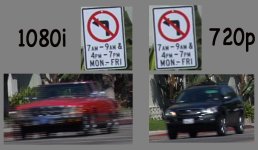
Screenshots: 1080i vs 720p
- Thread starter BrianF
- Start date

235 Studios
Veteran
What about shoting in 1080p? I've been using this instead of 720p, and I like the extra resolution.

J.R. Hudson
Spirit Animal
As the graphic below illustrates, 1080i is noticeably sharper
Noticable or Neglible ?
Interlace = Baaaaddd.
Barry_Green
Moderator
Yeah, just shoot 1080p...
1080p?
1080p?
That 1080 screen grab is from footage shot at the setting:
RECORDING SETUP > REC FORMAT (P2) > 1080i/24p
Is there a setting that will give me 1080p/24p?
Apologies if I'm missing something elementary here.
(The 720 footage was shot at the setting "720p24p". I stepped through a lot of the footage frame by frame. Found no interlacing artifacts in the 720 clips, but all over the 1080 clips.)
1080p?
That 1080 screen grab is from footage shot at the setting:
RECORDING SETUP > REC FORMAT (P2) > 1080i/24p
Is there a setting that will give me 1080p/24p?
Apologies if I'm missing something elementary here.
(The 720 footage was shot at the setting "720p24p". I stepped through a lot of the footage frame by frame. Found no interlacing artifacts in the 720 clips, but all over the 1080 clips.)
John,
To my eye, on my monitor (Apple 23" Cinema), it's pretty noticeable. I wouldn't say dramatic, but I also wouldn't say negligible. I did a blind A/B test with someone who isn't at all technically inclined -- he picked the 1080 footage on every shot. The reaction wasn't that one was horrible and the other was great. Rather, it was one was noticeably better than the other.
I'd really like to shoot 720p24pN for a slew of convenience and workflow reasons, but I'm trying to be as straight as possible with myself in determining the quality sacrifice in terms of perceived resolution. At present, it looks like it's not great, but it's there.
Of course, if interlacing artifiacts are always going to be a cost of going 1080, that probably evens it up.
To my eye, on my monitor (Apple 23" Cinema), it's pretty noticeable. I wouldn't say dramatic, but I also wouldn't say negligible. I did a blind A/B test with someone who isn't at all technically inclined -- he picked the 1080 footage on every shot. The reaction wasn't that one was horrible and the other was great. Rather, it was one was noticeably better than the other.
I'd really like to shoot 720p24pN for a slew of convenience and workflow reasons, but I'm trying to be as straight as possible with myself in determining the quality sacrifice in terms of perceived resolution. At present, it looks like it's not great, but it's there.
Of course, if interlacing artifiacts are always going to be a cost of going 1080, that probably evens it up.
J.R. Hudson
Spirit Animal
I love some Full Rez samples
BrianF said:That 1080 screen grab is from footage shot at the setting:
RECORDING SETUP > REC FORMAT (P2) > 1080i/24p
Is there a setting that will give me 1080p/24p?
Apologies if I'm missing something elementary here.
(The 720 footage was shot at the setting "720p24p". I stepped through a lot of the footage frame by frame. Found no interlacing artifacts in the 720 clips, but all over the 1080 clips.)
the 720 modes are all progressive and the 720p24pn mode will give you straight 24p.. no cadance added to make a 30fps file. ..you will notice you get a loger possible record time when using this mode because the camera is only writing a 24fps file instead of converting its 24fps into a 30fps file which uses 1/4 more data. the mode you are using (720p24p) uses a cadance to repeat frames and make a 30fps file. in order to get 24p from it, you would have to pulldown (reverse telecine) to true 24p. the same is true for the 1080 24p mode.in fact, ALL of the 1080 modes are telecined to a 30fps framerate. so when you shoot 1080 24p. the camera shoots at a true 24p and then adds interlaced frames in a 2:3:3:2 telecine cadance to make a 30fps file. when you want to work with the true 24p,,again you have to perform a reverse telecine, or "pulldown" the footage back to its original 24p. you do not lose any uality in doing this. basically the reverse telecine just gets rid of the added interlaced frames and leaves only the original 24p frames. once you have done this you will not see any interlace artifacts. .. hopes this makes sense. pretty much any pro editing or compositing software out there should be able to detect and remove a 2:3 or 2:3:3:2 telecined cadance from 24p footage at any given resolution.
basically its the same as working with th 24p footage from the DVx.. only its 1080p HD instead of 480p SD. again though 720p24PN mode actually creates true 24p files that nothing needs to be done to when using a 24p timeline. if your using the regular 720p24p mode though.. youll notice in the file properties that its a 30fps file.. am the reverse telecine needs to be performed to work with the true 24p. but the mode is great for shooting 24p with an automatic telecine in camera for broadcast.. same goes for all the 1080p modes. since you would be using a 30i fps timeline for broadcast in either HD or SD you can shoot and go straight to editing without having to telecine the footage. its only when you want to use true 24p that you need to use the 720p24pn mode, or reverse telecine any other format to a 24p file.
Hudson,
some full res files for you..
http://www.rowecine.com/exhibition/HVX 720p vs 1080p.zip
i just had nothing better to do at 3AM. sorry for the quick setup, but hopefully you can tell how close they are.. but how the 1080 mode gives that little extra edge. esecially given the fact that it is not just a more defined image at the same size of the 720p images.. but that its ever so slightly more defined at 2x the size of the 720p image. and as we all know.. blowing things up 2x their native size is not a great way to go about ADDING percieved resolution or detail. so in light of that fact, even if the 1080 mode held the exact same details as the 720 mode.. (in a way, it does.. since the 720 image is downcoverted from the 1080 image, but as yet the percieved res of the 1080 is hairs above the 720 since it has more pixels to define its image information with) it would be ideally advantageous to shoot 1080 for standard 24p anyway because you have a larger original format copy of the imagery. and espescially for projection.. who wants to start with a sharply rendered 1280x720 pixel image that they want bown up to a theatre screen size when they could have potentially started with a sharply rendered 1920x1080 pixel image?
some full res files for you..
http://www.rowecine.com/exhibition/HVX 720p vs 1080p.zip
i just had nothing better to do at 3AM. sorry for the quick setup, but hopefully you can tell how close they are.. but how the 1080 mode gives that little extra edge. esecially given the fact that it is not just a more defined image at the same size of the 720p images.. but that its ever so slightly more defined at 2x the size of the 720p image. and as we all know.. blowing things up 2x their native size is not a great way to go about ADDING percieved resolution or detail. so in light of that fact, even if the 1080 mode held the exact same details as the 720 mode.. (in a way, it does.. since the 720 image is downcoverted from the 1080 image, but as yet the percieved res of the 1080 is hairs above the 720 since it has more pixels to define its image information with) it would be ideally advantageous to shoot 1080 for standard 24p anyway because you have a larger original format copy of the imagery. and espescially for projection.. who wants to start with a sharply rendered 1280x720 pixel image that they want bown up to a theatre screen size when they could have potentially started with a sharply rendered 1920x1080 pixel image?

Mack Fisher
Active member
its all about interlaced video!
Neil,
Very helpful information. Thanks much.
It seems that the interlacing artifacts I froze in the FCP timeline would not actually be there in a final output at 24p, as those frames would be thrown out. Right?
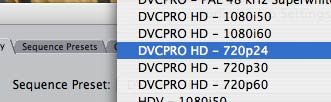
To confirm what I was seeing in Final Cut, I just did another test of the same shot at three different settings (with a necessarily different FCP sequence setting for each). Results:
720p24pN - no artifacts
720p24p - no artifacts
1080i/24p - artifacts
It sure would make it simpler if there was such a thing as 1080p/24p - but neither the HVX nor Final Cut Pro offer this setting.
My conclusions so far:
1080 - Quality gain, less efficient P2 usage and workflow
720 - Quality loss, more efficent P2 usage and workflow
Tough decision.
Very helpful information. Thanks much.
It seems that the interlacing artifacts I froze in the FCP timeline would not actually be there in a final output at 24p, as those frames would be thrown out. Right?
To confirm what I was seeing in Final Cut, I just did another test of the same shot at three different settings (with a necessarily different FCP sequence setting for each). Results:
720p24pN - no artifacts
720p24p - no artifacts
1080i/24p - artifacts
It sure would make it simpler if there was such a thing as 1080p/24p - but neither the HVX nor Final Cut Pro offer this setting.
My conclusions so far:
1080 - Quality gain, less efficient P2 usage and workflow
720 - Quality loss, more efficent P2 usage and workflow
Tough decision.
Attachments
J.R. Hudson
Spirit Animal
Neil Rowe said:Hudson,
some full res files for you..
http://www.rowecine.com/exhibition/HVX 720p vs 1080p.zip
i just had nothing better to do at 3AM. sorry for the quick setup, but hopefully you can tell how close they are.. but how the 1080 mode gives that little extra edge. esecially given the fact that it is not just a more defined image at the same size of the 720p images.. but that its ever so slightly more defined at 2x the size of the 720p image. and as we all know.. blowing things up 2x their native size is not a great way to go about ADDING percieved resolution or detail. so in light of that fact, even if the 1080 mode held the exact same details as the 720 mode.. (in a way, it does.. since the 720 image is downcoverted from the 1080 image, but as yet the percieved res of the 1080 is hairs above the 720 since it has more pixels to define its image information with) it would be ideally advantageous to shoot 1080 for standard 24p anyway because you have a larger original format copy of the imagery. and espescially for projection.. who wants to start with a sharply rendered 1280x720 pixel image that they want bown up to a theatre screen size when they could have potentially started with a sharply rendered 1920x1080 pixel image?
You the man Neil.
..i dont know about fianl cut as i use PPRO with raylight right now. it lets me quickly convert the MXFs to AVI's.. (sort of a proxy file way of doing it) and perform the reverse telecine/pulldown during conversion so i end up with a true 24p file and then i just make a custom 1920x1080 24p project in PPRO. so the workflow is easy, but yes.. you do get less time out of the P2 cards when shooting since its adding the extra interlaced frames for a telecine to the recorded file.
note: i also just fixed the full res images zip above.
note: i also just fixed the full res images zip above.
Neil Rowe said:the 720 modes are all progressive and the 720p24pn mode will give you straight 24p.. no cadance added to make a 30fps file ...
I never quite understood the value/reason/purpose for adding the cadence. I would think that true 24p (via 24pn) would always be the way to go. 24 pure native frames. Why would I want extra information being created? resolution, sharpness?
J.R. Hudson
Spirit Animal
Thanks again Neil
This is both 720 and 1080 (Combined)
I say it's neglible; it isn't discernable to the naked eye is it ?

This is both 720 and 1080 (Combined)
I say it's neglible; it isn't discernable to the naked eye is it ?
J.R. Hudson
Spirit Animal
In fact; the Chroma becomes more pronounced at 1080p

235 Studios
Veteran
Cynic821 said:To stay on topic, in FCP, i thin you have to use the Frame Rate Conversion, which refuses to install on my machine! ANyone have the .pkg file to share?
You do have to convert the footage (Reverse Pulldown) to use the 1080p, but you do not use the Frame Rate Conversion - Or at least I don't. I've been using Cinema Tools to extract the 24p out of the 1080pa I shoot. I've put together a tutorial on how to get to the native frames using FCP 5.1.1 & Cinema Tools 3.1.1. You can download the PDF here: http://www.235studios.com/tutorials/235Using1080paWithFCP.pdf
Hopefully that will help those of you using FCP.

Cynic821
Carbonite Member
reading now and will modify the post here with questions, thanks alot!
youd didnt mention about changing the timeline specs to match the footage, im pretty sure i know what to set it at, but for those confused and just in case im wrong, would you mind posting a setting for the sequence to nativily edit in?
youd didnt mention about changing the timeline specs to match the footage, im pretty sure i know what to set it at, but for those confused and just in case im wrong, would you mind posting a setting for the sequence to nativily edit in?
Last edited: