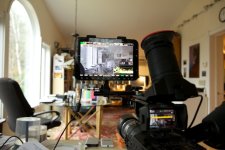
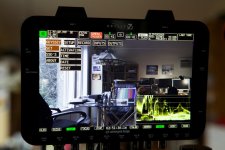
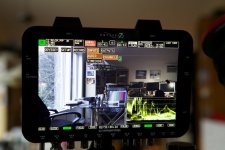
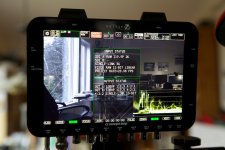
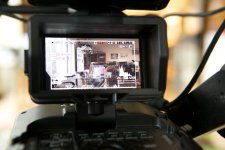
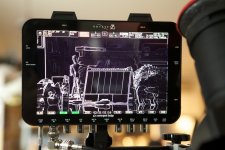
Screens on the Odyssey 7Q in action

Thanks Olof! Man, screens usually look terrible in photos, but the 7q looks crisp and amazing. Pretty jealous right now lol
 
I noticed you have some photos with the LUTs on and off, and it appears to be the same image but with the LUT on it looks like some of the highlights are clipping (based on the on-screen histogram and zebras). LUTs shouldnt be clipping highlights! What LUT is that? are the LUT options any good?
 
I noticed you have some photos with the LUTs on and off, and it appears to be the same image but with the LUT on it looks like some of the highlights are clipping (based on the on-screen histogram and zebras). LUTs shouldnt be clipping highlights! What LUT is that? are the LUT options any good?

There is only one LUT in the FS700 option at this time. And yes it does cause clipping and crushing in a contrasty image. I understand in the future there will be more LUTs available.

BTW I am a CD dealer and I just got my first shipment this week, they are all spoken for. I have more on order as well.

I am currently trying to work out a FS700 O7Q FCPX workflow for 2K RAW. That I can recommend to my customers.

I also have a very solid mounting system for the O7Q and I am making custom length 3G BNC cables and Power solutions for the O7Q.
 
There is no good reason for a LUT to clip an image on either end. A LUT is a curve or a series of values and there is no reason it can't preserve the full range of the input image. I can't think of any single situation in which I would want to record or monitor a clipped signal.
 
I noticed you have some photos with the LUTs on and off, and it appears to be the same image but with the LUT on it looks like some of the highlights are clipping (based on the on-screen histogram and zebras). LUTs shouldnt be clipping highlights! What LUT is that? are the LUT options any good?
Of course a LUT can clip a highlight! The FS700 RAW without the LUT is showing the S Log-2 image. With the LUT is the standard REC709 curve. REC709 can't hold as much information -- that's why Log exists. The RAW recording has all the info of the Log. The REC709 is just there as a guide.

In general I tell people to light for REC709, knowing that they have a lot of leeway to fix any issues in highlights or shadows by recording Log or RAW. That's why it's nice to be able to toggle between them, because you don't have to kill yourself struggling to bring up the ambient levels to get detail under that table or shoot at a higher stop to retain info through a window. Flip over to the Log to see if you have the bits of info you can bring out in post, then flip back to REC709 so that your contrast and color saturation can look normal to make artistic lighting decisions.
 
If a camera has a dr wider than the 709 space then any lut that does not look really milky and or muddy will probably clip the core signal?

edit - seems I cross posted with Mitch :)
 
Of course a LUT can clip a highlight! The FS700 RAW without the LUT is showing the S Log-2 image. With the LUT is the standard REC709 curve. REC709 can't hold as much information -- that's why Log exists. The RAW recording has all the info of the Log. The REC709 is just there as a guide.

In general I tell people to light for REC709, knowing that they have a lot of leeway to fix any issues in highlights or shadows by recording Log or RAW. That's why it's nice to be able to toggle between them, because you don't have to kill yourself struggling to bring up the ambient levels to get detail under that table or shoot at a higher stop to retain info through a window. Flip over to the Log to see if you have the bits of info you can bring out in post, then flip back to REC709 so that your contrast and color saturation can look normal to make artistic lighting decisions.

I wonder if he was seeing the waveform as representative of what is being recorded to the drives (independent of LUT), and that the LUT was clipping Slog2. I assume the waveform is based on whatever you are currently seeing, so it changes as you apply/remove the LUT. Is this correct? Now, if the LUT is applied and you hit record, will it capture Slog2 footage and not apply the LUT to the footage? I think that was maybe nyvz's concern.
 
I wonder if he was seeing the waveform as representative of what is being recorded to the drives (independent of LUT), and that the LUT was clipping Slog2. I assume the waveform is based on whatever you are currently seeing, so it changes as you apply/remove the LUT. Is this correct? Now, if the LUT is applied and you hit record, will it capture Slog2 footage and not apply the LUT to the footage? I think that was maybe nyvz's concern.
In the current recording functions, the LUT is only a monitoring tool. The meters read whatever is applied, for now. In the future it will be possible -- with a big warning indicator so you don't get screwed up - to view an image with or without a LUT applied and use an exposure tool that is separately set by you to measure with or without LUT. Think of looking at a "normal" REC709 LUTted image while popping on a waveform or histogram set to Log so that you can judge what is actually captured Once you wrap your head around it this can be a very useful way of working.

Right now we're recording the RAW with S Log-2 encoded within. When we release the compressed codecs then it will become possible to make other choices.
 
Nice to hear that the wfm will be independent if the lut in time.

With red I always thought that the histo changing as you change the (non existant) iso needed the far larger warning!
 
Guys just look at the alexa, it has the same DR in logC and in REC709 and it looks beautiful. Really I completely understand that a LUT can clip highlights, I just see no reason why it should... Perhaps someone can tell me a good reason? Because Sony poorly designed one of their gamma curves that way? Because you really want to match your FS700 with your iphone?

And don't tell me you have to clip highlights because high DR images have to look washed out, just compress the highlights and the shadows. Look at film, 16 stops and it doesnt look at all grey or washed out when exposed normally.

This brings up the question of what kinds of custom LUTs will be supported and how we will be able to build our own. To me custom LUTs for recording are an area for huge potential with the 7Q since its relatively easy to match cameras very accurately with a good starting point like RAW/SLOG2 and a good LUT. It would be great to be able to show up on set and be able to instantly match my camera to other popular cameras or even build my own secret sauce all recording directly to 4K/2K prores files. I want to be able to deliver files that look good without any work but also have the room grade more later, SLOG2 is a nice idea but I dont want to leave the entire look to some unknown colorist or worse some editor that doesn't know how to handle it.
 
Last edited:
Simply if a camera has 14 stop dr and the monitor is capable of displaying 7 stops then the signal must be clipped if displayed with proper contrast. To display 14 stops over seven looks milky.

Yes one could put a knee on the lut and retain highlights but then the lut would look weird. I don't think it can be described simply as the are so many ideals for different shooters with different post workflows and different on set viewing requirents..
 
I strongly disagree. I've heard people say that before, but there is a difference between display contrast and camera DR, and there is really no reason for one to depend upon the other. I've seen displays with high contrast ratios and ones with low ones, 16stops images will look milky on both if the images is milky and it will look contrasty on both if the image is contrasty. What is proper contast? Is the point of displays to reproduce the brightness and contrast level of the original scene? By that reasoning we should only shoot only images with very blown highlights because it will look better on our LCDs. Why then do 12-16 stop images from RED/Alexa/F65 look great without clipping either end even when displayed on poor contrast ratio monitors? You think they would look better if we clipped out the shadows and highlights so they looked like they were shot on our phones?

Film compresses highlights and shadows and it looks great, why ever clip to white or black when you can compress instead? Isn't that the age old problem of video, that it clips instead of falling off, why would you clip it more when you can just make it fall off smoother?
 
Last edited:
I don't see how you can strongly disagree with different shooters and sets having different lut needs. You outline your need and that is a very reasonable and practical subset of a varied need set.

Given one, and only one, lut I would pick the one you outline. But I'd prefer many luts.
 
Last edited:
To take this in a different direction, how is the odyssey as a MONITOR? how accurately does it reproduce color/contrast? I am looking for a small monitor and would prefer it to for more than just focus and framing.
 
Back
Top