Screen Shots from music video just shot (critique?)

dreallen

Active member
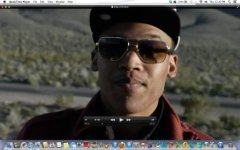
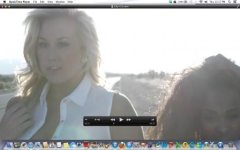
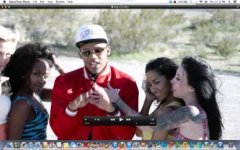
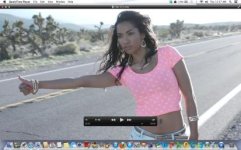
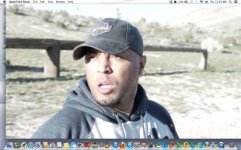
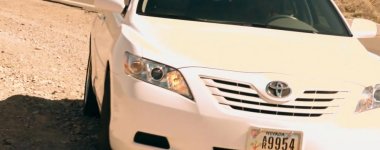
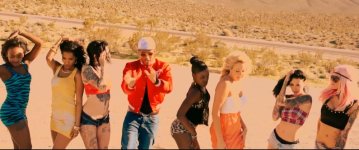
Just finished shooting a music video for Sony recording artist B Skully. It's coming out great!
 

Attachments

  • Screen Shot 2013-03-28 at 12.20.22 PM.jpg
    Screen Shot 2013-03-28 at 12.20.22 PM.jpg
    18.4 KB · Views: 0
  • Screen Shot 2013-03-28 at 12.17.50 PM.jpg
    Screen Shot 2013-03-28 at 12.17.50 PM.jpg
    14.6 KB · Views: 0
  • Screen Shot 2013-03-28 at 12.13.32 PM.jpg
    Screen Shot 2013-03-28 at 12.13.32 PM.jpg
    21.5 KB · Views: 0
  • Screen Shot 2013-03-28 at 12.03.26 PM.jpg
    Screen Shot 2013-03-28 at 12.03.26 PM.jpg
    20.9 KB · Views: 0
  • Screen Shot 2013-03-28 at 11.57.55 AM.jpg
    Screen Shot 2013-03-28 at 11.57.55 AM.jpg
    19.9 KB · Views: 0
  • Screen Shot 2013-03-28 at 11.55.56 AM.jpg
    Screen Shot 2013-03-28 at 11.55.56 AM.jpg
    20.8 KB · Views: 0
Last edited:

Looks great Dre

Bright back lit scene must have been a challenge but younailed it.


Now we need to show you how to screen grab without the screen junk. :tongue:

Try Frame Grabs instead maybe.
 
Will do shooter. Meanwhile here is the video pretty much finished except for a couple little things that bugged me.

 
Dre,

Command Shift 4 will give you camera cross-hairs that you click and drag out to cover only the portion of the screen you want to grab.
Critique, dunno if I qualify. I'm not a pixel man like most of the experts here. I'm all about story. I think you did a competent job, though. Only the single shots of the artist bug me as slightly hot. Otherwise, no man, you did your thing and I see you threw the wagon in! Starring role! I smiled at that. Now, did the wagon have its own trailer or did ya skimp out?? And talking about trailers of another ilk, I'm still editing my trailer, man. Trying to figure out out to put fake surveillance camera footage in.
 
The two images furthest to the right are overexposed by nearly two stops, and I can see the same thing in the video for those same shots. I also see some shots where you tried to bring down the clipped highlights and it's a strange flat-offwhite tone, like the shot where the victim chases after his stolen RV. A two-or three stop Grad ND filter would have made all the difference in the world. Regarding those other shots, just stopping down two stops and lifting the shadows in post would have protected your highlights.
 
Interesting thing though Ryan...he ran some shots really hot into the dnager zone... but they did not exhibit the frequent complaint about highlight fringing issues etc...

Some how he did protect his highlights enough and also convey a feeling of "the hot desert sun"... etc.
 
Interesting thing though Ryan...he ran some shots really hot into the dnager zone... but they did not exhibit the frequent complaint about highlight fringing issues etc...

Some how he did protect his highlights enough and also convey a feeling of "the hot desert sun"... etc.

I disagree with that aesthetic of burning the negative to make it seem hot, unless our character was a parched/delusional wanderer in the desert, as i've seen it done a bit differently and well before.

However, if we are going to go with that as our reasoning, than he still lacked consistency as that level of over exposure is not held through the other shots in that environment/scene as well. If you are going to do something like that on purpose, you need to commit to it, IMO. I will subjectively disagree that over-exposure in this case makes it look any hotter. I think it looks overexposed, while the better exposed stuff still looks like it's plenty hot.

My .02$
 
Last edited:
My real point was he did this with an AF100 and some AF100 users cant take a picture of their cat in their kitchen without the issue that Dre managed very well.
 
Top work Dre, Im having a resurgence of love for my AF100 lately. I think lifting the white so they roll off a bit nicer would be worth while, overall I thought it was a cool video. Keep at it bro I love your enthusiasm in all your posts since joining this forum, its infectious :)
 
You guys are all right and your critique is much appreciated. I concede it was a great effort. EFFORT! But I also concede that I blew out the whites on too many occasions and did NOT...I repeat DID NOT take advantage of my ND filters and pre take settings due to time constraints. I fell to the pressures of losing light and just trying to get as many varieties of shots as I could and in a very LAZY way just told myself it could be fixed in post. NEVER AGAIN! But truth be told...this is the FIRST thing I have ever shot with this camera so it is only going to get better. WHEW!!!! I learned so much just frikkin shooting as opposed to just frikkin talking about shooting...lol

Dre
 
Oh...by the way, honestly...I didn't do a DAMN thing on purpose on this shoot. So hearing you all talk about lifting the whites and blowing out the highlights to acheive an effect...nope. Didn't do it. I just pointed, looked through the lens until I saw my subject well enough to feel comfortable enough to call action. I will be revising my methods though for sure! Still learning. And luckily getting paid to do it.
 
I also see some shots where you tried to bring down the clipped highlights and it's a strange flat-offwhite tone, like the shot where the victim chases after his stolen RV.

Yep, it's the first thing that put me of also. It's actually present in the first shot of the video on the hood of the white car.
2.jpg
It looks awful. Also the shots taken from inside of the van where the outside can be seen are also quite bad.3.jpg
I also disliked the close up on the white background: 4.jpg
And the group dancing scene, it's also way overexposed.1.jpg
 
Damn, I burnt my lunch because of this post!:)
Anyway I wanted to add what EndCredits already pointed out. Underexpose and then bring the image up in post. But I wanted to add another thing: when you do clip avoid offsetting the colour of the highlights if there is white around them. Clipped patches of yellow or what other colour for that matter don't look good. The car scene for instance it looks bad because other parts are white. I would fix that if I were you... The same goes mostly for clipped blacks. I always try keeping neutral blacks and whites in scenes that don't really allow me to push them to another colour (your car scene for instance). If you have the time you should just mask out the car from the rest of the image and have it clip to white.
 
But I definitely appreciate you doing this for me. I won't be making the same mistakes again for SURE. If I do I just wont be using that damn shot...LOL!
 
Im coming in after seeing it and reading what everyones already posted. Those first stills you posted whilst somewhat over exposed didnt look entirely unusable, though Im seeing after theyve been graded theyre worse. Feels to me like when colour shifts are being made in the grade, theres no compensation occurring as to what that does to exposure in addition to whatever was on the edge or over exposed has been pushed further in that direction with some odd colour casts. I think a more accurate grade would assist a great deal here.
 
Thanks alot Noel. I am definitely making notes in anticipation of grade and post for the next shoot. We have gone back and done a re edit without those shots and it is ALOT better. Will be posting some new stuff soon.
 
Back
Top