Scene files for the AG-DVX200

greytail

Well-known member
Has anyone shot using the scene files supplied with the DVX200. I am having terrible results with the default scene file when indoors. The colors are off and are an ugly yellowish, despite careful setting of the white balance. I recently shot an orchestra with poor lighting. Some of the violins were mahogany....fine, but others were an ugly yellow. Skin tones looked okay. I had been careful not to overexpose and checked the image with the waveform monitor while recording. The funny thing is that when I tried to correct it in FCPX, I couldn't but when I used the match color feature with an identical shot from a GH4 it almost looked like the GH4. The colors were much better. What do I do? I really don't what I am doing messing around with the scene file settings.

Please note, you need to fast forward to the second clip to see the gh4 and then the match color clip which is at the end.
 
Last edited:
I picked up my DVX200 last Thursday and shot a job in a reasonably dim pub, also I was disappointed with the results, a real strong yellow cast, also the hi-gain settings above 12db are horrendously noisy, I was shooting at FHD 1080x50p.
I was all set to sell my P2 HPX-500 but I have instantly decided to keep it.
I have found that the 'scene 6' seems to produce the best looking settings for low light indoor shooting.
Overall, I'm not impressed with the low light performance of the factory scene files.
 
Just talked with a Panasonic tech. He is looking into it. Is it The Camera or is it my camera....that is my question.
 
Personally, I prefer slightly flatter looking camera originals and then I will put the curves in in post to bring in contrast as required. I made these scene file by simply shooting test footage and comparing it to my P2 HVX500 footage, the factory scene files on the DVX200 are heavy on the Master Ped and the Chroma Phase needs pulling back from the ghastly yellow and more in to the red.
 
+ 1 for Scene 6 on the DVX200. I'd stay away from all the other profiles , unless you have time for post - go for V-Log L - best image out of the camera. I know it's a pain for long form projects like concerts, been there, but to get the best out of this camera, you have to shoot V-Log IMHO. I shot a few quick shots in the rest of the profiles while I was testing the camera recently, and decided not to use them as I wasn't happy with them - either too contrast or too sharp.

Concert lighting can be really tricky sometimes. Depending on your machine, if you shoot in LOG, you can quickly de-log the image afterwards to bring it to REC.709 and with a simple curve can get really decent results.

 
Totally agree with K0bayashi.
Default SF6 and V-Log (+ external recorder) actually give the best results.
In addition, I post here my "outdoor improved skin tones" scene files :

HD + Norm 1

Niv chroma : +5
Phase chroma : -5
Matrice : Norm 1
Master ped : -8
Mode gamma : HD
Black gamma : -4
Black gamma "type" : 3
Iris auto effect : -8
The rest : by default.

Cine Like D + Norm 1

Niv chroma : +8
Phase chroma : -6
Matrice : Norm 1
Color Correction : R-Mg sat -10 / Yl-Yl-R sat -15 / Yl-R-R sat -5
Master ped : -8
Mode gamma : Cine Like D
Black gamma : -5
Black gamma "type" : 3
Iris auto effect : -8
The rest : by default.

Hope you'll approximately enjoy it.
 
Last edited:
Shooting V-log is something I haven't tried yet but I guess I will have to. Is this the workflow everyone is going to have to comply with? It means more rendering and more strain on the computer especially in 4k. It is also not very practical when the client just wants you to shoot an event and hand it over unedited. Therefore, I am looking for a good, all round "baked look" that is acceptable. I think this means finding the right concoction in a scene file that does the job. I do not understand why Panasonic markets a camera that has such lousy scene file settings. They could easily publish a whole bunch of them for people to try. Surely they know what you know, that what they have in the camera is not satisfactory.
 
Shooting V-log is something I haven't tried yet but I guess I will have to. Is this the workflow everyone is going to have to comply with? It means more rendering and more strain on the computer especially in 4k. It is also not very practical when the client just wants you to shoot an event and hand it over unedited. Therefore, I am looking for a good, all round "baked look" that is acceptable. I think this means finding the right concoction in a scene file that does the job. I do not understand why Panasonic markets a camera that has such lousy scene file settings. They could easily publish a whole bunch of them for people to try. Surely they know what you know, that what they have in the camera is not satisfactory.

the V-Log workflow is straighforward and quite easy - for a quick grade all you have to do is apply a de-log (LOG to REC 709) LUT, and then grade like you would any other footage - you can do 2ndary or third LUT's or do a simple S-curve, bump up saturation, contrast, adjust exposure etc.

It took me 10 minutes to grade the footage above, and I haven't been shooting LOG for long, but it's hard to go back to any backed-in look unless I am doing stuff for broadcast.
 
Hi There,

I just got my DVX200. At the beginning I was shoked about the pictures it produces at the default profile.
But I'm not argueing about the colours. My Images was full of artifacts. I needed to dial "Master Detail" down to -31 to get a good picture.
Before it looked like a sharpness filter is attacking the noise, the result wer artifacts everywhere. I looked at the footage at 4k 100%.
Does anybody of you had this problems?

Is there aleready a new firmware out? I cloudn't find one.
My is: Ver.1.10-00-0.00

Best wisches
Björn
 
Last edited:
Scene file 1 is screwed up. There are several reports about it. Try scene file 6 and post your results on it.
 
We just got our DVX200 and did an in office test under fluorescents with Scene File 1. Same yellow cast over everything and seriously contrasty, noisy image at MOV codec 1080 24p 50MB/sec. We need to start a four day shoot in a classroom under fluorescent lighting, so anyone who had a good set of settings for that let me know.

Just saw this on twitter ‏@TereAguirreHaro has some serious issues with the DVX200
Panasonic DVX200 another AF100 fail? http://fb.me/4ma48RO0X
 
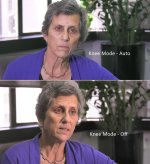
OMGosh !!! .. what was Panasonic thinking ??? .. Go in to "Scene File" then to "Knee Mode" and put it to OFF .. bOOm !!! .. people look like living humans again.
 
DVX200 - Knee Mode.jpg
Sorry, I should have said "Scene 1" but "Knee Mode - Auto" is active on all of them. Which I have now turned off. Skin tone is atrocious with "Knee Mode - Auto", you end up with the camera hunting the compression and skin tone becomes the victim. A dreadful colour twist through the face ranging from magenta eye sockets to yellow/green highlights. As you can see from the image.
 
The knee on "auto" is an automatic function, and as such, can do things to your image that you wouldn't want it to at times when you wouldn't want it to. The very first thing I do is turn the knee off or set to manual.

Second, the knee should never be allowed to adjust skin tones, because the knee compression does shift colors. But generally, if following "proper" exposure guidelines, skintones shouldn't really be straying into the knee's territory anyway. The knee in auto can affect anything from 80 to 109 IRE. If your absolute hottest skintones were around 70 IRE, there should be plenty of headroom before the knee could get in the way. In murrayjob's image, the skintones are ranging from 20 in the shadows, all the way up to 85. Anything above 80 is well within the knee's territory, especially on auto, and most especially with a bright window behind it.

I think murrayjob's images look vastly better with the knee off, certainly. But I am curious about the level of exposure, as it seems like she's overexposed to me (when viewed strictly in IRE terms). Perhaps the brightness of the background made it necessary to expose her brighter to make it look better in context?

In any case, never ever ever ever let the knee anywhere near your skin tones.
 
Back
Top