This might be of interest to some of you.
YUV smearing kept nagging in the back of my head. Problem of all profiles …a limitation of the GH4 and it’s codec. Happening when an almost desaturated color crosses the U or V axis. Once it’s recorded you can not undo it (I have yet to see an example it can be undone). So best is to find a way to prevent it, before it happens. Those almost greyish colors should not hop the axis.
Solution …Saturate them!
In the test I did it works, with both CineD and Natural in 1080 All-Intra. Worst codec.
‘Works’ is maybe a too big a word, but the smearing is refined, the islands are broken up into smaller parts giving it a better distribution.
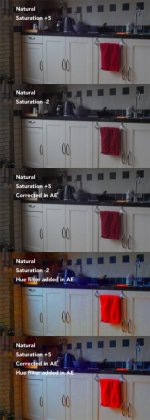
Attached my Natural test. Settings : Hue-2 vs Hue +5
I eyeballed the desaturation of the saturated clip and just by the look of it it doesn’t look like there are any disadvantages.
If it works in 1080 All-I it will work in UHD ProRes 422, just not sure how effective that would be …and alas the profile that could use this workaround the most, can’t use it as we have not acces to the Hue settings …bummer. But it might help the attempts to recreate a V-log version with CineD
In the linked movie second half is the saturated part.

[video]http://www.bunkweb.nl/filmpie/Hue_CineD.mov[/video]
YUV smearing kept nagging in the back of my head. Problem of all profiles …a limitation of the GH4 and it’s codec. Happening when an almost desaturated color crosses the U or V axis. Once it’s recorded you can not undo it (I have yet to see an example it can be undone). So best is to find a way to prevent it, before it happens. Those almost greyish colors should not hop the axis.
Solution …Saturate them!
In the test I did it works, with both CineD and Natural in 1080 All-Intra. Worst codec.
‘Works’ is maybe a too big a word, but the smearing is refined, the islands are broken up into smaller parts giving it a better distribution.
Attached my Natural test. Settings : Hue-2 vs Hue +5
I eyeballed the desaturation of the saturated clip and just by the look of it it doesn’t look like there are any disadvantages.
If it works in 1080 All-I it will work in UHD ProRes 422, just not sure how effective that would be …and alas the profile that could use this workaround the most, can’t use it as we have not acces to the Hue settings …bummer. But it might help the attempts to recreate a V-log version with CineD
In the linked movie second half is the saturated part.
[video]http://www.bunkweb.nl/filmpie/Hue_CineD.mov[/video]
Attachments
Last edited: