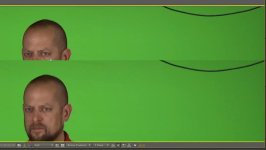
Samurai vs. AVCHD Green Screen Comparision Screen Grabs

To be fair (or brutal) to the OP...I dont feel the test is being best served by the quality of the lighting for a chroma key.

There is a total absence of any rim, edge or BG light..which IMHO is required for all keys no matter what codec.

On the other hand this could also be a good test in the hands of a highly skilled key compositer who would be able to determine if one or the other codecs were able to be used more effectively in "pulling a key" from..

I know the OP pulled a quick and dirty key from each using the same setting. Fair enough.

But then...I think one needs to attempt to pull the very best key from each and make them work best as possible. They both will require a more or less efforts than each other...maybe.

I definitely will be doing CC and key tests in different workflows with my Samurai (recent acquisition) and the native codec of the AF102.
Shoot next week will be dual codec shot and post house is prepped to report. Not a chroma key shoot this time though.
 
+1 to the idea that there's something seriously amiss with the AVCHD image.

Say Hi to Snoopy for me!
 
Wow... I threw this test together in a matter of minutes- including the screen and lighting setup. Grabbed a guy quick to get in the shot, stuck the first picture I could find in my pictures folder of my son at a themepark. Took absolutely zero time in keylight. I simply was just trying to post my findings after playing with a Samurai for the first time.

I was just extremely impressed because of how much better the ProRes shot looked than my AVCHD. Like I have said all along, this is the way ALL of my AVCHD footage has looked right out of the box. Granted, the keys pulled MUCH better than this after taking some time- but that's not what I was trying to show here.

Regardless, if anyone has any input for me as far as my workflow in AE goes- I would appreciate it. I completely agree with whoever said that if everyone's footage looked like that this camera would have been a fail- I just figured not too many people where doing chroma key work with it or I would have heard about it more, as well. Thanks for input!
 
I have seen this blockyness when working with the .mts in premier and after effects. I converted to prores using fcp and got much better result
 
I have just bought a hyperdeck.. So not exactly on topic. The footage off of it (after converting to cineform) is so much higher quality.
I am developing my green screen skills and testing shots, I tried keying my badly shot footage in avchd and raw hyperdeck cineform, ugly on avchd and much nicer as raw, especially on edges with fast movement. I will use avchd for run n gun volume stuff.. But as for quality you can't beat these sdi recorders. Just stick it into magic bullet and give it some stress, that's telling.
I do not doubt that with correct setup great keys can be had with avchd.
Craig
 
Interesting. I have never converted any of my AVCHD files to ProRes because I didnt think I needed to since AE/Premiere edited them natively. I will try that and if that is a better workflow, I really wish I would have tried that sooner. With all that being said, I have pulled some excellent keys with the raw .mts files, but they took alot of work. Anything that could save me time is GREATLY appreciated.

Question for anybody that has imported raw AVCHD files into AE... are you just importing or are you importing and then interpreting the footage differently after it comes in.

BTW... this post was not intended to be a knock on AVCHD from the start... in fact I have been very happy with it AND my AF100 for the past 11 months I've been using it. If converting to ProRes before ingest gets me what I am seeing straight out of the Samurai, I guess I can sell it and I'll be $1500 ahead!!! :)
 
Interesting. I have never converted any of my AVCHD files to ProRes because I didnt think I needed to since AE/Premiere edited them natively. I will try that and if that is a better workflow, I really wish I would have tried that sooner. With all that being said, I have pulled some excellent keys with the raw .mts files, but they took alot of work. Anything that could save me time is GREATLY appreciated.

Question for anybody that has imported raw AVCHD files into AE... are you just importing or are you importing and then interpreting the footage differently after it comes in.

BTW... this post was not intended to be a knock on AVCHD from the start... in fact I have been very happy with it AND my AF100 for the past 11 months I've been using it. If converting to ProRes before ingest gets me what I am seeing straight out of the Samurai, I guess I can sell it and I'll be $1500 ahead!!! :)

I think I am misunderstood here.. I should have explained better. I edit avchd all the time in its native state with premiere and after effects. I use cineform to make the uncompressed footage manageable. It does nothing to improve its quality as such.

Craig
 
Can you post an MTS file somewhere for us to download? I think that for some reason your AE is interpreting the footage as interlaced. I owned the AF100, I can tell you that the reason people are responding like they are is because your import is broken. I can help, but I want to see if my AE will do that to your footage as well.

This is a known issue with AVCHD import in Adobe tools, like I've said. I had seen it with FS100 files as well. People thought it was the camera, or the codec, but it was neither. If you've been using the output like that, you've REALLY been missing out.

That is NOT normal.

One thing you could do as well is use the program 'ClipWrap' which you can use as a free demo for only a certain length of video. Run through that into ProRes and then bring that in.

Not that you want to do that in the future, but at least it will show you that the MTS file is being interpreted by AE wrong. You need to tell it that it is not interlaced, and I don't remember specifically where do to that.

Again, give us an MTS file! :)
 
I'm getting the same results with AVCHD in AE CS5. Yes, there is a bug in CS5 that it will interpret AVCHD as interlace. But even with that fixed by telling AE how to interpret the footage, it still looks interlaced. I read somewhere that AE does not like AVCHD because of the fact that each frame is not complete. The post said that one needed to convert AVCHD to a complete frame codec. I did that and things did improve.

AVCHD - http://www.youtube.com/user/senigalliaprod?feature=mhee#p/u/5/STmRLhwpdrM

Improved, but still issues with noise under the brim. Converted to another codec; I don't remember which. I can look it up.

http://www.youtube.com/user/senigalliaprod?feature=mhee#p/u/2/qYmq73j7m2E
 
Well I use AE CS5 and brought in MTS files directly as well. What I don't understand is what causes it to happen and not happen. Mine does not do this with the footage from my former AF100. Even worse, I downloaded an MTS file from someone off the FS100 and it did it in Premiere, yet, my files from my FS100 don't do that in Premiere! :)

We're here to help! :)
 
roro20 needs to transcode the AVCHD to ProRes 422 or HQ and test that clip in AE. No other way to trouble shoot this. Then we will know if its AE handling the codec incorrectly.
 
Like many, I've been dragging and dropping the AF100's footage straight into CS5 since January, with no issues. I haven't tried keying yet, but can't see the footage degrading at all due to keying, and certainly not to the degree shown here.
 
One can pull excellent keys directly from the AVCHD footage (4.2.0)

example UltraKey in Premiere Pro (but I have had no issues with Keylight in AE):

Wendys-Spicy-75.png


...but there is no doubt that they will be better still, pulled off 4.2.2 footage such as from the Samurai or the Hyperdeck.

That is a given fact in post production and is well documented for both compositing and CC work.
 
This is DEFINITELY After Effects decoding the footage WRONG. In fact, here is a discussion with Adobe mentioned decoding problems with certain AVCHD footage in CS4:

http://forums.adobe.com/thread/499293

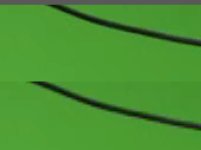
Note his decoding issues, well, this is what you are dealing with! :) Here is the SAME file in AE, one imported normally, one run through ClipWrap first and converted to ProRes422. Sadly, the moral of the story is DON'T let adobe decode your MTS files for you.

Screen shot 2011-12-02 at 1.51.19 PM.jpg

I am sure you can figure out which one is which :)

Hold on, haha, the JPEG just removed out all the detail when I uploaded it, let me zoom in more....

Screen shot 2011-12-02 at 1.55.25 PM.jpg
 
Back
Top