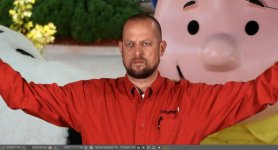
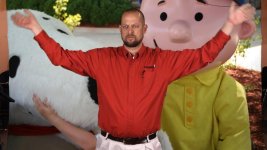
Samurai vs. AVCHD Green Screen Comparision Screen Grabs

roro20

Well-known member
Applied Keylight- selected the green color w/ the picker and shrank the screen matte -1.2. Basically a 15 second key job. Copied the keylight settings from one clip to the other. Interesting find, as well... After Effect / Premiere CS5 ONLY support pro-res files w/ 2 channels of audio or less. So, I had to set my cam to record LPCM in order to get AE to recognize the clip as a supported format.

AF-100 AVCHD
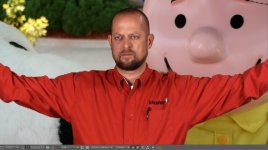
avchd.jpg
Samurai- PRORES HQ
proresHQ.jpg
 
Hmm, the attachments are flawed, as the AVCHD looks like it was crudely upsized (even the AE menus look worse).
 
Perhaps... However the are just 2 screen captures. I didnt do anything to upsize any of the clips. The preview window was a bit larger as you can see on the avchd comp but both were at 100% view.
 
And the avchd clip does look softer... Not just on the screen grab. I was NOT expecting this!!!
 
Again, the attachments are flawed (whether by the forum software, or by you. The AVCHD is 1000 X 561px while the other is 1000 X 541px. Full screenshots of the same frame would help, as the AVCHD grab is clearly flawed as displayed here (look at Charlie's left eyebrow, the aliasing is impossibly bad).
 
Again, the attachments are flawed (whether by the forum software, or by you. The AVCHD is 1000 X 561px while the other is 1000 X 541px. Full screenshots of the same frame would help, as the AVCHD grab is clearly flawed as displayed here (look at Charlie's left eyebrow, the aliasing is impossibly bad).

Agreed. Something is broken with how AE is possibly interpreting the AVCHD footage. As said, the clue is the aliasing on the eyebrow. I've keyed AF100 footage in AE and it has NEVER had this problem.
 
Like i said the preview windows were different sizes hence rhe different size screen grabs. I have always seen this aliasing on my keyed avchd footage which is the SOLE reason i wanted to try a samurai. I have always figured that was normal 4:2:0 aliasing. I can assure you that is exactly as it looks. With that being said I would love to find out that i have been doing something wrong all along in bringing the avchd footage in.
 
Something is definitely wrong, that aliasing on the eyebrow which isn't even part of the key is the first clue. Can you put a link to the MTS file off the camera? I can bring it up in my AE and take a look at it. Even if the image were softer, it would just hide a bit of the aliasing more. That's not what is happening here. This looks like a case where AE is trying to interpret the footage as some sort of interlaced conversion. I've seen footage from the FS100 AVCHD get interpreted wrong by Adobe products and show INSANE aliasing (like this is).

Like I said, I've keyed AF100 footage from the camera before, when I owned it. I've NEVER seen anything show up like this using keylight.
 
And is that a wire or something going across his eyebrow? It has to be in the AVCHD footage that is getting interpreted wrong and not in the plate.
 
Just got back to a computer so I could look at the grabs again, and that is not his eyebrow, it is actually a cord coming off one of the lights. Like I said this was a super quick import/key job so I didnt mask anything out. Again, this is how ALL of my AVCHD footage has looked when keyed at first, so if anyone has an idea on how I should be interpreting this footage upon import- I am all ears. I imported the ProRes file the same way I imported the AVCHD file (drag & drop into the project).

Like I said, I just assumed this was how 4:2:0 footage looked when keyed, as I have never seen any of this aliasing when keying 4:2:2 footage out of my HPX170. I have pulled literally hundreds of keys with AF100 AVCHD files and the all have aliasing like this until I fix it all by masking layer upon layer.

Id be happy to YouSendIt the .mts file to whomever to see on your end. Thanks for your input!

Ronnie
 
Here are the full screen frame grabs exported straight out of AE... FWIW... the frame grabs were 1920X1080 but DVXUSER is resizing them down to 1000X563.
AVCHD
avchd-full.jpg
PRORES HQ
prores.jpg
 
Last edited:
...and your conclussion now are what? ( You are seeing the original so are better placed for evaluation)
 
My conclusion is the same as it has always been... The samurai's prores files look great! I just wish it were a little better MONITOR :)
 
....and in relation to the comparison tests you put up....the conclussion about the post production workflow and quality with the files from the Samurai vs the files from the internal AVCHD......was?
 
To be honest. I have HDV footage that has less aliasing than that sample. No doubt the ProRes HQ codec is better.
 
Last edited:
To be honest. I have HDV footage that has less aliasing than that sample. Something is wrong here.

Exactly my point. There are many posts (along with sample footage and grabs) here on dvx about how good keying with the stock codec is, with no mention, ever, of aliasing; if it were anywhere near this bad, the AF100 section would've been on fire since the first week of the camera's release. The one frame grab looks like crudely uprezzed 360p. The real question is, what should Ronnie do in Ae to get the normal/expected look from his AF100 footage, to then be able to make a real evaluation? As someone else (Shooter, I think) already pointed out in another thread, even using the uncompressed footage from a Hyperdeck yields a marginal improvement; the single biggest benefit is having redundant recording.
 
Exactly my point. There are many posts (along with sample footage and grabs) here on dvx about how good keying with the stock codec is, with no mention, ever, of aliasing; if it were anywhere near this bad, the AF100 section would've been on fire since the first week of the camera's release. The one frame grab looks like crudely uprezzed 360p. The real question is, what should Ronnie do in Ae to get the normal/expected look from his AF100 footage, to then be able to make a real evaluation? As someone else (Shooter, I think) already pointed out in another thread, even using the uncompressed footage from a Hyperdeck yields a marginal improvement; the single biggest benefit is having redundant recording.

Good points. I haven't done a green screen shoot yet with the AF-100, but will in a few weeks. I do believe something is whack in AE on roro20's samples. I wish I was more advanced in AE to trouble shoot it but I know just enough to get in trouble. However, like I said, In AE, I have cleaner HDV keys than that sample.
 
Back
Top