Samurai 2.8 is out

I posted this in a other thread but since this one specifically pertains to firmware 2.8 solving the green screen problem I'm re-posting it here.
"Im currently filming a doc in Armenia with and without S-log using the SDI-A out, was using my Samurai with the 2.7 firmware and now with 2.8. In both cases, daily I will get a couple green, yellow or grey clips. I'm pretty sure it has to do with the supplied Atomos cable though. I've picked my F3 up off the sticks and watched the Samurai screen go from normal to green screen. My cable routing runs near the handle and when my hand bumps it is when I've witnessed it happen. I'll then jiggle the cable connection and the screen will jump around and eventually come back to normal. While the Samurai's screen may be awful for judging exposure or color, it's great for making sure your footage doesn't look like a neon explosion. Dont get me wrong, I love this thing for it's weight, ease of use, battery life, monitor, etc. but I have no confidence in my recording unless I check every clip in the monitor when I start rolling. If it's as simple as a bad Atomos cable I'll be ecstatic.

FYI -I've been using a Western Digital Scorpio Black 500GB and it's performed flawlessly, even when shooting while walking. The OWC 6G Mercury Extreme Pro SSD I was using was great until it got bricked the other night after the computer went to sleep while downloading. Nothing seems to be able to revive it, even Disk Warrior. Have no idea what happened with that."

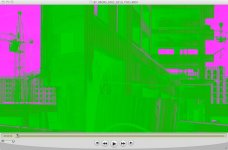
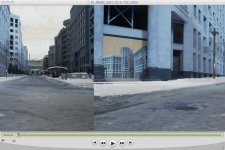
Green Screen 1.jpgSplit Grey screen.jpg
These were shot today with firmware 2.8
 
There may be cable problems also, but I have not seen a single problem since switching from HDD to SSD and I have not gone back. The Samsung SSD 470 128 GB, which is also recommended by Sound Devices, has been fantastic, and 128 GB is 1.5 hours in ProRes HQ, which for me is plenty. I have two of them and am hesitant to go back to the Hitachi 500 or 750 again. The SSD also seems to use less power. I do keep the monitor on while filming which gives an idea of how dim the S-Log capture actually is, since the EI/LUT can make it look like overexposure at times and it is a good way to know that there are no "green screens". I really like that a quick push of the power button locks/unlocks the touch controls on the screen.
 
I have some issues with the Samurai which seems to be related to firmware later than 2.6. Almost all recorded clips has a trash clip next to them. Every other clip is a small size, around 200-700KB in size with a brief sequence or just blank. I'm using an Intel 320 SSD drive but I think this is related to the new trigger functions. I'm using my AF101 so it might be related to trigger and Panasonic unless F3 users have the same thing?
 
Back
Top