FAQ S-log2 vs. S-log3 for HDR grading: which is better?

Not to derail whatever you guys have going, but, if shooting for HDR10, I'd be really tempted to use HG7&8. I'm pretty sure their measured dynamic range is around 9.6, or close to 10 stops. And, given that I can only think of 3 different consumer TV panels that can authentically show correctly produced HDR10 content right now (LG's model year 2016 OLED panel, Samsung's "9800" series panel, and Sony's ZD9 panel-- with relatively few existing in the wild), HG7&8 seem like the safest and most robust way to fit that 10 stops into 10 bits. As far as the color gamut is concerned, I'd be a little surprised if "standard" or "cinema" really limited what you could capture vs S-Gamut3. Maybe it would, but the camera's CFA seems to be the true bottleneck regarding color. I could be wrong though... Just thought I'd throw it out here since the thread began with how best to expose for HDR10 using the FS7.


The F55 does have the same wide color gamut as the F65, different than FS7/5, but I agree with you that CFA is likely the bottleneck. Also agree that HG7&8 can work but also STD gamma for certain low light/night scenes, where minimizing noise in the low key is more desirable than emphasizing color volume in unremarkable highlights.
 
I ran the same test that Piotr did, the test clip of the crayon drawing, in color matrix '2020NC' and 'undefined.' There is a pronounced emphasis to chroma in the 2020NC matrix that needs correction to be consistent with the original drawing. A straight up conversion from sRGB or AdobeRGB or bt.709 to HDR 2020NC matrix takes on a neon-like appearance inconsistent with the original crayon drawing. Ideally we would want to be able to do a straight conversion from 709 to HDR but it is not always possible as this demonstration illustrates. The difference becomes more pronounced when going up or down in brightness. Colors can become garish in some situations.
 
So why do you think I do not see any (not a striking one, for sure) difference between 2020NC specified vs. undefined in ffmpeg encoding? Can you see "Color primaries: BT.2020" even without specifying 2020NC, like I do in my resulting clips?

Piotr
 
So why do you think I do not see any (not a striking one, for sure) difference between 2020NC specified vs. undefined in ffmpeg encoding? Can you see "Color primaries: BT.2020" even without specifying 2020NC, like I do in my resulting clips?

Piotr

I assume then you see *some* difference if not a striking one. Perhaps we are seeing the same thing but characterize it differently. They are not identical. I see BT.2020 primaries with or without 2020NC matrix. BT.2020 primaries have been a requirement for HDR10 but my understanding is the matrix was optional. Remember I started doing this before the UHD Premium spec had been written. At the time, we thought P3 would be the color space but they decided it would be 2020.

When the matrix is undefined, do we know what matrix is substituted by default? And then consider, what is the point of specifying the mastering display RGB primaries and WP? Is that just informational? You for example are specifying P3 primaries in your mastering display metadata. So if you thought like I did that you would be defining a P3 subset within a 2020 container, then how does 2020 matrix fit in?

When we specify a matrix parameter, we are defining the non-linear transfer between CbCr and luma. That's not just significant, it's fundamental. So whereas mastering display parameter is specifying x,y coordinates within a table of chromacities, matrix is including luma, meaning the color volume changes with x,y chromacity coordinates according to the matrix transfer function. So change your scene luma and CbCr changes with it.

Example: Use the crayon drawing as a baseline. In a straight up transfer from sRGB (the 16 bit tiff image) to ST.2084, the paper displays at approximately 200 nits, unnaturally bright in my opinion. If you reduce brightness to something more comfortable and natural, say 50-60 the chromacity changes as well. Try that yourself. To keep the crayon colors looking like they did before you reduced the brightness of the paper, you have to separate the luma adjustment from the chroma to preserve the appearance of the crayons. The amount of change to the chroma is different depending on whether you used the 2020NC matrix transfer or undefined.

Although I have not tried it, using 2020C (constant) instead of 2020NC (non-constant) should yield about the same result but with more precision to the former.

My experience to date, has been that maintaining the consistency of a color grade is easier when the adjustment follows the undefined matrix transfer. Why this matters is because none of us are seeing the full gamut of 2020 colors at this time on any monitor that we are grading it on. This seems rather blind, particularly that for mastering display we are using P3 primaries but with 2020 matrix transfer function. Should we be surprised if colors get wonky? This is what I have seen happen, particularly worse when grading 4000 nits because yes, people are asking for it.
 
I assume then you see *some* difference if not a striking one. Perhaps we are seeing the same thing but characterize it differently. They are not identical. I see BT.2020 primaries with or without 2020NC matrix. BT.2020 primaries have been a requirement for HDR10 but my understanding is the matrix was optional. Remember I started doing this before the UHD Premium spec had been written. At the time, we thought P3 would be the color space but they decided it would be 2020.

When the matrix is undefined, do we know what matrix is substituted by default?

Well, Tom - judging from the fact that - as reported by MediaInfo - BT.2020 is always the matrix of the HEVC clips, no matter if we use "2020NC" or "undefined" in ffmpeg command line, I'd guess this is the default. Still unsure though what other command line syntax triggers it...

And then consider, what is the point of specifying the mastering display RGB primaries and WP? Is that just informational? You for example are specifying P3 primaries in your mastering display metadata. So if you thought like I did that you would be defining a P3 subset within a 2020 container, then how does 2020 matrix fit in?

When we specify a matrix parameter, we are defining the non-linear transfer between CbCr and luma. That's not just significant, it's fundamental. So whereas mastering display parameter is specifying x,y coordinates within a table of chromacities, matrix is including luma, meaning the color volume changes with x,y chromacity coordinates according to the matrix transfer function. So change your scene luma and CbCr changes with it.

Example: Use the crayon drawing as a baseline. In a straight up transfer from sRGB (the 16 bit tiff image) to ST.2084, the paper displays at approximately 200 nits, unnaturally bright in my opinion. If you reduce brightness to something more comfortable and natural, say 50-60 the chromacity changes as well. Try that yourself. To keep the crayon colors looking like they did before you reduced the brightness of the paper, you have to separate the luma adjustment from the chroma to preserve the appearance of the crayons. The amount of change to the chroma is different depending on whether you used the 2020NC matrix transfer or undefined.

All valid points, Tom. As a matter of fact, when trying to apply really high brightness here and there in a graded scene, I never just apply more Gain as it inevitably influences the Chroma in an uncontrolled fashion; I'd say that for all those Luma "spikes" above some 400-500 nits, I'm trying to use more sophisticated tools in Resolve than simply cranking gain...

Although I have not tried it, using 2020C (constant) instead of 2020NC (non-constant) should yield about the same result but with more precision to the former.

My experience to date, has been that maintaining the consistency of a color grade is easier when the adjustment follows the undefined matrix transfer. Why this matters is because none of us are seeing the full gamut of 2020 colors at this time on any monitor that we are grading it on. This seems rather blind, particularly that for mastering display we are using P3 primaries but with 2020 matrix transfer function. Should we be surprised if colors get wonky? This is what I have seen happen, particularly worse when grading 4000 nits because yes, people are asking for it.

Haha - yes, those high nit values can become addictive after you started grading for HDR, don't they, Tom :) I'm trying to always back off a little - if only to protect my own SUHD TV. But my situation is special in that I'm using my own "target" display as my grading monitor, and don't give a damn for any other HDR TV out there... My set's ABL serves me well as an indicator of too high overall brightness, dimming the screen slightly after the initial burst of light whenever I went to high; this helps a lot! I realize it wouldn't been so simple if my deliverables were intended for a wider public!
Merry Christmas to you Tom, and everyone else in this Forum :)

Piotr
 
Well, Tom - judging from the fact that - as reported by MediaInfo - BT.2020 is always the matrix of the HEVC clips, no matter if we use "2020NC" or "undefined" in ffmpeg command line, I'd guess this is the default. Still unsure though what other command line syntax triggers it...

Piotr, No.

MediaInfo is *not reporting* BT.2020 signal format as either constant luminance nor as non-constant luminance. Not reporting! It is merely reporting the color primaries as BT.2020; not what we are talking about with the HEVC metadata parameter for colormatrix. Remember, the primaries are just x,y coordinates of chromacity. BT.2020 coordinates for color primaries say nothing about luminance. The colormatrix specifies which transfer function derived from simultaneous equations that solve for E' the non-linear signal for luminance are used. See table 4 in ITU "signal format" constant or non-constant luminance. Or undefined. Then what?

See link for ITU paper, refer to table 4.
https://www.itu.int/dms_pubrec/itu-r/rec/bt/R-REC-BT.2020-2-201510-I!!PDF-E.pdf

And Merry Christmas to you to Piotr, thank you!

Edit:

Actually I read the table wrong. The derivation of colour difference signals are calculated differently depending on whether the signal format for luminance is constant or non-constant. Doesn't change the facts, we don't know what's used when we specify --colormatrix 'undefined'
 
Last edited:
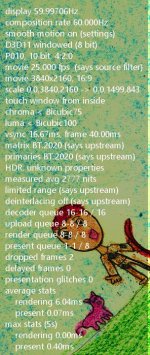
Here is madVR player's info on the HEVC clips (the same for matrix 2020nc and undefined; played back on a PC monitor though it's not important here). Interesting is the "measured avg 2777 nits"...
 

Attachments

  • 2020nc.JPG
    2020nc.JPG
    83.6 KB · Views: 0
Last edited:
I think shadows are more important, because that's where the noise is most dominant. More bits means less granularity (exaggeration of noise). At least that's been my experience. S-Log3 looks noticeably less noisy in the shadows.
 
Mark, you are right - but this is just one (fully justified) requirement. When a HDR picture has only sparse areas of very high brightness (like a small light source, specular highlights etc.), and the majority of it is just a "normal" brightness level scenery (perhaps even subdued by the colorist's intent) - it's all so important that those mid- and low-key areas are detailed, colors are well defined, and noise is under control. It's exactly the difference in brightness between the two that creates the stunning HDR effect - and lots of information in shadows that S-log3 provides is beneficial.

However, there are situations (like a full, bright sunshine scenery) where the average brightness level of the majority of the scene needs to already be high - and still those specular highlits on water, or direct sun rays shining through foliage, should be even brighter (preferably as bright as the viewing device would possibly allow). With such scenes, the opposite requirements of as much information as possible being present in highlights, prevails. And getting this is much easier when shooting with S-log2...

It's been exactly those contradictory requirements that one grading for HDR comes across so often that made me start this thread! Cheers

Piotr
 
The only case for S-Log2 that I can imagine would be a snow scene. Perhaps a skiing event. There, you would need subtle gradations of white levels. But darker scenes do better with S-Log3, in my experience.
 
Back
Top