F55: S-Log2 / S-Gamut to Rec709 LUT for Resolve

There was a colorist on Twitter who said the same thing, "I don't LUT, I grade".

But here's the thing, to my eye, I've only seen maybe once or twice midrange (F3, FS100, FS700) Sony cameras look good, I mean *really* good that have been touched by a colorist. By "really good", I'm talking about what you see on the Alexa group on Vimeo.

I could be all wrong, but I don't think many colorists care enough to try to get to the bottom of why an F3 doesn't look as good as an Alexa, when 90% of the technical components are there. Low noise, 10bits, most of the resolution, etc etc.

I feel you can get there with these cameras, but it really, really helps if you use a LUT that gets the camera looking great in one easy step rather than fighting the nature and colorimetry of the camera by hand. I can tell you an Alexa plus it's LUT is an amazing starting point. The F3 with the early Slog LUTs is not.

Nate

I appreciate all the work I've seen you do to get us to that starting point with the LUTS. Back from the early days of the F3. I've shot a lot with the F3, RGB to the Gemini or Cinedeck, and we always had good results in post. With the Alexa as a standard its always been comparable on many levels. Marketing, timing etc... and the F3 didn't do what I thought it would when it was launched. Its still a great camera, and I'm still using it. The F55 is a different story, and all that I've seen over the last 4 months, is a good start. It will be a good conversation to ask some of the colourists about their ideas of using Luts.
 
Oh no, I hope you didn't think that commentary was directed at you.

More about a good colorist that I didn't necessarily agree with. That's it :)
 
Last edited:
I asked the colorist at the Sony Canada launch about the slog2 LUT and he said he would also much rather start from scratch and build his own too. But I think for those people who want to dabble and work on their own material, ths LUT is an excellent start.

Nate since Sony put the beta LUT on thier site do you know if they are planning to release a "final" version of it?
 
Here's some of the Slog2 skating footage with the Rec 709 LUT from the F65 team applied. Thanks for finding it Nate.

 
Thanks for the comparison Nigel. As good as the LUT is(as a start point), I think we're all having the same results of the blacks being crushed a little. Im finding after applying the LUT in Resolve, use the "Shadow" tool in the Color Wheels to bring the shadow exposure up three to six "points" and it becomes a great start point for further CC and grade. I'd be comfortable (if I expose gray at 33% in S-Log/gamut) to blindly batch apply the combo of LUT + shadow exposure increase to hand to a client as a daily or preview of the material. I'd really be thrilled if I could apply the combo to a sub-SDI MLUT for on set monitoring. Eh Hmm, Sony?..

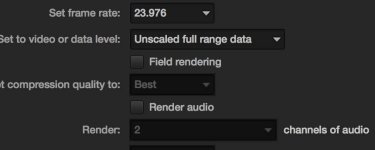
Nigel, just to confirm, did you select all of your clips in the Media Pool and later in Color section of Resolve and check the Clip Attributes to "Data Level" instead of "Video" or "Auto". As naturally bright as they are in the scene, Im surprised the bright trim lights at the edge/foot of the rink clipped in some shots. Your exposure seemed correctly underexposed near 33%. I thought maybe "Video Levels" were accidentally selected in the chain somewhere and that clipped it.
 
Thanks for the comparison Nigel. As good as the LUT is(as a start point), I think we're all having the same results of the blacks being crushed a little. Im finding after applying the LUT in Resolve, use the "Shadow" tool in the Color Wheels to bring the shadow exposure up three to six "points" and it becomes a great start point for further CC and grade. I'd be comfortable (if I expose gray at 33% in S-Log/gamut) to blindly batch apply the combo of LUT + shadow exposure increase to hand to a client as a daily or preview of the material. I'd really be thrilled if I could apply the combo to a sub-SDI MLUT for on set monitoring. Eh Hmm, Sony?..

Nigel, just to confirm, did you select all of your clips in the Media Pool and later in Color section of Resolve and check the Clip Attributes to "Data Level" instead of "Video" or "Auto". As naturally bright as they are in the scene, Im surprised the bright trim lights at the edge/foot of the rink clipped in some shots. Your exposure seemed correctly underexposed near 33%. I thought maybe "Video Levels" were accidentally selected in the chain somewhere and that clipped it.

Bill

I'll have to check on the clip attributes. I only have a basic understanding of resolve, but trying to learn more. The rink lights were pretty bright. I think they were clipping when we shot in Slog2. At the Vistek, Sony event a couple of colourists were looking at that at the DMT station, and they were able to recover a bit in those highlights.

I'll have to look at that shadow tool. This LUT is a nice starting point, but the blacks are sometimes crushed. I do like how it handled the tilt down on the woman's face to skates as she stepped on the ice. She's right next to one of those flo's and the LUT had nice roll off in those highlights. All the info is there in Slog2, and you really see the DR from the face to skates.

The big issue right now is exposure tools in the EVF, as everyone has talked about. Zebras only go down to 50, so there's a lot of winging it on the fly
 
Nigel, just to confirm, did you select all of your clips in the Media Pool and later in Color section of Resolve and check the Clip Attributes to "Data Level" instead of "Video" or "Auto". As naturally bright as they are in the scene, Im surprised the bright trim lights at the edge/foot of the rink clipped in some shots. Your exposure seemed correctly underexposed near 33%. I thought maybe "Video Levels" were accidentally selected in the chain somewhere and that clipped it.[/QUOTE]


Just looked at it and it was on auto. Changed it to data, and on the delivery, what do you set that data level too?
data level.jpg
 
Nigel, just to confirm, did you select all of your clips in the Media Pool and later in Color section of Resolve and check the Clip Attributes to "Data Level" instead of "Video" or "Auto". As naturally bright as they are in the scene, Im surprised the bright trim lights at the edge/foot of the rink clipped in some shots. Your exposure seemed correctly underexposed near 33%. I thought maybe "Video Levels" were accidentally selected in the chain somewhere and that clipped it.


Just looked at it and it was on auto. Changed it to data, and on the delivery, what do you set that data level too?
View attachment 68067[/QUOTE]

Yeah, Im a Resolve rookie myself. I selected Unscaled Full Data Range for export as well. I was told that Auto is supposed to select full range but I never trust anything that says Auto. The lights may be looking clipped in the ungraded S-Log footage but the LUT can save it quite often. Check the still grabs I posted in another thread; the sun clipped but the LUT smoothed it out.
http://www.dvxuser.com/V6/showthread.php?303777-Great-article-on-Sony-s-F-Dynamic-Range

Or.. the lights are just legitimately blown and we're spinning our wheels. Worth checking on it though.
 
I can see the difference when you change it to data. The blacks don't seem so crushed. Re exporting now
 
Yes, makes a noticeable difference. If it's set to auto, you lose whatever detail is there in the shadows between 0 and 64.

Also, loses whatever highlights that are there from 960 to 1023, but that's not as noticeable. But still makes a difference.


Or.. the lights are just legitimately blown and we're spinning our wheels. Worth checking on it though.

Usually you can pull down the gain in a node before the LUT and help highlights out that way too.

Nigel, Resolve lets you apply LUTs in about a zillion different places. If you place it on "3D Input Lookup Table" in setup and you "lose" highlights because of the way the clip is exposed, Resolve will not let you bring those highlights back later in the grade. They will be destructively gone.

But if you place the LUT on the OUTPUT, or on a node in your clip grade, it's non destructive and you can bring those highlights/shadows back in the grade.

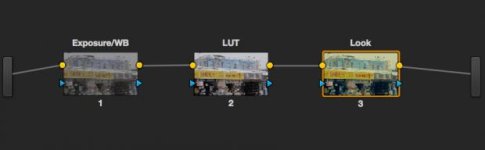
Here's how I do the LUT:

Screen Shot 2013-03-10 at 1.50.16 PM.jpg

The only reason I don't do the LUT on "Output" in the Setup Panel is because if you do all your grading and then apply the LUT, the controls are awful twitchy, and very small changes on the color wheels effect big changes in the image. I find it easier to do the bare minimum in the first node (exposure changes, white balance changes), apply the LUT, and then do the more involved work AFTER the LUT is applied (looks, secondaries, etc).

If nothing else, Resolve is a invaluable learning tool for a DP. What still photographer doesn't learn what's possible and what's not via Photoshop, Aperture, or Lightroom? I think it's still smart for DPs to maybe leave serious color work to guys who live and breathe it, but otherwise, I think everybody should get their hands dirty playing around :-)
 
Last edited:
Yes, makes a noticeable difference. If it's set to auto, you lose whatever detail is there in the shadows between 0 and 64.

Also, loses whatever highlights that are there from 960 to 1023, but that's not as noticeable. But still makes a difference.

Usually you can pull down the gain in a node before the LUT and help highlights out that way too.

Nigel, Resolve lets you apply LUTs in about a zillion different places. If you place it on "3D Input Lookup Table" in setup and you "lose" highlights because of the way the clip is exposed, Resolve will not let you bring those highlights back later in the grade. They will be destructively gone.

But if you place the LUT on the OUTPUT, or on a node in your clip grade, it's non destructive and you can bring those highlights/shadows back in the grade.

Here's how I do the LUT:

View attachment 68070[/QUOTE

Thanks Nate. This is a good start to learning more about it. I never have enough time in colour sessions to pick colourists brains on specifics with Resolve. I just end up tinkering, but want to know more.
 
If someone wants to start from scratch when grading then the first thing they need is a LUT to convert the linear scene the camera saw, back to into linear space for grading after being mangled by whatever recording system. It's a common issue - take a camera that can be modified with picture profiles, log curves etc,. then ingest where a lot of software 'assumes' a pure REC709 curve (Adobe for example) and the light values that you're grading with may be wrong. Meaning that if you play with exposure overall the math is incorrect so different parts of the image will adjust incorrectly.

The LUT should be first in the chain, it's not a creative decision, it's simply reversing how the camera was set up to get your colours and luminance in the right place to then be creative. Of course that's not to say you can't use LUTs creatively elsewhere in the chain but in resolve the other nodes are perhaps better for that. If you pull down the gain before a LUT then you're affecting how well the LUT can reverse that curve.

A good use of a LUT for example is if you have to match two different cameras because the differences will be consistent from scene to scene. So take footage, linearise it, colour correct to match then generate a standalone LUT to be used in Resolve purely to get both cameras in the same space and that workflow becomes a bit easier because you've taken some of the headache out of matching and leaving all the time for the creative decisions

Of course you can grade by eyeballing it but i wonder sometimes whether something is perceptibly 'off' when messing with images through incorrect curves.

cheers
paul
 
If anybody is interested in a FCPX plug to load LUTs like this into, please shout out. I have a developer acquaintance that is thinking about taking it on.

I told him I'd pay around $100 for such a thing, given Pomfort charges about that much. My only problem with Pomfort is that you're stuck with the way they do it and there's not much adjustment. Also there's not much in the way of highlight mojo in theirs either (saturation rolloff, etc)
 
You can download LUT Buddy from Red Giant Software and it is free. It lets you load LUT's into FCP and there is also not adjustment for it after that, but you can either use the built in adjustments in FCP after that,,, or if you want some "curves" functionality for $49 you can buy the Nattress Levels & Curves plugin (yes as in Graeme Nattress the dude from RED) and it will let you do some more adjustments to certain ranges of the image.

I too thought of a developing a plug-in for Adobe to apply LUT's and some highlight mojo but so far I seriously think you and me are the only two people who really give a **** about this.
 
Back
Top