F55: S-Log2 / S-Gamut to Rec709 LUT for Resolve

Nate Weaver

Veteran
Nate have you tried applying the sony lut to any night time footage, and have you had to pre-adjust the image before adding lut?
 
Yeah, I mean, there's a few dusk shots in that last stupid thing I posted. But not night.

You always have to adjust a shot after applying a lut like that that adds so much contrast. Or at the least, very often. I put a node before the lut for basic color balance and exposure.
 
So far I don't like the contrast the lut gives on night footage, and don't see much point to it. But again it's not like I know where I am exposing so for sure you ened to add a filter (Adobe talk) or a node (Davinci talk) to adjust before hand. This morning I shot some moving cars with 500mm lens so finally have some daylight footage to try sony lut on. I might like my own recipies better for now but time will tell.
 
Well, I guess I'd say you can never just slap a lut on things and walk away. It's a first step. But I would say you're often going to have to adjust the data before it gets "lutted".

I guess my deal is I've just never dug Sony's tastes in image processing. Color response, contrast, etc. The lut does away with all that.

If Sony's "look" doesn't bug you, then yeah, it might be too much to deal with.
 
Well, I guess I'd say you can never just slap a lut on things and walk away. It's a first step. But I would say you're often going to have to adjust the data before it gets "lutted".

I guess my deal is I've just never dug Sony's tastes in image processing. Color response, contrast, etc. The lut does away with all that.

If Sony's "look" doesn't bug you, then yeah, it might be too much to deal with.

Ok I give sony lut another chance (after all I only spent a couple minutes with it and let impatience get the best of me).

Once thing throwing me off was the color temperature of the clip, once I cooled it off the default Sony lut wasn't all that bad. But still a little too much contrast for my liking so I backed it off some. Here's a quick frame grab of something I'm playing around with:

8537575414_74aa7e693a_c.jpg
 
I mean, here's one thing, Resolve gives you multiple EASY, FAST ways to back off contrast in just the right places in the curve. Takes seconds.

If Premiere and it's filters are what I think they are, then it's more work in some ways and less in others.

By the way, there's some details as to how the lut is designed to be used that are up in the air in Premiere. Is the full range video the 55 records being fed into the lut? or are things being clipped at 64 and 960 video levels before going in? If so, then the lut is more contrasty than it's supposed to be. I think you'd have to bring up the scopes to really know.
 
In either Premiere or After Effects, its very easy to adjust only a small part of the curve but its not intuitive I agree. But if you are really looking for an easier interface you can use something like Magic Bullet plugin which gives you ways to adjust only parts of the curve you want with brightness or contrast - similar to the FCP interface in fact.

I haven't even looked at a scope yet, but is next on my list.

The frame I posted is using the Sony lut and a white balance filter to adjust the color temperature. This was clip Clip0001.mxf so still getting the hang of things.
 
Nate

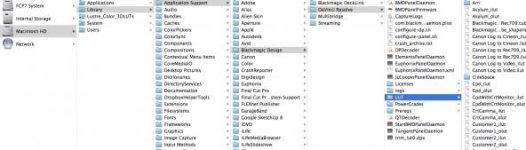
Was able to put the LUT in the Arri folder in Resolve. I've been looking at it with some of the footage I've shot, and its a great starting point. Nice rolloff in the highlights and doesn't crush the blacks too far. I like it. Thanks very much.
 
Hey, it's not me. Came from Joel Ordesky in the F65 group, and I imagine in turn from the colorists at the DMPC. I would have never known about it had I not been snooping in Sonys F65 forum!

I find I have to either lift the blacks or lift the low mids on some shots because its bringing those blacks down. But again, I treat it as a good starting point, the "camera setup" I can't achieve in-camera.
 
Hey, it's not me. Came from Joel Ordesky in the F65 group, and I imagine in turn from the colorists at the DMPC. I would have never known about it had I not been snooping in Sonys F65 forum!

I find I have to either lift the blacks or lift the low mids on some shots because its bringing those blacks down. But again, I treat it as a good starting point, the "camera setup" I can't achieve in-camera.

Its a great starting point. Looked at a shot of a skater, tilting from head to white skates. This LUT had nice rolloff in the highlights of the skates. We were playing with it at the DMT station at the Vistek launch last night. All the information is there in Slog2, and the LUT keeps the highlights smooth. All the colourists I work with like starting from scratch, but this is nice for me to be able to export out a good baseline for viewing, or editing. I'll post a before and after applying the LUT.

thx

N
 
All the colourists I work with like starting from scratch,

There was a colorist on Twitter who said the same thing, "I don't LUT, I grade".

But here's the thing, to my eye, I've only seen maybe once or twice midrange (F3, FS100, FS700) Sony cameras look good, I mean *really* good that have been touched by a colorist. By "really good", I'm talking about what you see on the Alexa group on Vimeo.

I could be all wrong, but I don't think many colorists care enough to try to get to the bottom of why an F3 doesn't look as good as an Alexa, when 90% of the technical components are there. Low noise, 10bits, most of the resolution, etc etc.

I feel you can get there with these cameras, but it really, really helps if you use a LUT that gets the camera looking great in one easy step rather than fighting the nature and colorimetry of the camera by hand. I can tell you an Alexa plus it's LUT is an amazing starting point. The F3 with the early Slog LUTs is not.
 
Back
Top