S-Log on the FS100

Postmaster

Dark Side of the Camera
Well maybe I should call it G-Log with a "G" like in Glencairn ;-)

Just a little teaser for the moment (with my own silly face)

GlenColor PP1 ungraded

GleColorUG.jpg

Glencolor PP1 graded

GlenColor.jpg

G-LOG ungraded

G-Log.jpg

G-LOG graded

Graded.jpg

Those JPEGs got converted to sRGB so they look a bit different - actually darker - as on a proper calibrated wide gamut monitor, but you get the idea.

Watch this space! :evil:

Frank
 
Hmmm what camera trickery can the profile do.

Whatever it is I'm quite interested after looking
at the pictures.

Keep us posted :)
 
I like the PP1 graded better. The problem with trying to create a LOG approximate with an 8-bit space is that you are sacrificing detail in your midtones to extend the shadow/highlight ranges that are typically crushed into the 8-bit. The only way LOG makes sense is if your log capture bit depth is much larger than the target, like 10 or even better 12 to 14.
 
I was musing over S-LOG for quite a while and was wondering if something similar – or at least S-LOGish – can be achieved via the PP settings. So I looked at waveforms of S-LOG files out of the F3. I tried to match them – as close as possible with the FS100. Of course that isn´t real S-LOG but if handled right, it can be quiet pleasing.

When I started to explore this, I wasn´t sure how those settings would behave in 8 bit space at a long GOP codec - as Rick mentioned.
So I recorded in the camera and uncompressed on a BlackMagic Deck at the same time. The differences are almost not there. Uncompressed is a hair sharper and a bit nicer in blurry (out of focus) areas, but nothing to write home about. The AVCHD codec of the FS100 holds up to grading the same way the uncompressed material does (much to my surprise) and refuses to fall apart. At least as long you are in a 32 bit floating point space.

So yeah, technical Rick is right, but I was not able to proof that in a real world scenario. Ether I don´t understand 8bit math or Sony does some Voodoo before the signal is written to the card or send to the HDMI. As far as I know, The FS100 uses internal 12bit processing.

Personally I like the look of the graded G-LOG better, takes away a lot of the harshness, but maybe that´s just the lost detail Rick was talking about.

Gotta look deeper into this.

Frank
 
I was musing over S-LOG for quite a while and was wondering if something similar – or at least S-LOGish – can be achieved via the PP settings. So I looked at waveforms of S-LOG files out of the F3. I tried to match them – as close as possible with the FS100. Of course that isn´t real S-LOG but if handled right, it can be quiet pleasing.

When I started to explore this, I wasn´t sure how those settings would behave in 8 bit space at a long GOP codec - as Rick mentioned.
So I recorded in the camera and uncompressed on a BlackMagic Deck at the same time. The differences are almost not there. Uncompressed is a hair sharper and a bit nicer in blurry (out of focus) areas, but nothing to write home about. The AVCHD codec of the FS100 holds up to grading the same way the uncompressed material does (much to my surprise) and refuses to fall apart. At least as long you are in a 32 bit floating point space.

So yeah, technical Rick is right, but I was not able to proof that in a real world scenario. Ether I don´t understand 8bit math or Sony does some Voodoo before the signal is written to the card or send to the HDMI. As far as I know, The FS100 uses internal 12bit processing.

Personally I like the look of the graded G-LOG better, takes away a lot of the harshness, but maybe that´s just the lost detail Rick was talking about.

Gotta look deeper into this.

Frank

It does bring about a lot to think about. :) The grading G-LOG looks flatter to me in dynamic range so I can see where it helps to....smooth out the tonal range of the image more. In the PP1 setting, it's like the mid tones are getting stretched up into the higher colors a bit more and you are getting that flattened down.

But at the same time, on the G-LOG, I see lots of color range flattened out in the midtones. Like in the face, the highlights are gone. In the yellow in the clapper, the range of color flattened out. Also on the G-LOG, look at where the highlights sit, they are mostly all greyish and not white.

You could do that as well to the PP1 by reducing down the highlights.

I think I'd target something between those two gradings.
 
The graded G-LOG definitely looks better - at least, the skin tones are far more pleasing and there is a bit more latitude in the image, which provides some depth. But I think I would need to see uncompressed video or TIFF files on my calibrated monitor to judge accurately. The highlights look milky and greyish, like Rick said, in the graded G-LOG, but that could also be from converting to an 8bit JPEG - although, now that I think about it, going from 32bit float to 8bit linear should blow the highlights or leave them alone, not flatten them. Meh.
 
That could be my grading taste, I like my highlights always a bit on the bluish side. Looks different here on the board, than on my grading monitor.
It´s 1:30 in the night now and I have to go to bed, but tomorrow I grade that clip again (just the luminance)and leave the colors alone.
Than I post a link to a tiff straight from the timeline.

Good night guys,

Frank
 
A flatter LOG image graded will always look more filmic than in-camera settings. No doubting that. There's a reason this is the preferred workflow in digital cinema. The solution is happy medium between LOG and in-camera settings. AVCHD holds up nicely as far as compression issues (as Postmater mentions, uncompressed 8bit vs AVCHD 8bit is barely noticeable) but what really hinders grading is the 8bit format. AVCHD seems to randomize the gradations so it's not as noticeable though.

A shot of someone's face or a lot of detail in frame will make any 8bit grading issues very hard to spot. But as soon as you shoot a smooth gradient like the sky or a wall, you'll see the 8bit mark of death: banding.

Postmaster when you're testing this, do some extreme grading of a smooth gradient to really see how the codec holds up. Only then an we really see how well it handles grading and how it randomized the gradations.
 
Frank, thanks again for putting the effort into figuring this out... can't wait to see what comes out of it!
 
Okay, here comes a little update.

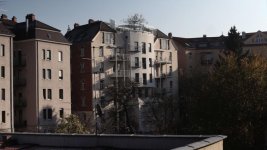
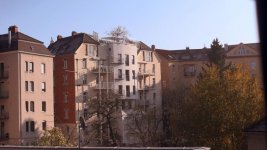
This was shot with GlenColor1 PP for outdoor use (ungraded).

2Glen2.jpg

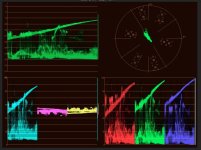
Scopes-Glen1ungraded.jpg


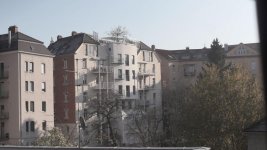
This was shot with G-LOG (ungraded)


2GlegUngraded.jpg

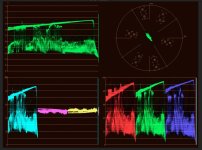
Scopes-G-LOG-ungraded.jpg

And this is G-LOG after grading.
This matches what may eyes saw on that early morning as close as possible.
The shot with the Gelncolor PP is to blueish, the actual mood was much warmer.

2GLOGgraded.jpg

Scopes-G-LOG-Graded.jpg

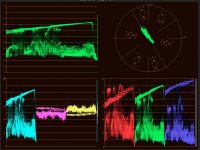
If you look at the scopes, you ca see what G-LOG does. It´s not really an S-LOG, but it gets a different distribution of values, that are quite handy in post.
There is one strange thing, that I don´t understand yet. If you look at the scopes from the first shot on GlenColor1 PP, there are those empty lines, in the luma and YUV parade.
Looks like there is information missing. Whereby the information in the G-LOG shots seems to be more complete and dense.

Rick, do you have any idea what could cause that?

Here you can download the uncompressed full HD TIFFs, straight from the timeline: http://www.file-upload.net/download-3891460/G-LOG.zip.html

Frank
 
Last edited:
So Frank, what are the PP settings you are using to get the G-LOG? From your first set of pictures I was noting how the red in your shirt came out. In the G-LOG graded it doesn't look as pleasing (To me) as in the GlenColor1 graded. Getting reds "Right" is a problem that I have run into with the FS100 PP settings. Do you make adjustments to the color depth for the G-LOG?
 
That last example sold me, so reminiscent of CineGamma 3 & 4 on the EX line. OOohh, the excitement is building... lots of questions....

Now, is this extending the dynamic range, or even reducing it? Is there any 'help' for the highlights, or are we exposing for the highlights and letting the other tonal values trickle down?

I note you too have wound down the chroma quite a bit, I guess this is to minimise the threat of red clipping in highlights?

From what I've seen in the TIFFs, this is an excellent opportunity to let the camera's sensor capture data in the areas where an 'expensive image' excels - highlights and shadows - by using up the mid-tone section (brightening shadow detail, lowering highlight detail), so when you 'open up' the image in grading, pushing the tonality back where it should be, the mid-level tonality is... well, not compromised, but it's definitely donated some of its spare organs to its tonal siblings. So correct exposure and good lighting is the order of the day. Not good for run-and-gun, but mighty fine in controllable circumstances like interviews, GVs and beauty shots.

I guess if we wanted the exposure flexibility or wriggle-room, the queue starteth here for an S-Log F3 or similar.
 
...So Frank, what are the PP settings you are using to get the G-LOG? ...
Yes! I'd like to understand this also... I read your post, Frank, and I like the pictures, but don't find out WHAT exactly G-LOG is?? So will be good to know what is it, how to get it in camera settings, and what exactly you did in grading?
 
Those JPEGs got converted to sRGB so they look a bit different - actually darker - as on a proper calibrated wide gamut monitor,

Frank

I'm booked to start the grade on a feature shot on f3/Slog/444 to external recorder, this show is going out to film, so i'm working in P3.

I can pull these stills in a spare moment up and look at them beside "real" Slog in my wide gamut suite as well...

d
 
A flatter LOG image graded will always look more filmic than in-camera settings. No doubting that. There's a reason this is the preferred workflow in digital cinema. The solution is happy medium between LOG and in-camera settings. AVCHD holds up nicely as far as compression issues (as Postmater mentions, uncompressed 8bit vs AVCHD 8bit is barely noticeable) but what really hinders grading is the 8bit format. AVCHD seems to randomize the gradations so it's not as noticeable though.

A shot of someone's face or a lot of detail in frame will make any 8bit grading issues very hard to spot. But as soon as you shoot a smooth gradient like the sky or a wall, you'll see the 8bit mark of death: banding.

Postmaster when you're testing this, do some extreme grading of a smooth gradient to really see how the codec holds up. Only then an we really see how well it handles grading and how it randomized the gradations.

No, that is not true, it will not always look more filmic. It's all in your ability to grade the footage. Shooting log flattens out the highlights and the shadows, and in an 8-bit space, robs those values from the mid tones. For scenes with really high dynamic range, if you then apply the S-curve to crush blacks and the highlights, you are going to expand the midtones back into where they would have been had you done it in camera. However, they're quantized now and so you are introducing larger steps which can produce banding depending on how much you crush the top and bottom. To get the BEST out of your camera, you need to figure out how you want to handle the highlights that you would in post, and set the knee as such to get it as close as possible. That way, you quantize out and shrink the range in 8-bit you'd do in post and keep all the other range in the mid-tones for information you want to keep.

To get the advantage of what people call a LOG curve, you need to have a larger bit depth for storing that extra top and bottom information so you aren't throwing away information in the mid tones, and this is EXACTLY what you are doing.

I also don't agree with AVCHD randomizing the gradations, because I see the opposite. If your remove most of the noise from an image, both the AF100 and FS100 have a tendency to band. It's because they DON'T do anything in the gradations, like add dithering noise, that they do this. Further, AVCHD actually cleans out the noise and makes things have a bit more of a plastic look as compared to externally recording footage. It's not extreme like on a Canon DSLR so I have no problem with it, but it's there. It's an H.264 issue.
 
Okay, here comes a little update.

This was shot with GlenColor1 PP for outdoor use (ungraded).

View attachment 43555

View attachment 43557


This was shot with G-LOG (ungraded)


View attachment 43554

View attachment 43559

And this is G-LOG after grading.
This matches what may eyes saw on that early morning as close as possible.
The shot with the Gelncolor PP is to blueish, the actual mood was much warmer.

View attachment 43556

View attachment 43558

If you look at the scopes, you ca see what G-LOG does. It´s not really an S-LOG, but it gets a different distribution of values, that are quite handy in post.
There is one strange thing, that I don´t understand yet. If you look at the scopes from the first shot on GlenColor1 PP, there are those empty lines, in the luma and YUV parade.
Looks like there is information missing. Whereby the information in the G-LOG shots seems to be more complete and dense.

Rick, do you have any idea what could cause that?

Here you can download the uncompressed full HD TIFFs, straight from the timeline: http://www.file-upload.net/download-3891460/G-LOG.zip.html

Frank


Hmm, maybe I am not seeing what you are seeing. For instance, I see the Magenta and the Cyan to be a bit larger in range in the PP1, when compared to the GLOG scopes. It's hard to say because I see for instance more information in different areas of the PP1.

The issue I see after downloading the files is that the PP1 is not closer to what you graded than the S-LOG. Look where the shadows sit on the PP1. In your final grade, you would need to lift that all up to get it where it is, and the LOG setting is much closer to that spot it felt to me (after looking at them closely). In this case, using the PP1 is going to cause you to get all the quantization of the shadows to pop up when you will that stuff out of the shadows, and that didn't look good either.

Now that you have an idea of how you'd grade this, I'd look at a hybrid between the two so that you are even closer to the final image. This will maximize the 8-bit.

Of course, the problem is, you really need to test this on a wide range of shots, to see how the 8-bit range holds up with top heavy or bottom heavy shots (meaning, the luminance is clumped at the top or the bottom, or like you have here, a VERY WIDE DR scene).

I will say, the graded G-LOG after I downloaded it seems to have too much red saturation. The ongoing FS100 love for red :)

And I forgot to mention, this is cool work Frank. I've wanted to expand the shadows a bit more on my FS100 and this is moving down that path. So thank you for taking the time to study this.
 
I will say, the graded G-LOG after I downloaded it seems to have too much red saturation. The ongoing FS100 love for red :).

Is this a problem with digital sensors as a whole? Had the same issue (and know a couple other people who did as well) with both the 5D and 7D.
 
Back
Top