F5: S-Log 2 and the color Red and Green

Gene Sung

Veteran
I have an FS700 and started using S-Log lately. Since S-Log is so new to the FS700, none of us know that much about it so I figured I'd post it on the F3/F5/F55 section where you guys use S-Log all the time.

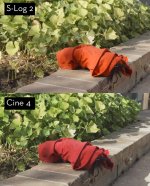
Not sure if this is an FS700 thing, but I notice that S-Log seems to really struggle with the color red. It always comes out very orange-ish. If you look at the .jpg attached, the red shorts are far more color accurate in the Cinegamma 4 frame.

Also, I've noticed that greens are a little bit more yellow when using S-Log; but it's mostly the Reds that really bother me.

Once again, do the Reds and Greens come out this way on the F3/F5 S-Log? If so, is there anyway around this?

Thanks for any help.
S-Log.jpg
 
I'm just using After Effects for grading. Nothing really fancy for S-Log since I've just started messing with it.

But yeah, no matter how many times I shoot red, it always comes out orange-ish; no matter what program I bring it into. On the LCD screen the red is visibly off as well, so it's definitely in-camera.

I've noticed in general, S-Log 2 (at least on my camera) treats color a bit differently than other profiles. The skin tones and highlights are so great, but struggling with Reds.
 
Slog 2 should not have much colour?

To get to 709 in post you should apply a LUT

Id suggest Resolve - I tried the SonySlog Lut in Resolve but it went way too hot. Maybe a newer version of resolve has a LUT for SLog2
 
Seems to have a bunch of colour with a bit of a kick in resolve. (no LUT)

Also Id say it is over exposed as the red seems a little clipped..

generes.jpg
 
Thanks for the LUT tip Morgan, I'll try it out. I noticed on some stuff that Den Lenny shot on S-Log FS700, the reds looks the same way (a bit orange-ish). Maybe it's an FS700 thing.
 
its a flat profile - you can make the reds go deep purple or bright orange - your choice - just spin the wheels

but you gotta not clip them when you shoot

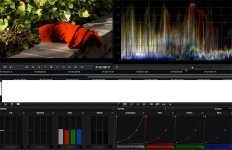
It doesnt show but if you open the image in resolve you will clearly see the red channel is clipped

S
 
Hey Morgan, I'm in After Effects, but when I select the Red Channel and due a slight hue shift, the Reds start to look good but it effects the skin tones at that point (since skin generally has red it in). I would image Resolve would probably do the same thing, correct?

And sorry guys for posting this in the F5 forum. It's just that I think you guys would have way more experience with S-Log than us FS700 S-Log newbies.
 
I have not noticed any issue with reds on my F55, so maybe it is just an FS700 thing. I mostly shoot S-LOG2/S-Gamut and the reds look normal to me with just minor grading in Resolve or Premiere. It would be good to test the two cameras side by side.
 
Hey Morgan, I'm in After Effects, but when I select the Red Channel and due a slight hue shift, the Reds start to look good but it effects the skin tones at that point (since skin generally has red it in). I would image Resolve would probably do the same thing, correct?

And sorry guys for posting this in the F5 forum. It's just that I think you guys would have way more experience with S-Log than us FS700 S-Log newbies.

In resolve you can do anything selectively so do what you want - but I guess if one red is off they all are. I dont know AE but I find resolve far the most sensitive..
 
Did you play with the color matrix?

Can you post a capture that isn't corrected at all?

S-Log2.jpg

Here's a before and after. As I mentioned, the Cine 4 is much more color accurate.

Thanks for the help guys. I was able to narrow down the Red channel range in After Effects, then it mostly just effected the Reds only, and not the skin tones (or very, very mildly) so that's a good start. From what have been said, I'm starting to think the Red issue is probably because S-Log 2 was designed for the F5 / 55 and then bastardized for the FS700 (like the 4K version), so Sony probably didn't optimize it for the FS700. Sigh.... to be the ugly stepchild of Sony....
 
It shouldnt have a drastic effect to turn red to orange, but from the frame grabs you posted the ungraded S-Log2 image is way over exposed(for S-Log). Middle gray/18% should be exposed at 33 with S-Log2, not the normal 50. A rough rule if not using proper exposure tools is to under expose about 1.5 stops from what looks good to your eye.
 
I've been doing some tests and i've almost finished writing them up, i'll post a link in the 700 forum later. But i'm not 100% convinced SLog on the 700 is the same as other Slogs, the curve looks like it might be different and also if you take the footage into Resolve and apply the official Sony 3D LUTS it initially looks terrible and you need to gain it down and take out some saturation - as if the source isn't quite as log as the LUTs are expecting. This is good news for shooting with it in 8 bit though. I don't have any other sources of SLog to put through the same test - so i'm flying blind a little here.

Anyway, it's an area to look at. I'll post a link once i've finished putting it together

cheers
Paul
 
Back
Top