(Rumored) DJI Mavic Pro II

The Mavick Pro 2 still won't do UHD at 60p, and it's questionable how much benefit the 10 bit codec will actually provide with a 100 mbps bit rate, still it's a massive improvement. I use the Phantom 4 Pro but with with this update I'd consider adding a Mavick just for portability.

I have high hopes that the 10bit codec will resolve the nasty compression artifacts that the mavic pro has when filming large patches of green grass and trees. If it wasn't for that issue, I wouldn't think upgrading is worth it.
 
When combined with the efficiency benefits of h.265, it seems like it's accomplishing that. The sample footage I've seen so far looks pretty good, even though it's mostly been on Vimeo or YouTube, which don't do wonders for it.
 
It looks much better than Mavic Air, and the hyperlapse is usefull atleast for the company I mostly freelance for.

The Mavic Air tends to lose all saturation in the darker areas when filming backlight. For example I film a lot of golf tournaments, and when getting beauty shots for the production the grass will be green but the trees will basically be grey/black if going against backlight. The Mavic Pro 2 seems much better into backlight by retaining saturation. The hyperlapse feature would be nice for the TV-productions when you want to show the arena (I do a lot of sports like Ice Hockey, Soccer, Basketball, etc...) and how people are coming to it. I also really like the feature to actually save paths/locations to take videos in different parts of the year/seasons.
 

Saw that on NewShooter this morning. My opinion: Useless. If the end user can't swap the cameras in the field, then what's the point? I'm betting it's more for the people that don't want to buy the more expensive Pro version right now, but will eventually want the better camera. So they'll end up paying more in the end than if they had bought the Pro to begin with and will still only have one camera to use after it's all said and done. Plus be without their drone during the service. Either buy the one you will use the most or buy both, if you have the money and think you will really need both camera options.
 
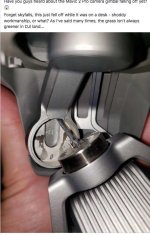
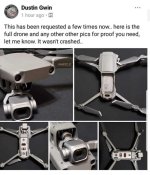
Seen a report of Mavic Pro 2 gimble problems. A gimble bracket is reported to have failed, the adhesive that holds the gimble together failing. The good news is that DJI is quick to respond replacing the drone in days. The guy says it was sitting on his desk when the gimble fell off. probably just a Monday morning machine with a poor build and poor quality assurance.

EDIT so far only One failure statistically acceptable in mass producing anything but social media is going nuts.
 

Attachments

  • gimble 2 v compressed.jpg
    gimble 2 v compressed.jpg
    48.1 KB · Views: 0
  • gimble 1 compressed.jpg
    gimble 1 compressed.jpg
    52.3 KB · Views: 0
Last edited:
Mine was delivered this morning. Guess I'll get it charged up after lunch and take 'er up this evening.

Hopefully that was just an anamoly. Did you see the video of the guy(maybe Tom's Tech?) flying it into the tree at pretty much full speed in sport mode as part of his torture test? Nothing but a few scratches...
 
Yes, I watched those tests, impressive. Now get flying and post some footage :-)
 
Last edited:
I bought it with the fly more pack for the extra batts and four position charger. All of the batteries appear to be dead, so they are currently on charge, and I'm topping off the remote as well. Hopefully everything will be ready to go when I get back from the gym and I can get in a quick flight before the sun completely sets. It's too bad that the original MP/MPP batteries don't work with the new M2, because I have four hot ones just sitting on charge right now. Seem like I read somewhere that the may make the old MP/MPP remotes compatible with the new M2's, so two remote operation may be a possibility, in the future.

Also: The new M2's DO NOT come with a memory card like the originals. Probably not a huge deal to those that already have drones, because you probably have several spares laying around and yes, the M2's have 8GB's of internal storage, but the original MP/MPP came with a 16GB card(at least both of my MPP's did).
 
I received mine last night... my Fly More package should be here next week. With any luck I'll be able to take it out for a spin this weekend, and hopefully use it in the short I'm shooting.
 
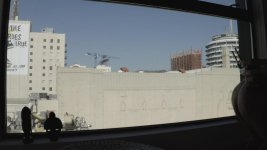
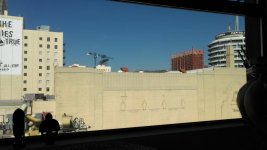
Just testing mine. Am I the first one to notice this?

Check this out. normal video mode vs log mode. THe log mode image is wider- it has no lens distortion compensation. :0
 

Attachments

  • Untitled_1.4.1.jpg
    Untitled_1.4.1.jpg
    44.8 KB · Views: 0
  • Untitled_1.3.1.jpg
    Untitled_1.3.1.jpg
    54.1 KB · Views: 0
Last edited:
Haven't played with D-log, yet. But here's some quick notes/thought in no particular order:

Even though mine came in a day early(Tuesday), I haven't had a lot of time to play with it, yet. Only got to activate it and update the firmware on Tuesday. Firmware update takes forever(at least 45 mins) and requires you to constantly keep hitting the "continue download" button.

Something that I don't think I've seen mentioned: 1080/120 is a 'crop sensor' mode. And a pretty heavy crop, at that. Also, toggling through the different frame rates, I noticed some just ever so slight frame size changes. Haven't played with "4K HQ" which is supposedly higher image quality, but crops into the sensor resulting in a 55 degree FoV, vs "4K Full FoV" which is 77. But the narrower FoV can be useful.

I've been pretty happy with the image and amount of detail seen/retained(lots of trees around me) with mine shooting UHD(it's not 4KDCI)/24fps, .MOV/h.265, Normal color profile and played back on VLC. Detail retention in the clouds looks pretty good, so far. Flew it a little after sunset last night and the Auto ISO went up to 3200 and it was pretty damn noisy.

If you're wanting to adhere closely to a "180 shutter"(even though 1/50 is as close as it gets to 1/48) when shooting 24fps, you'll still need ND. Even stopped down to f/11 and ISO 100, during the day with the sun out, you will still be well over 1/100.


Hopefully there's nothing wrong with my copy, because the obstacle avoidance sensors seem overly sensitive or maybe reading wrong. I was flying low altitude in my driveway and it kept stopping because of obstacle avoidance, even thought there was nothing even close to it.

Tried out the object tracking on myself and it seemed pretty decent(i just walked up the driveway), but I had to put the drone up at a much higher altitude than the manual states before it would allow it to lock on to me in that mode. The manual states around 6.6 feet(2m), I had to raise it over 25 feet.

The "landing lights" are BRIGHT.

I liked what I was seeing on-line before I received mine, but thought greens were a little neon, but that may just be encoding on YouTube and Vimeo, because on playback of what I shot, on my laptop, everything looked pretty natural, to me.

Not sure if it was my phone(running my old iPhone 7 as the standalone screen for the remote) or if the app/controller was working my phone extra hard, but the first time I flew, about five minutes in my phones brightness dropped significantly and the phone felt like the hood of a black car sitting in the summer sun. And I was standing in the shade.

Maybe I'll get a chance to play more with it tomorrow afternoon or Monday. Still need to tweak some flight control settings and wrap my head around the new obstacle avoidance system. Right now, EVERYTHING is on. So maybe I can see what I really want to leave on and what I can turn off.
 
Hopefully there's nothing wrong with my copy, because the obstacle avoidance sensors seem overly sensitive or maybe reading wrong. I was flying low altitude in my driveway and it kept stopping because of obstacle avoidance, even thought there was nothing even close to it.

Your house may have spirits and the obstacle avoidance system is detecting them. :happy:
 
Back
Top