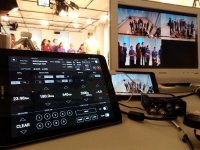
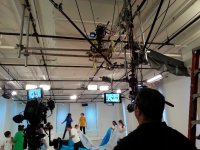
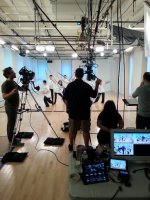
Using the ROP for the high angle camera.,,
This was a shoot for which we thought we would have a high angle shot on a jib or ladder. Thought it would be a lot more convenient using the ROP than constantly running up and down (or living at the top of the ladder for 2 days.
Surprise!! - On setup day we discovered there was too much movement in the floor when the performers were running around, and there was no way the EIS could get rid of the camera shake. We ended up rigging two EVA1's from the ceiling grid - and placed a third one on a tripod on the floor - which could pick off closer shots when they were in place.
ROP worked flawlessly for the entire 2 day shoot. I found that sometimes my tablet would go into sleep mode, but I could activate the tablet, have it re-establish connection with the camera, and then start the camera rolling all within less than 4 seconds.
Though it is possible to control focus with the ROP by placing the lens in 'Auto-Focus' mode and manually adjusting it on the tablet, the fact that we were at 11mm for the overhead and didn't need to change it meant I kept the lens on manual focus. I did however have a confidence read-out of the lens focus distance on the tablet.
For different setups there were slight lighting adjustments, and could do iris control from the ROP.
Frz_Cam_ROP.jpg (81.5 KB)
Frz_Cam_Rig_Horiz.jpg (91.7 KB)
Frz_Cam_Rig_Vert.jpg (95.2 KB)
There are still a few quirks in/suggestions for the ROP system --
1 - The change in the look of the 'Record Button' on the ROP needs to be more visible. Yes, the red light on the back of the camera was visible in this situation, but a more vivid 'RECORDING' reminder would be appreciated.
2 - The menu button on the camera is not functional when the ROP is connected. So when I went up the ladder for card changes I ended up needing to bring the tablet with me to access the menu for card formatting - (doing simul record to larger card in slot 2 meant that during formatting I would eject card 2 to avoid mistakes. Repeated trips up/down the ladder that was brough in and out for camera access were frowned on by production.)
3 - This is not specifically an ROP issue, but when in Simul Record mode, the 'Record Check' function is disabled. It would be really much better to be able to get to the thumbnails from the ROP. NEED THIS FEATURE !!!!
All-in-all, for what it does, the ROP performed flawlessly for the entire shoot!!!