Rode Wireless Go II

I have good news. We shot in 4 different locations today, with different contributors each time. I made sure not to turn on the transmitters until the receiver was on, and hey presto, I didn't hear a single glitch all day. I may report this finding to Rode.

That sounds like good news! Now can I remember to do that... that will be my test next time I use them! Yes, worth reporting I think.

Chris Young
 
Interesting. Just to clarify - you're talking about the clicking problem?

That's only 1 of the problems I'm encountering (along with the corrupt backups files that won't play or export and the "vocoder" weird glitch problem).
But still - be good if there's a solution to that one at least.

So you're saying receiver must always go on first?

That's not ideal because the received is the one that's easy for me to turn on and off - whereas the TX units are on the talent. I was deliberately turning the RX unit on and off so I just had the backup recordings when we're actually filming.
So looks like we just need to live with 1 very long backup file. Not the end of the world.

Are you using compressed or uncompressed?
 
Interesting. Just to clarify - you're talking about the clicking problem?

That's only 1 of the problems I'm encountering (along with the corrupt backups files that won't play or export and the "vocoder" weird glitch problem).
But still - be good if there's a solution to that one at least.

So you're saying receiver must always go on first?

That's not ideal because the received is the one that's easy for me to turn on and off - whereas the TX units are on the talent. I was deliberately turning the RX unit on and off so I just had the backup recordings when we're actually filming.
So looks like we just need to live with 1 very long backup file. Not the end of the world.

Are you using compressed or uncompressed?

Yes the clicking issue specifically. I'll be shooting again this Thursday, and will report back again.

I had the vocoder problem with my first set of this system, which has been sent back (because of click issue, vocoder and the on/off button on the receiver only working with a sharp fingernail).

As for switching the receiver off to stop backups - I'll test that out on Thursday, perhaps we'll be lucky and there won't be an issue once there's been an initial connection.

I've tried compressed and uncompressed, and the clicking was present on both - on all 3 of my systems (I currently have 2 sets of the Wireless Go II, and have sent one back).
 
Just returned from another day of shooting - again, no sign of clicking in any of the 4 shoot locations, having always turned on the receiver before the transmitters.

On one occasion, I turned off the receiver and then turned it back on again (while the transmitters were still on); again no sign of clicking, so this seems like good news.
 
Just returned from another day of shooting - again, no sign of clicking in any of the 4 shoot locations, having always turned on the receiver before the transmitters.

On one occasion, I turned off the receiver and then turned it back on again (while the transmitters were still on); again no sign of clicking, so this seems like good news.

sorry to butt in ignorantly, but are people saying that you will end up with clicking on your audio recording unless you always turn the receiver on first?
 
I'm on my third set of this system, and they have all exhibited this problem - and continue to do so. The clicking, which occurs randomly every few seconds, is present in the on-board backup recordings, and so is nothing to do with transmission. I've flagged it up with support, and they've pointed me towards their repair centre. Curiously, it only seems to happen during the first few minutes of recording.

I do have a theory, but haven't had time to test properly yet - I think (hope) that it may only occur when the transmitters have been turned on before the receiver. I have a shoot tomorrow where I'll be testing this theory out...

sorry to butt in ignorantly, but are people saying that you will end up with clicking on your audio recording unless you always turn the receiver on first?

That certainly seems to be the case for me. It's been a continual issue with multiple sets of this kit. Jump back one page in this thread to 05-12-2021 08:33 AM for more info.
 
Yes - but it doesn't happen all the time (to me anyway) and I don't know if it happens to everyone.

The theory about which order you switch on it a new one which I have tested out yet but will certainly try.

I'm also having problems with backup recordings which won't export (the software crashes when you try) and with what we're calling the vocoder glitch - where the audio has a weird distortion for about a second.
Please let us know if you suffer from any of these.
 
I've had this reply from Rode:
> I'll update our dev team about your case,
> We hear hearing issues similar to what you are encountering.
> So any information we can get, we bring them them to our dev team for investigation.
> At this time we may not have a direct solution, but we hope to be able to resolve most issues over future updates.
 
So, is the consensus that these units aren't ready for primetime yet?

Mine have been working flawlessly for 4 shoots now (being sure to turn the recever on before the transmitters). My gripe at the moment is that while I've only had one backup file that has refused to export via the rather clunky Rode Central app, it's taking Rode Support a VERY long time to convert and return the file to me. It would be much easier if they just released an UGG file converter app.
 
Mine have been working flawlessly for 4 shoots now (being sure to turn the recever on before the transmitters). My gripe at the moment is that while I've only had one backup file that has refused to export via the rather clunky Rode Central app, it's taking Rode Support a VERY long time to convert and return the file to me. It would be much easier if they just released an UGG file converter app.

Or they could make a system that works properly from the get-go, that doesn’t require manufacturer intervention to recover your recorded files. What should really be concerning all the people that use these, is the apparent randomness of the files not being customer readable.
 
Mine have been working flawlessly for 4 shoots now (being sure to turn the recever on before the transmitters). My gripe at the moment is that while I've only had one backup file that has refused to export via the rather clunky Rode Central app, it's taking Rode Support a VERY long time to convert and return the file to me. It would be much easier if they just released an UGG file converter app.

What happens if the units disconnect and reconnect? Any clicking then? What about a temporary shutdown of the receiver? I doubt you've used it enough to see how it handles these edge cases though...
 
I've had about 4 long documentary shoots now where I always turn the RX ON first and I always turn it OFF last. I haven't had any clicking problems at all since I started following this procedure.

I have had the units disconnect during this and there's been no problems when the TX reconnects to the RX. So looking good so far.

I do wish they would add a batch export though! For some reason the uncompressed files are in 30 minute chunks so a full day of shooting and you need to do a lot of exporting from two units. :D
 
Reading reports from these smaller systems reminds me of gopros where they're more a necessary evil for certain applications but not a pleasure to use at all.
 
I haven't carefully studied the latter part of this thread re: the clicking noise, but it seems like this is happening to European purchasers?
 
What happens if the units disconnect and reconnect? Any clicking then? What about a temporary shutdown of the receiver? I doubt you've used it enough to see how it handles these edge cases though...

During the last few shoots, I've found that as long as the inital connection is made through turning the receiver on first, then both receiver or transmitters can be turned off and on again with no clicking issues. This means that the receiver can still be used as a stop/start switch for the backup recordings. Obviously is both units are powered off, I'd need to turn the receiver back on first.

While it may all sound like a bit of a ffaff, it isn't really. Because the batteries genuinely last all day, I can just turn on the receiver while rigging the camera, turn on the transmitters while micing up the talent, and then just leave them on all day - turning the receiver off occasionally to break up the backup files.

For my needs, this is still the best bit of new kit I've purchased in years.
 
Last edited:
Interesting.
I've used it a couple of times since reading your tip and all good (no clicks or vocoder glitches).
I made sure to turn the receiver on first and keep it on.

It really doesn't make any sense why the order of initial switching on should make any difference. Very odd.
 
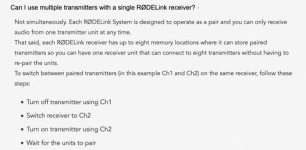
FWIW, I thought at one point Rode recommended turning on the receiver first before the transmitter in the old RODELink system when pairing them.

I can't find any reference to exact wording, but found these instructions regarding changing channels which implies it somewhat.

I would think modern technology has it figured out and the order doesn't matter, but I still think about data I/O and if a receiver is supposed to receive data, it should be 'ON' and ready to start receiving as soon as that transmitter is turned on and starts transmitting.

RODELink Note.jpg
 
Back
Top