
Navigation
Install the app
How to install the app on iOS
Follow along with the video below to see how to install our site as a web app on your home screen.
Note: This feature may not be available in some browsers.
More options
You are using an out of date browser. It may not display this or other websites correctly.
You should upgrade or use an alternative browser.
You should upgrade or use an alternative browser.
Rode Wireless Go II
- Thread starter scorsesefan
- Start date
> "I can see the marker in Rode Central, but, as I have already reported, I can't get it into any other software."
Interesting. And does the marker happen at the exact moment you press?
ie if you say "pressing in 3 .. 2.. 1.." the marker appears at exactly the right point?
I ask because when I've tried it I sometimes get no marker appearing - and sometime a marker flag appears but up to 10 seconds later (so of course it might just be a bit of interference - crazy that the flags look the same).
Interesting. And does the marker happen at the exact moment you press?
ie if you say "pressing in 3 .. 2.. 1.." the marker appears at exactly the right point?
I ask because when I've tried it I sometimes get no marker appearing - and sometime a marker flag appears but up to 10 seconds later (so of course it might just be a bit of interference - crazy that the flags look the same).
Last edited:

scorsesefan
Veteran
In terms of the new firmware (v1.2.3) otherwise, I have just been testing this against the various bugs:
1. Broadcast/uncompressed recording length: these can now be exported beyond the 7'14" length that was only possible previously. I've only tested for 14 mins so far, but this was fine. I'll let it run for much long soon and report back, but it is hard to imagine that it isn't fixed.
2. Broadcast/uncompressed recording stopping when signal is lost: this is now fixed and performs like the uncompressed recording did. That is, I tested with the signal completely dropped out for 1 minute and the TX unit continued recording unbroken. Despite Chris's comments above, this was a) reasonable to expect and b) essential
3. Some broadcast/uncompressed recordings not being made: this intermittent (but fairly frequent) problem, usually affecting one TX unit at random, seems to have been fixed, but I have to date only made 10 recordings with the new firmware. I'll update this post when I have more recordings. EDIT: I have now tested 40 (very short) recordings with no failures to record.
So good news: a great improvement, and it looks as if we have the three initial bug fixes required.
Cheers,
Roland
Good news, Roland. Re: the internal recording failure (uncompressed) during signal loss there must have been other reports to Rode besides mine, as I doubt they would have fixed that in a few hours...
On another note, I plan on testing the units today in Times Square, so we'll see how they hold up in a busy RF environment (although Covid has thinned out the crowds)...

Throwback
Well-known member
Wav files have 2gb limitation. That’s probably why they’re being split.
As I said: the uncompressed wav files are 259,356 KB in size, or an eighth of 2Gb...(EDIT: and the uncompressed .ugg file on the TX for these 30min 44sec files is 262,153 KB).
R
Last edited:
Throwback
Well-known member
Good news, Roland. Re: the internal recording failure (uncompressed) during signal loss there must have been other reports to Rode besides mine, as I doubt they would have fixed that in a few hours...
On another note, I plan on testing the units today in Times Square, so we'll see how they hold up in a busy RF environment (although Covid has thinned out the crowds)...
Yes, i'm sure that there were others than us reporting to Rode. Do post about your tests: Times Square is a little different to here in rural Norfolk (UK)!

cyvideo
Veteran
Like you Roland I've found nothing yet that accesses the GO markers. Looking at the exported file metadata there appear to be no global or region markers listed.
Trying to find the best way to sync all files, camera and GO IIs? For that, I'm using Pluraleyes. The fastest Pluraleyes sync-ups I've ever seen. I guess because both TX and RX units are locked in perfect 2.4Ghz sync. As the output of the RX is what is going to the camera Pluraleyes sees all the files as basically identical. Pluraeyes doesn't even seem to have to apply a "drift" calculation over the synced up files. As it has to with Zoom type external unlocked recordings.
In Vegas once all tracks are Pluraleyes synced I then use each individual track's clip triangle marker to set a sync reference marker in each track to have a common sync marker that can line up across all tracks. If staying in Vegas I then just "G" group all the tracks and edit away without worrying about sync loss on ripple edits etc.
My normal practice for syncing external audio recordings appears to be working well in my GO II tests so far. Limited in duration though they are. I'll be trying some 2-3 hour recordings to confirm my current process holds water over the long run times.
When I'm satisfied that all files are synced with the camera track and marked with IN/OUT I then add a matte video track to each external audio track. In Vegas I use the Cineform codec with render dimensions of 426 x 240 and select Cineform's video setting of LOW and select Cineform's 48kH 24-bit audio option. I then set Vegas Project Properties to DRAFT. I now set the render-out timecode of each of these Cinform matte/audio tracks to match the embedded timecode in the camera track. These renders are pretty lossless and go nearly as fast as an audio-only render out. Vegas basically just copies the audio files as there are no changes to them and just muxes them to their respective video mattes.
I can now import these low res 48kH Cineform files into Vegas, Resolve, Edius or whatever. When I bring them onto the timeline I then ditch the video and end up with just the 48kH 24-bit .WAV files which now have camera matching embedded timecode. On long-winded history doco edits dragging over months and in a couple of cases years having WAV files with matching TC to the camera interview files has proven to be a massive time saver. Saying nothing about the reduction in the frustration of syncing hours of files days and weeks later.
The reason I'm checking out the GO II kit is the appeal of a very small decent audio quality kit that can drop into a shoulder camera bag along with an A7 or similar for interstate shoots. Leaving only a lightweight lighting kit and sticks to go in the hold.
Why not use a small kit of UHF wireless mics? I do, but now Australia has been divided into spectrum blocks of B, C, D, and E. Different states and different cities and areas within states can be in any one of those spectrum blocks. For example frequencies in Block B cover central Sydney. But I cannot officially use Block B wireless mics frequencies in Sydney West as that is in Block C. A whole different set of frequencies. To cover the whole of Australia with say the current Sony or G series Sennheiser wireless kits and to make sure you are covered for ALL locations you would have to purchase four sets of wireless mics. With each kit having the right frequencies for Blocks B, C, D, and E. You can try and use a block B wireless kit in a Block E region, some guys do. Just don't get caught by ACMA who issue our radio communication licenses. Even if you get away with the illegal use of wireless using the wrong frequencies for the area you are in you run a big risk of suddenly getting drowned out by an overpowering surge of Telco traffic. All the Telcos have also been allocated spectrum across the board. In many cases in the same frequencies as your wireless kits. That is another appeal of the GO II kits! Freedom from frequency blocks!
Just trying to work out how best I can apply the GO II units to my workflow. Same as previously with unlocked external recordings by using Puraleyes. But now with the much faster and apparently drift-free file matching using these GO II units.
Chris Young
Our frequency conundrum!
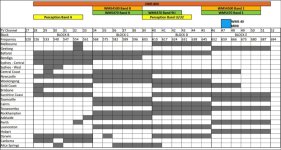
Trying to find the best way to sync all files, camera and GO IIs? For that, I'm using Pluraleyes. The fastest Pluraleyes sync-ups I've ever seen. I guess because both TX and RX units are locked in perfect 2.4Ghz sync. As the output of the RX is what is going to the camera Pluraleyes sees all the files as basically identical. Pluraeyes doesn't even seem to have to apply a "drift" calculation over the synced up files. As it has to with Zoom type external unlocked recordings.
In Vegas once all tracks are Pluraleyes synced I then use each individual track's clip triangle marker to set a sync reference marker in each track to have a common sync marker that can line up across all tracks. If staying in Vegas I then just "G" group all the tracks and edit away without worrying about sync loss on ripple edits etc.
My normal practice for syncing external audio recordings appears to be working well in my GO II tests so far. Limited in duration though they are. I'll be trying some 2-3 hour recordings to confirm my current process holds water over the long run times.
When I'm satisfied that all files are synced with the camera track and marked with IN/OUT I then add a matte video track to each external audio track. In Vegas I use the Cineform codec with render dimensions of 426 x 240 and select Cineform's video setting of LOW and select Cineform's 48kH 24-bit audio option. I then set Vegas Project Properties to DRAFT. I now set the render-out timecode of each of these Cinform matte/audio tracks to match the embedded timecode in the camera track. These renders are pretty lossless and go nearly as fast as an audio-only render out. Vegas basically just copies the audio files as there are no changes to them and just muxes them to their respective video mattes.
I can now import these low res 48kH Cineform files into Vegas, Resolve, Edius or whatever. When I bring them onto the timeline I then ditch the video and end up with just the 48kH 24-bit .WAV files which now have camera matching embedded timecode. On long-winded history doco edits dragging over months and in a couple of cases years having WAV files with matching TC to the camera interview files has proven to be a massive time saver. Saying nothing about the reduction in the frustration of syncing hours of files days and weeks later.
The reason I'm checking out the GO II kit is the appeal of a very small decent audio quality kit that can drop into a shoulder camera bag along with an A7 or similar for interstate shoots. Leaving only a lightweight lighting kit and sticks to go in the hold.
Why not use a small kit of UHF wireless mics? I do, but now Australia has been divided into spectrum blocks of B, C, D, and E. Different states and different cities and areas within states can be in any one of those spectrum blocks. For example frequencies in Block B cover central Sydney. But I cannot officially use Block B wireless mics frequencies in Sydney West as that is in Block C. A whole different set of frequencies. To cover the whole of Australia with say the current Sony or G series Sennheiser wireless kits and to make sure you are covered for ALL locations you would have to purchase four sets of wireless mics. With each kit having the right frequencies for Blocks B, C, D, and E. You can try and use a block B wireless kit in a Block E region, some guys do. Just don't get caught by ACMA who issue our radio communication licenses. Even if you get away with the illegal use of wireless using the wrong frequencies for the area you are in you run a big risk of suddenly getting drowned out by an overpowering surge of Telco traffic. All the Telcos have also been allocated spectrum across the board. In many cases in the same frequencies as your wireless kits. That is another appeal of the GO II kits! Freedom from frequency blocks!
Just trying to work out how best I can apply the GO II units to my workflow. Same as previously with unlocked external recordings by using Puraleyes. But now with the much faster and apparently drift-free file matching using these GO II units.
Chris Young
Our frequency conundrum!
cyvideo
Veteran
Yes, i'm sure that there were others than us reporting to Rode. Do post about your tests: Times Square is a little different to here in rural Norfolk (UK)!
LOL!
Last time I was in London we were doing interviews everywhere, Chelsea to the Tower of London the Imperial War Museum, Admiralty Arch, etc, etc. All in all about thirty, two to three hour-long interviews over a month. Because of the frequency legalities of using our Aussie UHF frequency blocks in the UK I took along two Rode Filmmaker kits with Rode and Sennheiser MKE2 mics as a backup. After testing them out over there I ended up using the Filmmakers exclusively. I can honestly say in the densest part of London's WiFi saturated environment I didn't suffer one drop out in the entire month. Sure, not big distances involved in interviews but in areas of central London with a massive amount of WiFi traffic I was impressed. I would look at the WiFi app on my phone and could see nothing but a massive amount of colored loops bouncing around indicating the massive amount of WiFi traffic around us. If these GO II kits deliver anything close to the performance I got out of the Filmmaker kits I'll be happy. Beating a set of GO IIs to death now. I do notice in brick buildings with closed doors and big sliding glass door panels they were starting to drop out at about twenty meters, sixty seventy foot or so. For interviews, this is not an issue for me.
Chris Young
Throwback
Well-known member
interesting posts Chris. Good to have you confirm the absence of markers. Yes, syncing with Pluraleyes or, perhaps better (certainly cheaper) Davinci Resolve is a good solution: I assume this is sample accurate? I'd also be interested in a quick way to sync in a DAW too: might seem odd, but there are potential audio-only uses for the GO II units too.
Sounds like frequency fun in Australia!
Cheers,
Roland
Sounds like frequency fun in Australia!
Cheers,
Roland

Peter C.
Veteran
There can be many technical and financial reasons why a manufacture may decide to split files. For example in the past audio recorders used an older file system fat32 which had file size limitation. Manufactures didn't switch to a more modern file system to save money on paying higher licensing fees. Gerald Undone pointed out the Z-camera splits files into smaller chunks to protect against file loss if the camera lost it's power you wouldn't lose the entire file. There are a lot of technologies that we take for granted that are free for the consumer to use but are not free for product manufactures. Knowing the reason won't change the fact that they split files.As I said: the uncompressed wav files are 259,356 KB in size, or an eighth of 2Gb...(EDIT: and the uncompressed .ugg file on the TX for these 30min 44sec files is 262,153 KB).
R
Last edited:
I did a 3hour+ test as well and as you say - the uncompressed recording is split into 30min-ish blocks whereas the uncompressed is one long file.
Interestingly this page says "In both modes, the Wireless GO II records audio in one-hour blocks. "
http://en.rode.com/blog/all/Wireless-GO-II-On-Board-Recording-and-Audio-Export-Modes-Explained
Perhaps they changed their minds?
Interestingly this page says "In both modes, the Wireless GO II records audio in one-hour blocks. "
http://en.rode.com/blog/all/Wireless-GO-II-On-Board-Recording-and-Audio-Export-Modes-Explained
Perhaps they changed their minds?

Run&Gun
Veteran
I did a 3hour+ test as well and as you say - the uncompressed recording is split into 30min-ish blocks whereas the uncompressed is one long file.
Interestingly this page says "In both modes, the Wireless GO II records audio in one-hour blocks. "
http://en.rode.com/blog/all/Wireless-GO-II-On-Board-Recording-and-Audio-Export-Modes-Explained
Perhaps they changed their minds?
I wonder if they designed it to do that on purpose, tying it to the ~30 min record time of "DSLR's"?
Peter C.
Veteran
As soon as I heard 30 minutes, the same thought occurred to me. it’s designed for dslr mirror camera which most still have that limitation so that seems like the most likely reason.I wonder if they designed it to do that on purpose, tying it to the ~30 min record time of "DSLR's"?
Last edited:
Throwback
Well-known member
There can be many technical and financial reasons why a manufacture may decide to split files. ... Knowing the reason won't change the fact that they split files.
Haha! You're the one speculating as to the reason, Peter, not me! I simply reported the length of the files...
Going by the website ref to hour-long blocks Rode evidently changed its mind, perhaps through necessity when fixing the bug, but 30 min blocks are, as I said, fine.
Cheers,
Roland
Last edited:
It's not exactly 30 mins though so not particularly useful. It's not like the individual files will match the DSLR files.
I rather think there's some nerdy technical reason.
Whilst there's nothing particularly wrong with splitting the files - it does make download rather tedious.
The software really needs some kind of batch downloading option.
Otherwise it's going to be very time consuming downloading lots of individual files one by one.
I rather think there's some nerdy technical reason.
Whilst there's nothing particularly wrong with splitting the files - it does make download rather tedious.
The software really needs some kind of batch downloading option.
Otherwise it's going to be very time consuming downloading lots of individual files one by one.
Just checked and the blocks I'm getting are 30 min 44 seconds so a rather odd duration.
The file size is 256 Mb though (ie a binary round number) which sounds like it's a file system limit of some kind.
Will be interesting to see if compressed recordings also split at 256mb.
That would obviously be a very long recording (around 3 hours I'd calculate)
The file size is 256 Mb though (ie a binary round number) which sounds like it's a file system limit of some kind.
Will be interesting to see if compressed recordings also split at 256mb.
That would obviously be a very long recording (around 3 hours I'd calculate)
Throwback
Well-known member
Just checked and the blocks I'm getting are 30 min 44 seconds so a rather odd duration.
The file size is 256 Mb though (ie a binary round number) which sounds like it's a file system limit of some kind.
Will be interesting to see if compressed recordings also split at 256mb.
That would obviously be a very long recording (around 3 hours I'd calculate)
Indeed: I mentioned the 30 mins 44 secs duration back in post #160! As I said then, the wav file is 259,356KB, but, of course, this is the exported format and file size: as I mentioned in post #164 the actual file format on the TX units is an .ugg file with a max size of 262,153 KB (256.0087890625 MB in binary). Not sure there is huge value discussing the technical reason for the limit, though it is worth asking Rode if this is now fixed (as I have). Exploration of the file size of the compressed version might be worth doing: personally, I will stick to the uncompressed mode now that - with the new firmware - that is working properly.
You are right: Rode Central is not a great program for extracting the files, with poor connections to computers, individual export and having to specify the destination folder afresh for each exported file. Let's hope Rode improve that (I've requested it, for what its worth). There's no reason why an audio company can't write a decent utility program (witness, for example, Sound Devices handy and excellent Wave Agent). I suspect that we are stuck with the slow USB transfer speed though.
Of course, for most users using the TX recordings will only be an occasional activity, for when the recording via the RX unit is not entirely usable due to dropouts or, even, clipping by too much output gain into a camera.
Cheers,
Roland
cyvideo
Veteran
interesting posts Chris. Good to have you confirm the absence of markers. Yes, syncing with Pluraleyes or, perhaps better (certainly cheaper) Davinci Resolve is a good solution: I assume this is sample accurate? I'd also be interested in a quick way to sync in a DAW too: might seem odd, but there are potential audio-only uses for the GO II units too.
Yes, it's all sample accurate. The reason I'm staying with Pluraleyes instead of using Resolve's syncing and alignment functions is that yes they do work to a degree. The issues I've had with Resolve on really long external audio recordings, mainly Zoom files as that's what I see most of is that Resolve will sync the video and audio but anywhere from, roughly 30 mins in I start to notice sync drift issues. Resolve doesn't appear to do any drift calculation like Pluraleyes. It seems to just do some kind of audio track analysis and align the external audio and the video clips as best it can. Not super accurate. That's why Red Giant have come out with a Resolve specific Pluraleyes version.
To get around the issues you mention with syncing files for a DAW. I only end up in a DAW at the end of a video edit when a soundscape has to be built so all my DAW work is related to the final sweetening of audio for a doco program. On a lot of the history docos, there are often complex multi-track sound FX requirements. along with the music obviously. In that sort of situation, I find it nice to have synced WAV files with identical names or numbers to the video files they relate to. How do I do that with say 500 audio clips that have now been synced with Pluraleyes?
Again it's back to Vegas. Once all the video and audio is synced I run a couple of scripts, both of which I have had to re-write since Magix took over Vegas. The first script is called "RegionsAtEvents". This will place at the beginning and end of each video clip the familiar green Region markers. With this script, the markers will be labeled with exactly the same name or numbers the individual video clips have.
Next, I then select the synced external audio track. The audio clip on this track may be a two-hour-long clip as the external audio recorder didn't stop/start with the camera's takes. The video clip Region markers obviously transverse this long audio clip.
Next, I will run a script called "BatchRender-Regions". I then select output "individual clips" then next I select the flavor of WAV files I require, 44, 48Hz, 16, 24-bit etc. Finally, I select my destination folder and click go.
What I end up with are identical length WAV files with exactly the same names/numbers as the camera clips. I can now bring all those video clips and these new exact length exact named WAV files back into a new instance of Vegas and export all of them as a Pro Tools AAF file.
Typically with history docos, the old archive clips have no useable audio. Many are old newsreel clips where 100% of the necessary "atmos" audio has to be re-created to match the clip. For example, there is some fantastic WWI footage but in reality, none of the original footage has audio. There is no original WWI war footage with audio. There was no portable audio recording capability back then. A great tool to recreate these soundscapes of old is Pro Tools. And to be able to use video and audio clips with matching names and numbers make it a lot easier. I started to use this workflow about fifteen years ago for the History of the RAN series. This is a segment example from 2007 of that doco series workflow. 100% done in Vegas and Pro Tools. All the audio barring the interviews and VOs is 100% recreation. It was a fun shoot and edit. I originally shot the 100% video in XDCam 50Mbps.
Chris Young
You are right: Rode Central is not a great program for extracting the files, with poor connections to computers, individual export and having to specify the destination folder afresh for each exported file. Let's hope Rode improve that (I've requested it, for what its worth).
Good idea. What's the best way to make feature requests to Rode?
Of course, for most users using the TX recordings will only be an occasional activity, for when the recording via the RX unit is not entirely usable due to dropouts or, even, clipping by too much output gain into a camera.
You may be right that most users will only occasionally need to use the backup. BUT the problem is you might not know that you need the backup until you get into the edit some time after. So for safety I think I'd always want to download the TX audio for safety. Which means potentially quite a bit of work after every shoot.
I don't mind the slow transfer too much as long as it can be automated. But having to sit there and download each file individually will be painful. That's something Rode needs to fix.
Throwback
Well-known member
I don't have any particular insights into how to communicate with Rode, Nathan: I've just used their 'contact support' section on their website, but can't say I've been bowled over by their responsiveness! Certainly worth hustling them about Rode Central's inadequacies: your point about a lack of ability to export all files in one go, as part of a regular download process, seems particularly valid. Do keep us posted if you get any response.
Cheers,
Roland
Cheers,
Roland