Rode Wireless Go II

@Roland. So I read your comments on Newsshooter, especially your conversation with Maddin. I tried his "microwave test", putting the TX unit in my microwave so it loses signal, and guess what -- the TX stops recording. This completely defeats the purpose of a backup recording function on a wireless unit. Is this a fixable bug or the real reason that Rode was able to "get around" Zaxcom's patent? Thoughts?

https://www.newsshooter.com/2021/03/02/rode-wireless-go-ii-export-issue-new-firmware/

Glad you have tried similar tests. I have no interest in the speculation about US patents, but cannot see why this would explain the different behaviour in compressed and uncompressed modes: obviously, what is currently possible with the compressed audio (i.e. much more resilience to major loss of signal, with the TX continuing recording in my tests) seems to be what should apply to the uncompressed audio too.

Cheers,

Roland
 
Given that the way round the three currently identified bugs in the Rode Wireless GO ii seems to apply to the uncompressed audio recordings on the TX units only, this means that using the compressed audio option is the best workaround until Rode provide a fix. So with that in mind, I have added a test of the compressed audio quality to my tests (with downloads) so you can hear the difference with a high-quality sound source: https://drbadphil.com/testing-the-new-rode-wireless-go-ii

The compressed sound quality isn't that bad at all, although it goes against the grain to record any audio with lossy compression.

Cheers,

Roland
 
OK,so I tested it again with compressed audio setting on the TX backup recording and it continued to record despite losing signal completely (in the microwave). But for some reason the backup recording icon on the RX turns off despite the fact that it's actually recording. Buggy...

Not sure that is actually a bug: when the signal is lost the RX has no idea what the TX is doing - it might be switched off, run out of battery, fallen in the water etc. - so can hardly say that the TX unit is still recording. But glad that you too found the compressed audio continued fine.

Cheers,

R
 
Yes, but it would appear that the TX would stop recording (in uncompressed mode currently) in the event of a disconnect or extended dropout -- which is exactly what the backup recording function is designed to address, no?
The difference is a dropout would mean they’re connected but you’re losing bits of the signal and momentarily gap in the audio or it’s garbled, like when talking on a mobile phone with bad reception. So if you’re in a middle of a take and you lose a word or two you can recover without re recording.
 
^ Got it. But still not sure why it would continue recording in one mode and not the other if it wasn't designed to do so at all...
 
The difference is a dropout would mean they’re connected but you’re losing bits of the signal or getting bursts of noise. Like when talking on a mobile phone with bad reception. So if you’re in a middle of a take and you lose a word or two you can recover without re recording.

Hmm Peter, I'm with scorsesefan on this: you can't be wondering how bad/long a dropout is and whether the TX recorder will stop or not. Anyway, it works perfectly with the compressed audio mode at the moment, and it just needs fixing so the uncompressed audio mode does the same.

Cheers,

Roland
 
^ Got it. But still not sure why it would continue recording in one mode and not the other if it wasn't designed to do so at all...
That is weird but maybe it’s because in compressed mode it keeps recording because the record time is so huge. So are you saying in compress mode it keeps recording even when the connection is broken?
 
That makes sense because the literature says it only records when the transmitter and receiver are connected. It’s designed for dropouts not as a stand alone digital recorder. Besides I can’t imagine you’d want it recording when the camera is no longer receiving audio.

That’s exactly when you want it recording. Hits, dropouts, interference, complete signal loss. If I have a localized back-up recording I want it to record until I tell it to stop. Otherwise, what’s the point?
 
That’s exactly when you want it recording. Hits, dropouts, interference, complete signal loss. If I have a localized back-up recording I want it to record until I tell it to stop. Otherwise, what’s the point?
I think it's equally pointless to record everything making it that much harder to sort through the audio. If I'm filming an interview I've got headphones on monitoring the audio, if I heard a drop out I'd be fine knowing I've got audio backup. But if the wireless completely disconnected I could no longer hear the audio, the camera is no longer recording audio, then even if the transmitter is still recording (which you aren't sure it is) you have no back up. There's professional way to approach something that's important. I think it's silly what your expecting out of this device.
 
I spoke to Rode US tech support a few minutes ago. When I told him that the TX unit stops recording when it breaks from the RX his response was basically "Well, that defeats the whole purpose of the back-up recording function" They were unaware of the issue, but they said they would report it to their tech people in Australia and give me updates.
 
I spoke to Rode US tech support a few minutes ago. When I told him that the TX unit stops recording when it breaks from the RX his response was basically "Well, that defeats the whole purpose of the back-up recording function" They were unaware of the issue, but they said they would report it to their tech people in Australia and give me updates.

Well, good to pressure them from different angles. I've contacted technical support in Australia about all three bugs/issues, but have had no response: hardly like Sounds Devices et al in terms of responding!

Cheers,

Roland
 
I think it's equally pointless to record everything making it that much harder to sort through the audio. If I'm filming an interview I've got headphones on monitoring the audio, if I heard a drop out I'd be fine knowing I've got audio backup. But if the wireless completely disconnected I could no longer hear the audio, the camera is no longer recording audio, then even if the transmitter is still recording (which you aren't sure it is) you have no back up. There's professional way to approach something that's important. I think it's silly what your expecting out of this device.

I'm not expecting anything out of this device. I was stating that if you have a local back-up recording occurring, it needs to always be recording when you need it/want it to be. There are times you may need that audio and just because you may not be able to hear it at the camera(or even mixer) at the time, it doesn't mean you don't need it. Hell, it could be the best sound bite from the entire shoot.

I've been a part of shoots where having a back-up of what's being said, regardless of what we know is being said at the time, may be important, even if you can't see the people talking at that exact moment(b-roll it). Talk to one of my audio guys about his adventure chasing two subjects that were on horseback around a ranch a month or two ago. They ended up putting a drone up, because it was so hard for the cameras to keep up with them, and by extension, audio. I'm sure he would have loved to have had my system up and running, then.

You're right, there are professional ways to approach important things, but not every shoot is in a studio or other controlled environment and a lot of the time you have to be ready to roll with the punches.

If I need the ability to be wireless and have a local back-up, I now have a system in-place that provides reliable, professional wireless transmission(at least as reliable as RF can be today...) AND timecode sync'd 32-bit float/48KHz files recorded hardwired from the same mic.

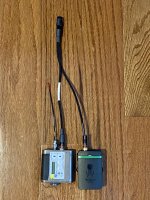
IMG_5645.jpg
 
Roland

You can drop markers into both TX units simultaneously for future sync alignment. It's called "Manual Marker Drop." You set it up in Rode Central. Now whether these make it through on the Rode Central export and are readable by DAW or NLE software I'm not sure. Another question? When you do this does it insert some kind of a marker in the outgoing stream that can be identified in the camera's internal audio file?? Haven't ventured that far into it yet.

Chris Young

EDIT: Just received an email from Rode. New Rode Central and firmware for the Wireless Go II's. v1.2.3.

From Rode:

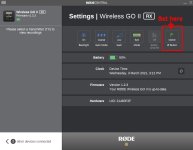
"Manual Marker Drop

In addition to the transmitters automatically dropping a marker in the audio file when a dropout is detected, you can manually drop a marker in your recording at any time via the receiver. This feature can be enabled in RØDE Central by toggling the 'Ø Button' to 'Marker' in the receiver settings. Now when you click the power button on the receiver while recording, a marker will be placed in the audio file."


Rode grab.jpg
 
Last edited:
Chris,

Back in post 113 where I first mentioned this sync problem I referred to the use of markers, which seemed like an option to aid syncing, and how they didn't then show up in my software (Vegas Pro, Reaper, Soundforge). This applies with the new firmware (1.2.3) too. May be others have had more luck, but I haven't heard of anyone managing this.

The new firmware doesn't make any difference to the starting or ending of the TX recordings by use of the RX on/off: i.e. this still doesn't stop or start the two recordings simultaneously. I didn't expect it would, not least given Rode's change of naming from 'stereo' to 'split' in the previous (i.e. second) release of Rode Central.

Incidentally, do you actually have a Rode Wireless GO ii?

Cheers,

Roland
 
In terms of the new firmware (v1.2.3) otherwise, I have just been testing this against the various bugs:

1. Broadcast/uncompressed recording length: these can now be exported beyond the 7'14" length that was only possible previously. I've only tested for 14 mins so far, but this was fine. I'll let it run for much long soon and report back, but it is hard to imagine that it isn't fixed.

2. Broadcast/uncompressed recording stopping when signal is lost: this is now fixed and performs like the uncompressed recording did. That is, I tested with the signal completely dropped out for 1 minute and the TX unit continued recording unbroken. Despite Chris's comments above, this was a) reasonable to expect and b) essential

3. Some broadcast/uncompressed recordings not being made: this intermittent (but fairly frequent) problem, usually affecting one TX unit at random, seems to have been fixed, but I have to date only made 10 recordings with the new firmware. I'll update this post when I have more recordings. EDIT: I have now tested 40 (very short) recordings with no failures to record.

So good news: a great improvement, and it looks as if we have the three initial bug fixes required.

Cheers,

Roland
 
Last edited:
Great to find this thread as I've just got a WG2 and was testing over the weekend and like others have found lots of problems (missing recordings, recordings stopping when out of range, corrupt recording).

Hopefully these issues have been fixed with the latest update so will run some more tests.

However one issue I've got is that the marker function isn't working properly.
I've just tried making a recording and adding a manual marker (with the latest firmware) and even on the RC app the marker didn't appear.

Is anyone else finding this?
 
I can see the marker in Rode Central, but, as I have already reported, I can't get it into any other software.

Cheers,

Roland
 
In terms of the new firmware (v1.2.3) otherwise, I have just been testing this against the various bugs:

1. Broadcast/uncompressed recording length: these can now be exported beyond the 7'14" length that was only possible previously. I've only tested for 14 mins so far, but this was fine. I'll let it run for much long soon and report back, but it is hard to imagine that it isn't fixed.

2. Broadcast/uncompressed recording stopping when signal is lost: this is now fixed and performs like the uncompressed recording did. That is, I tested with the signal completely dropped out for 1 minute and the TX unit continued recording unbroken. Despite Chris's comments above, this was a) reasonable to expect and b) essential

3. Some broadcast/uncompressed recordings not being made: this intermittent (but fairly frequent) problem, usually affecting one TX unit at random, seems to have been fixed, but I have to date only made 10 recordings with the new firmware. I'll update this post when I have more recordings. EDIT: I have now tested 40 (very short) recordings with no failures to record.

So good news: a great improvement, and it looks as if we have the three initial bug fixes required.

Cheers,

Roland


By way of an update, I have now done a much longer TX internal uncompressed recording with the new firmware, of 1hr 3mins: this also recorded fine, but divided the recording into three files - two of 30mins 44secs, and one of the remaining minute or so. The compressed mode (I ran one TX in each mode) produced a single file for the entire 1hr 3mins. Given the slow speed of the Wireless GO ii's USB transfer, the breaking up of long uncompressed recordings*into chunks (which equate to 259,356KB) seems OK.

Cheers,

Roland
 
Last edited:
Back
Top