Rode Wireless Go II

I purchased the Rode Wireless GO II, as I did the original version, with no remote intention of using either on a professional set (as I set out in my blog post with the tests): I can't imagine why anyone would conceive of that, but I take the point that we live in strange times.

But still it's extraordinarily useful for many (non-critical) things I have coming up, including one where I am filming a river from source to the sea and need to cut in stereo audio to match the (low and slow) drone view - shouldn't take many helium balloons to lift 64g of the two TX units into the air to get a silent airborne spaced pair. Wouldn't fancy doing that with the weight and cost of Audio Ltd. or Lectrosonics units!

Cheers,

Roland
 
Rode have just issued an updated version of their PC/Mac software (Rode Central). The only visible and, indeed, stated change is that the 'Mono' and 'Stereo' recording modes are now called 'Merged' and 'Split'. I hope this doesn't mean that Rode is sidestepping the issue of how to sync the two TX unit on-board recordings if you want these perfectly aligned for stereo!

Cheers,

Roland
 
Wifi does have a feature called TimeSync that can synchronize wifi elements down to less that a microsecond, so it seems it is possible to do proper synchronization. I'm guessing that's what Deity and others use for their timecode capability.
 
The biggest functionality issues I have found so far - and not covered in my testing posted yesterday (i.e. https://drbadphil.com/testing-the-new-rode-wireless-go-ii) are:

i. No ability on the RX unit to stop or start internal recording in the TX units. This might seem trivial, given that the TX recorders roll round and start again once the 7 hrs (for WAV files) memory is full, except that it is otherwise extremely difficult to sync the two TX recordings if you - say - want correctly aligned stereo. Turning the RX on or off as a means of starting recording doesn't - in my experience - start and stop the TX recordings simultaneously. So to get the stereo recordings off my TX units properly aligned, I had to do this manually using the recordings from the RX unit as the guide. Even adding a marker didn't help: this doesn't show up in my audio software (Reaper and Soundforge) - not sure it shows up in anything.

ii. Occasional failure of a TX unit to record. This is despite both being set to record (via the PC software) and recording icons showing up on the RX unit. So far, out of 19 recording sessions, each TX unit has failed to record one session. Obviously, if more prevalent this would be a concern (it rather undermines peace of mind from a TX back-up recording), so it will be interesting to see if others get the same problem (equally, if they don't). I'll also continue to monitor the situation with my recordings.

I've messaged Rode about both and suspect both are addressable via firmware: I'll provide an update if they come back with anything useful.

Otherwise, very pleased!

Cheers,

Roland

And a new bug others noted (e.g. https://www.youtube.com/watch?v=IpNDoL-nJWo at 7'10"), and which I can confirm through testing is that when exporting the uncompressed files using the Rode Central software, the maximum length of the file is 7'14". The full file can be seen on the TX units, but because it isn't a wav file (it is an .ugg file with an accompanying .egg file) it can't just be copied across, bypassing the Rode software. Obviously a bug with the latter, and hopefully it will be fixed soon. The compressed files are fine, but I don't want to be using MP3s!

Cheers,

Roland
 
Wifi does have a feature called TimeSync that can synchronize wifi elements down to less that a microsecond, so it seems it is possible to do proper synchronization. I'm guessing that's what Deity and others use for their timecode capability.

Thanks Paul. It'll be interesting to see if Rode tackle this (despite their rapid dropping of the word 'stereo' from the updated software!), although I'd settle for fixing the two main bugs first. Of course, auto-syncing in an NLE (natively, if the NLE has it, or with Pluraleyes etc.) would work for replacing video with audio with dropouts with the on-board recording, but not everyone has access to those without further expenditure. And, of course, this approach isn't so relevant if you were using the system for non-video purposes (e.g. ambience/nature recording).

Cheers,

Roland
 
Of course, auto-syncing in an NLE (natively, if the NLE has it, or with Pluraleyes etc.) would work for replacing video with audio with dropouts with the on-board recording, but not everyone has access to those without further expenditure.

The auto sync in FCP X is so good and so almost effortless to utilize. The only problem here is you would have a 7 hour timeline with just little snippets of video where you were actually rolling camera, which would be messy to deal with but not impossible.
That would be a killer feature request for Apple, have a checkbox to only sync audio where there is video with auto subclipping of the audio. That would make using the Røde effortless.
 
The auto sync in FCP X is so good and so almost effortless to utilize. The only problem here is you would have a 7 hour timeline with just little snippets of video where you were actually rolling camera, which would be messy to deal with but not impossible.
That would be a killer feature request for Apple, have a checkbox to only sync audio where there is video with auto subclipping of the audio. That would make using the Røde effortless.

It doesnt produce a single 7 hr file...!

R
 
So after some thought it seems this is a great and affordable little tool, but I think I would feel best about something like a 2nd Generation Sennheiser AVX that has true 32-bit float recording on the transmitter, XLR for a variety of mics, and stronger signal with max reliability.

Have there been any murmurs on an updated AVX line?
 
^Yes, I agree about the lack of start/stop recording, but happy to have it at all ;).. I also had one recording error on a TX unit. As you say, probably firmware fixable...
You can stop the recording on the TX units by selecting which mic you want to stop by using the "Link" button on the right of the RX. As you tap this button it will cycle through TX #1 and #2 with a little square outline box showing which TX you have selected. Once you have selected one of the TX units then press the Link button for three seconds and that will unlink the TX and it stops that TX recording. To relink reselect that TX by selecting it with the Link button. Now hold the link button for three seconds and RX will start to hunt for a pairing. This is indicated by the WiFi icon becoming animated. While that is cycling one press once on the ON/OFF button on the selected TX and wait a couple of seconds for the pairing to take place. If the internal recording is turned on via Rode Central then the RX will now indicate TX recording has restarted on the re-linked unit.

BTW, have rewired a couple of Sennheiser MKE2 mics I've had for years and will also confirm that they work very well with the Go II Wireless. Just a side note. Soldering on the Rode mic cables is like trying to solder Fairy Floss. Soldering on the MKE2 cables is like welding steel pipe. The difference in the strength of the internal cables between the two is quite obvious. The Sennheiser cable is one tough little piece of wire.

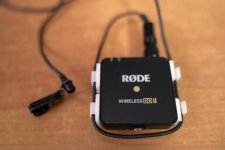
To overcome direct pulling on the non-locking jack plug I'm using this workaround. Not pretty but the TX units are out of sight when using a Lav mic so I thought what the heck! They are just small self-adhesive cable tidy clips from my local electronic store. For any Aussies on here that's the Jaycar chain of stores.

Chris Young

DSC00269.jpg
 
That doesn't seem like an easy way. Besides I've found with other wifi devices you don't want to keep breaking and trying re-establishing a connection. I thought based on the manual if you turned off the receiver the transmitter would stop recording. But either way if you have the talent doing multiple takes you don't want a long delay in between as you fiddle with your wireless system. I would use a clap board is leave obvious sound cues to indicate the takes. At some point there is diminishing returns trying to use it in a way it wasn't intended. The recording is a backup.
 
You can stop the recording on the TX units by selecting which mic you want to stop by using the "Link" button on the right of the RX. As you tap this button it will cycle through TX #1 and #2 with a little square outline box showing which TX you have selected. Once you have selected one of the TX units then press the Link button for three seconds and that will unlink the TX and it stops that TX recording. To relink reselect that TX by selecting it with the Link button. Now hold the link button for three seconds and RX will start to hunt for a pairing. This is indicated by the WiFi icon becoming animated. While that is cycling one press once on the ON/OFF button on the selected TX and wait a couple of seconds for the pairing to take place. If the internal recording is turned on via Rode Central then the RX will now indicate TX recording has restarted on the re-linked unit.

Hi Chris,

My original point (post 113) about the lack of ability on the RX to start-stop the TX recordings was about doing this so they started and stopped in perfect sync. The easiest way to start and stop both TX recordings is by turning on/off the RX unit: this is a lot simpler than what you describe!

Cheers,

Roland
 
I purchased the Rode Wireless GO II, as I did the original version, with no remote intention of using either on a professional set (as I set out in my blog post with the tests): I can't imagine why anyone would conceive of that, but I take the point that we live in strange times.

The Go would just be way so much more useful if it can be relied upon. The tiny form factor of the receiver and TRS output is screaming to be put on a gimbal (as seen in marketing materials). It could be really useful for my gallery exhibition long-take gimbal shoots.

And also useful for quick set-up audio situations with mirrorless cameras when I don't want to bother setting up more audio gear and/or recording dual system.

If the Go can cut the mustard even just at short-range, it'd be worth more than its weight in gold.
 
True my man but in all my years of shooting interviews how many times have I really had to turn off someone's mic. None that I can really recall as a must. If working with a soundie he would kill the sound on the mixer if it had to happen.

I can recall a number of times when it would have been advisable, highly advisable! Like when we have had presenters go to the John with their wireless still turned on. Or another occasion where a female interviewer was in the John with the producer, obviously another female, and hearing the interviewer bagging the c**p out of the interviewee. All of it going through the whole control room on a live show. Thank god for Ad breaks!

Chris Young
 
Hi Chris,

My original point (post 113) about the lack of ability on the RX to start-stop the TX recordings was about doing this so they started and stopped in perfect sync. The easiest way to start and stop both TX recordings is by turning on/off the RX unit: this is a lot simpler than what you describe!

Cheers,

Roland

Yes true Roland, but that kills both mics. Not so useful if you have just wrapped on a two-person interview and PTC at the side of a noisy football field. As the interviewee leaves the scene his mic can be killed quite quickly while the host/presenter continues his wrap to the camera with his channel still active and recording. Much as a soundie would kill the sound on his mixer from the interviewee mic as the interviewee left the field of view. No redundant sounds to be sorted through if using the TX recordings in post. I hate the idea of using the TX internal recording anyhow if the transmitted on-camera sound is good. External recoding is a back-up as far as I'm concerned unless it's TC locked 32-bit float as then it is superior to the camera's internal tracks. I've spent too many hours with Pluraleyes trying to sort out the mess people have made with Zoom recorders and their like in noisy environments when trying to lock together external unlocked, unsynced very long audio takes with a few hundred camera clips that only have ratty wind affected atmos mic audio as a sync guide... if you know what I mean.

Roland again, don't get me wrong. If I'm working with a soundie with a Sound Devices set-up or something similar recording externally with camera timecode locked recordings, well I'm all in for that. That's plain easy to work with. To me, that's where I can find perfect sync all the time. I've found even with perfect synced starts with unlocked recordings you will still end up with drift over time. Sometimes as much as a second or so over an hour. Just makes for a lot of work in post. That's part of the magic when Pluraleyes can work and works well is with unlocked sources is when the camera internal atmos recordings are good enough to be cross identified with the external recordings. Pluraleyes ability to recalculate for time sync drift is magic when it works. Then again I don't think I'd be using these little Rodents for any complex audio/video jobs that needed a lot of frame-accurate post sync work. They are just amazing for what they are. I already know of one op who is already using his Go II TXs purely as location ambient concealed placement mics to supplement the recordings of his location work. He just uses the Go II RX as a remote control on/off switch for the Rode TX units. Many uses for these little things.

Chris Young
 
@Roland. So I read your comments on Newsshooter, especially your conversation with Maddin. I tried his "microwave test", putting the TX unit in my microwave so it loses signal, and guess what -- the TX stops recording. This completely defeats the purpose of a backup recording function on a wireless unit. Is this a fixable bug or the real reason that Rode was able to "get around" Zaxcom's patent? Thoughts?

https://www.newsshooter.com/2021/03/02/rode-wireless-go-ii-export-issue-new-firmware/
 
OK,so I tested it again with compressed audio setting on the TX backup recording and it continued to record despite losing signal completely (in the microwave). But for some reason the backup recording icon on the RX turns off despite the fact that it's actually recording. Buggy...
 
That makes sense because the literature says it only records when the transmitter and receiver are connected. It’s designed for dropouts not as a stand alone digital recorder. Besides I can’t imagine you’d want it recording when the camera is no longer receiving audio.
 
That makes sense because the literature says it only records when the transmitter and receiver are connected. It’s designed for dropouts not as a stand alone digital recorder. Besides I can’t imagine you’d want it recording when the camera is no longer receiving audio.
Yes, but it would appear that the TX would stop recording (in uncompressed mode currently) in the event of a disconnect or extended dropout -- which is exactly what the backup recording function is designed to address, no? And why would it work in "compressed" mode and not "uncompressed" mode?
 
Last edited:
Yes true Roland, but that kills both mics.

Indeed, Chris, but that was what I was seeking: as I said, I'd like some way - such as turning on/off via the RX, an added control, or markers that make it through to a DAW/NLE - that allow sample-accurate sync of the two TX recordings for stereo. This may not happen and I can live with that. Yes, of course it can be useful to stop/mute individual channels from either end, as one can already.

Cheers,

Roland
 
Back
Top