Rigging the Fostex DC-R302 Mixer/Recorder Rigged for DSLR Work

TheDingo

Veteran
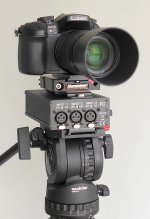
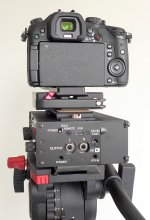
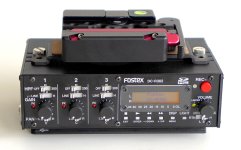
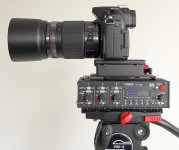
Here's how I rig my Fostex recorder with my GH3 when I shoot quick interviews. ( sans cables in these pictures )

XLR connections are in front, audio controls on the left side, RCA tape-out is fed to the GH3 mic-input. Sachtler tripod plate is on the bottom, with a Kessler Kwik release on top. I also use a Marshall 7 inch monitor that I'm currently mounting in the GH3 hot-shoe. So far this works quite well and gives a little extra weight to the camera. ( GH3 with lens is very light )
FostexDCR302A.jpg

FostexDCR302B.jpg

FostexDCR302C.jpg

FostexDCR302D.jpg
 
Looks like you have assembled a clumsy Video camera.
Many DSLR shooters in the city i'm from have given up on them and gone back to full video cameras rather than the 'hotch potch' of DSLR shooting.

My suggestion keep your Panasonic HMC-150 camera for shooting video and the DSLR for shooting stills.
 
Last edited:
My thoughts... Adding a longer plate might give you the ability to better balance your camera on the head when using longer glass.
 
Really ... a tool that tries to do everything usually ends up doing nothing very well. DSLRs are for stills, video cameras are for video.

Ok...so you re saying that all the great videos we ve seen since the beginning of the ''DSLR revolution" would have been better shot with a video camera? A small sensor HMC150 type video camera?
 
Ok...so you re saying that all the great videos we ve seen since the beginning of the ''DSLR revolution" would have been better shot with a video camera? A small sensor HMC150 type video camera?
Depends on what you mean by "better." The natures and priorities of still shooting and video shooting are different and it's difficult to optimize a tool to work equally well for both. Consider, for example, lens diaphragm settings - except for lenses where the diaphragm is adjusted from the camera controls (Nikon 'gelded' G-series lenses,etc) still lenses usually have rings with click stops and are calibrated in /f numbers while lenses expressly for cine use usually have detent-less diaphragm rings and are calibrated in t-stops.
 
Depends on what you mean by "better." The natures and priorities of still shooting and video shooting are different and it's difficult to optimize a tool to work equally well for both. Consider, for example, lens diaphragm settings - except for lenses where the diaphragm is adjusted from the camera controls (Nikon 'gelded' G-series lenses,etc) still lenses usually have rings with click stops and are calibrated in /f numbers while lenses expressly for cine use usually have detent-less diaphragm rings and are calibrated in t-stops.

Of course you re right about the technical differences between still and video shooting, but I think we re at a point where those differences are fading away. There are even cheap cine lenses in the market (samyangs) that offer very good quality for the price.
There are dozens of rigs and accessories optimized for DSLR video shooting and there are new ''video'' features on the latest DSLRs. I dont think its a coincidence that all the major manufacturers are getting in that 4K race with their DSLRs. I believe the small sensor cameras are slowly dying! And for those who can not afford an Alexa or an Epic or an F55 or even a C100...those DSLRs are the closest thing...just my opinion:)
 
If it works for you, then it works for you. Cool.

Question: How do you monitor audio, when the Fostex display is facing 90 degrees to your left? I would have thought you'd want to rotate the Fostex 90 degrees to your right so the display and adjustments would be easily accessible at a glance from the operator. It just seems odd that you would go through the effort to add a mixer, then not be able to see it or adjust it in use. So... I'd be interested in why you did it this way and whether your not this limits you.
 
Its interesting where all this NEW production is ending up....... YouTube / Vimeo? and most of it with CRAP audio.
How many of these shoots are to a standard that could 'actually' be broadcast? It may be fine to shoot in 4k but where will it be shown...mmmm. What the resolution of your local broadcast station?

I would much prefer people to back off the video wizardry and improve the audio.....
Here is a series of weekly video clips that I have been following for some time, have a look, interesting producton (and they think it's wonderful and others now are regarding this as the 'standard' to follow)

http://happymonday.net.au/episodes-46-52/episode-forty-seven-feat-alex/
 
Last edited:
Here is a series of weekly video clips that I have been following for some time, have a look, interesting production (and they think it's wonderful and others now are regarding this as the 'standard' to follow)

http://happymonday.net.au/episodes-46-52/episode-forty-seven-feat-alex/

Sigh... handheld shakey cam with lots of rolling shutter artifacts, and in-camera audio that hasn't had a lick of post processing (not that the audio can be saved, but it can certainly be improved -- and for that matter, the same goes for the video).

The OP here will easily exceed this. He's at least setting this system up on a tripod, and he's at least using a decent mixer. A decent mic properly placed and he'll just crush this clip. This is quite a good thing -- what's not to like?
 
Looks like you have assembled a clumsy Video camera.

Actually it works really well. I carry the Fostex with the Kessler QR as one unit in my audio case, and it snaps on to the tripod in a few seconds. Then I add the Kessler plate to my camera and this snaps into place in a few seconds. Once I've plugged in my audio cables and mounted a lens, it takes only a few moments to balance the rig and I'm ready to go.

Switching cameras takes less than 30 seconds. ( i.e. pull the audio cables, swap the cameras, reconnect the audio cables, and rebalance the rig )

I haven't used it handheld, as I think this would be too klunky for me and I perfer to use dual system sound with a UHF system for handheld work.

I also own a Sound Devices MixPre-D that could be used this way, but then I have to add an additional recorder to the mix if I want two simultaneous copies of my audio.

Originally I was interested in the Tascam DR-60, but the pots aren't continuous ( they are clickable switches ) and I feel the interface is overly complicated compared to the Fostex.

Since I've owned my first GH2 camera, I've used the HMC-150 for about 10 percent of my work, which is usually for live event work. The GH3 image quality leaves the HMC-150 in the dust, which is why I plan on upgrading it to the new PX270 this summer. ( my work is interview/educational and my camera is on sticks most of the time )
 
Really ... a tool that tries to do everything usually ends up doing nothing very well. DSLRs are for stills, video cameras are for video.

I would put more faith in the operator than I would the equipment...

Shane Carruth's UpStream Color blew me away when I saw it on the big screen at the Bell Light Box Theatre in Toronto, and this was shot on the very limited little GH2 camera.

When I look at some of the initial videos shot with the new GH4, a few are quite breathtaking, and would require at least a Canon C100 to duplicate with a "video camera".
 
Question: How do you monitor audio, when the Fostex display is facing 90 degrees to your left? I would have thought you'd want to rotate the Fostex 90 degrees to your right so the display and adjustments would be easily accessible at a glance from the operator. It just seems odd that you would go through the effort to add a mixer, then not be able to see it or adjust it in use. So... I'd be interested in why you did it this way and whether your not this limits you.

I usually stand beside my camera and not behind it when conducting interviews, as people seem more relaxed when the camera isn't between me and them. ( talking to them with my head crunched down to the EVF is a big no-no for me )

Occasionally I have another person monitor the audio using the Fostex headphone jack ( while I have my headphones plugged directly into the camera ), and it's easier for them to work beside the camera while I stand behind. ( I also prefer to have the XLR cables out the front instead of the side of the camera, as I find it easier to keep them out of the way )
 
I would much prefer people to back off the video wizardry and improve the audio...

Totally agree with this, but you need good basic gear to get half-decent sound, and you have to know how to use it.

Here is a series of weekly video clips that I have been following for some time, have a look, interesting producton (and they think it's wonderful and others now are regarding this as the 'standard' to follow) http://happymonday.net.au/episodes-46-52/episode-forty-seven-feat-alex/

...While this is fine for the web, I am not a fan of shaky-cam footage or audio where the person is mic'd from too far away so you get a lot of noise and less of the person you are interviewing. ( I know it's tough to properly mic somebody when you are working as a one-man-band )
 
You know it's not really about the equipment. That clip would be garbage whatever they shot it on because there was no reason to ever have shot it and they had no clue about basic quality control.

DSLR's are just another tool. Used by pros you can get amazing results, used by idiots you get junk.

DSLR's have some limits but so does a video camera or a film camera. They used them on HOUSE when space was an issue and on UP IN THE AIR to shoot the wedding reception so they are capable in the right hands of great work.

In the first case they were used on a "video" show because the video cameras would not fit in the set. In the second they were cut with 35mm footage and were used because they could be shot by cameramen IN the shot and not be "visible" to the audience.
 
Its interesting where all this NEW production is ending up....... YouTube / Vimeo? and most of it with CRAP audio.
How many of these shoots are to a standard that could 'actually' be broadcast? It may be fine to shoot in 4k but where will it be shown...mmmm. What the resolution of your local broadcast station?

I would much prefer people to back off the video wizardry and improve the audio.....
Here is a series of weekly video clips that I have been following for some time, have a look, interesting producton (and they think it's wonderful and others now are regarding this as the 'standard' to follow)

http://happymonday.net.au/episodes-46-52/episode-forty-seven-feat-alex/


As others have already pointed, you can have CRAP audio no matter what camera or DSLR you re using...and the final delivery (web, tv, big screen) does not really matter...what matters is the image...and the audio ofcourse...:)
Your question about where 4K content will be shown reminds me the endless arguments even here in DVXuser, back in the DV-HDV days, where many people, including myself, had the opinion that HD is useless since there wasnt any HD delivery at the time! Now I know I was wrong. If we would be choosing gear according to our local broadcast stations, we would still be shooting mini-dv I guess:)
I cant understand what you mean by the link you posted...but I guess those videos would be awesome if shot with a DSLR...:violin: hahaha just kidding.
Personally I starded to be more ''serious'' about audio by using DSLRs. I guess their limitations forced me to consider ways to improve my audio. Im not saying that I finally have great audio...but I keep on trying:)
 
My suggestion keep your Panasonic HMC-150 camera for shooting video and the DSLR for shooting stills.
If Panasonic built the best of their modern technology into their pro camcorders I'd be happy to use them instead of DSLR's and audio field recorders. I've done video shoots both ways, and own a Panasonic AF100, as well as GH2 and Nikon D800 and D5100. I've got the AF100 rigged with a Manfrotto wired remote that shows me aperture and focus distance on-screen, along with the AF100's built-in waveform monitor. The built-in ND filters are a godsend. But in spite of those highly useful features, the AF100 is not good enough to suit my needs. How so? Here's where it falls short:

1. Lacks cinematic highlight detail. The harsh blowouts look like a cheap videocam, and you can't fix the gamma curve.
2. Lacks a high-quality codec. The unhackable, consumer-grade AVCHD encoder craps out on pans and full-screen movement.
3. Lacks sharp dynamic range. Even with an external recorder, AF100 image details are mediocre, barely even GH1 quality.
4. Lacks crucial pro-audio features. Two tracks limited to 16-bit 48K is inadequate for anything beyond one-on-one interviews.
5. Lacks flexible monitoring. LCD and viewfinder have limited adjustment range, require camera contact and close proximity.

To do better for less than $5000, my only option is to build a DSLR/field recorder rig. Is it worth the hassle? Consider:

1. Superb highlight detail. The GH2 looks great as-is. The Nikons have customizable gamma curves that do anything I want.
2. High-bitrate video encoders. GH2, D800, and D5100 can be hacked to capture as much motion picture detail as I can use.
3. Sharp and clean. GH2 is actually too sharp, but free of aliasing. Nikons have the best dynamic range, but aren't alias-free.
4. Total audio control. Zoom H6 records 4-6 tracks of 24-bit audio, outputs stereo mix for in-camera backup and sync tracks.
5. External monitoring. Compact HDMI monitor arm can angle in any direction, has its own headphone jack and focus assist.

For me, the drawbacks of a modular rig (no built-in ND filters) are outweighed by the gains in flexibility, backup tracks, and audio/video technical quality, not to mention the affordable cost of the gear. If Panasonic packaged the functionality of a GH4 and an H4n in a $5000 camcoder, I'd upgrade immediately, but in the meantime I'm rocking the DYI approach.
 
Last edited:
Back
Top