F55: Replicating CineEI mode in Custom Mode… S-Gamut3 included. ;)

Yeah Sam shoot some tests with slog3 in CineEI mode then try the LC709A LUT. As mentioned there is no proper LUT for slog3 in custom mode. Maybe if you crank saturation down after it might look ok...

Wish Sony kept it simple but god only knows the logic behind their madness.
 
You did the test at the begining of the thread did you not?

We see some differences on a chart.

Virtually everything I have shot (does anyone actually look at the footage section!) has been Slog3/Custom with LC709 and levels applied.

S
 
My tests didn't involve LUTS, my tests only look At base color gamut and slog combinations.

Sony only has two sets of LUTS is all I'm saying ;

Slog3.Sgamut3.cine

Slog2.SGamut (not 3. Not cine)

I've also used the wrong LUTS before when I wasn't up on all this Color space business.

Anyway I was just letting others know. :)
 
Ok this is a drop dead basic test and simple observations and you guys have way more experience with post than me so far on this camera.

Previously I thought that in CINE EI the presets were just different LUT's and the file was always recorded the same, but I just shot the same picture of a chart in CINE EI slog3 at 3200 preset and at 5600 preset in XAVC. Lighting remained around 2800K. When they come into catalyst browse or Resolve it sure looks like the original files are different and of course the 5600 is much warmer. That's before applying any LUT or anything.

I conclude from this that Cine EI is actually white balancing the underlying file with the preset white balances not just applying a different LUT. It looks like the LUT is always the same then.
If Sony is willing to change the file from 3200 to 5600 they should be able to make smaller Kelvin adjustments and green Magenta adjustments as well. I don't see why they don't.
Am I missing something here ?
 
Ok this is a drop dead basic test and simple observations and you guys have way more experience with post than me so far on this camera.3200 to 5600 they should be able to make smaller Kelvin adjustments and green Magenta adjustments as well. I don't see why they don't.
Am I missing something here ?

I don't think you are missing something.

S
 
Yes, This confirms what you said a few posts ago Morgan.

However, Can anyone confirm what happens in RAW - is the recording altered by use of a preset white balance or is it just metadata?
 
Last edited:
Ive not used the raw recorder It 'should' record the WB as meta and allow infinite lossless adjustment in post.. that is what raw is to me.

At 14bit 4000 levels, linear, you see there is a lot more space for different colour channels to be on different 'places' on the image.

S
 
Ok this is a drop dead basic test and simple observations and you guys have way more experience with post than me so far on this camera.

Previously I thought that in CINE EI the presets were just different LUT's and the file was always recorded the same, but I just shot the same picture of a chart in CINE EI slog3 at 3200 preset and at 5600 preset in XAVC. Lighting remained around 2800K. When they come into catalyst browse or Resolve it sure looks like the original files are different and of course the 5600 is much warmer. That's before applying any LUT or anything.

I conclude from this that Cine EI is actually white balancing the underlying file with the preset white balances not just applying a different LUT. It looks like the LUT is always the same then.
If Sony is willing to change the file from 3200 to 5600 they should be able to make smaller Kelvin adjustments and green Magenta adjustments as well. I don't see why they don't.

Yes Lenny, in CineEI mode whatever color temp preset you select gets recorded to the file. The Sony LUTs are not color temperature dependent so one Sony LUT works on any color temperature recorded. As you say no different LUTs are needed and when you download Sony's LUTs there is only one LUT per Look. Color temp doesn't matter.


Can anyone confirm what happens in RAW - is the recording altered by use of a preset white balance or is it just metadata?

As for what happens in RAW, I have the R5. It's sort of the same thing. You pick one of the three preset color temperatures and later on that's what you have in post. Of course you can change the color temperature later quite easily with Sony RAW viewer and Catalyst. Now while it WORKS like metadata you are just changing there is no way for any of us to know for certain if the color temp preset in RAW mode actually affects what gets recorded or is just affecting metadata. Canon did some weird thing where color temp gets baked into its RAW format.. so with Sony anything is possible.
 
Dennis thanks for doing this, jpg compression will probably muzz this up but I tried (Slog3) getting the EI image and overlaying it to the Custom image, then adding the 709LUT (which is quite steep and will exagerate difference)

The smaller colour areas within the main colour areas are the EI version - one may be able to see that there are minor differences in rendering of orange pink etc.

I would suggest those changes could be semi significant in terms of skin rendering.

S


View attachment 96644


Thanks for doing the overlays. I think your characterization of "semi-significant" is correct. For my purposes, the overlay confirms that the S-Log3 gamma in combination with the EI gamut or custom matrix (sgamut3.cine[like]) both lutted in Resolve with LC709A can be graded to the desired intent. Unfortunately, that applies only to the F55 at this point.

For those picky DP's there are always the hypergammas available for on-set monitoring and baking in perfect matrix settings and white balance. I don't think one needs to insist that S-Log's include that functionality. S-Logs are supposed to be graded.
 
'Semi significant' indeed

I think this test probably needs repeating (well it does for me) as the F55 may not match my FS7 (which I emperically thought was closer - but didnt test on a chart)

S
 
Thanks for doing the overlays. I think your characterization of "semi-significant" is correct. For my purposes, the overlay confirms that the S-Log3 gamma in combination with the EI gamut or custom matrix (sgamut3.cine[like]) both lutted in Resolve with LC709A can be graded to the desired intent. Unfortunately, that applies only to the F55 at this point.

For those picky DP's there are always the hypergammas available for on-set monitoring and baking in perfect matrix settings and white balance. I don't think one needs to insist that S-Log's include that functionality. S-Logs are supposed to be graded.

Sam for your overlay did you use the two different LC709 LUTs? Sorry to harp on it, but just checking.
 
Sam , you've been defying conventional thought and shooting slog3 in custom haven't you ?
Have you tried shooting charts in your set up vs cine EI and doing an overlay w those ?
 
Sam , you've been defying conventional thought and shooting slog3 in custom haven't you ?
Have you tried shooting charts in your set up vs cine EI and doing an overlay w those ?

Yep Ive been doing that entirely.. to get NR and wb and Slog, only loss.. luts :)

I had the two next to each other (custom and EI) and they looked 'similar' once I turned Matrix OFF - matrix clearly added saturation.

It was only a casual test. I didnt chart it.

Whatever the tech answer I find SlogCustom+LC709 lut a better place to start grading than HG - but then Im too lazy to investigate the billion options that HG/Matrix offer

S
 
I did a similar test but also took in account the slog2/sgamut color space from CineEI mode and then put the appropriate Sony LUT on top also to compare the final looks after LC709A was applied.

Below are the results and I included vectorscope as well.

What's interesting to me is that even though Sony provides different LC709A LUTs for the different gamma curve/color gamut the final result do not look similar at all.

CineEI Mode slog3/sgamut3.cine with Sony slog3/s.gamut3.cine to LC709A LUT
cine_EI-slog3sgamut3cine_zps2cfirztt-2.jpg


Custom Mode slog3/sgamut3.cine Like with Sony slog3/s.gamut3.cine to LC709A LUT
custommode-slog3sgamut3cine_Like_zpsonp7h3zr.jpg


CineEI Mode slog2/sgamut with Sony slog2/sgamut to LC709A LUT
cine_EI-slog2sgamut_zpsggrraajl.jpg


Custom Mode slog2/sgamut with MatrixOff with Sony slog2/sgamut to LC709A LUT
custommode-slog2sgamut_Matrix_Off_zpsnn9num8r.jpg
 
Last edited:
Dennis - from what I see the Slog3 Cine EI and Custom tests look pretty much identical, but the Slog 2 tests are different. is that correct?
Also on the Slog 2 ( I'm not familiar with it - is slog2/gamut a color space or a a gamma? Confused about what gamma was used for Slog 2 tests.
 
Yes the slog3 in s.gamut3.cine color space between modes are very close and would be easy to match with maybe some small tweaks (but ONLY available to do this on the F55 unfortunately). The slog2 tests would be a lot more work to match.

Gamma means; slog2, slog3, HG7, linear, etc.. (the curve applied to the signal)

Color space is; S.Gamut3, S.Gamut3.Cine, S.Gamut. REC-2020, REC709, etc..

On the FS7, F5 and F55 in custom mode you can select your gamma (slog 2 or 3) and the color space is defaulted to "s.gamut". So for my slog2 test I did custom mode slog2 gamma with the default color space (S.Gamut) and MATRIX off to see how well it would match slog2 with s.gamut in CineEI mode which is an option under the "color space" menu in CineEI.

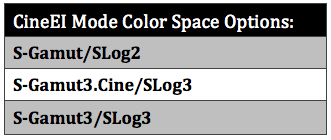
If you take a look at my article on DVINFO.net there are some tables which summarize the combination of gammas and color space that are possible in the stock camera.

Table-CineEI-Mode-Color-Space-Options.png


You can select any one of these in CineEI mode so my slog2 tests shows that between modes the color doesn't match at all. So that leaves the bigger question what the hell color space or color processing is going on in Custom mode even with everything under MATRIX turned off?

It means if you shoot in Custom Mode you can expect this hyper-coloring which in my opinion can make the final image look very videoy.

I hope this makes more sense, sorry if this whole thing was confusing.
 
Last edited:
Back
Top