andrearusky
New member
Help!
I have a problem with the playback (and edit) of the 7D footage:
I have a weird horizontal line flickering and splitting the video into 2 halves
Here I recreated the effect in photoshop so you can understand better what I am talking about:
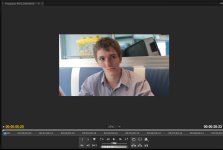
It's always visible no matter render or not. No matter what's the size (scaling) of the Program Monitor Window, no matter what's the Playback Resolution (Full, 1/2 or 1/4)
Actually, this playback issue is visible also if I playback the movies with quicktime player.
My configuration is:
Window 7 64bit/Adobe Premiere Pro CS5 (5.0.3)
NVIDIA GeForce GTX 470 - Drivers Version 8.17.12.6658 (Driver date: 1/7/2011)
Processor i7 930
RAM 12 GB
Internal SATA RAID 0 (1TB + 1TB)
Monitors: DELL 2407WFP + ViewSonic VA2026w
But I don't think it's a monitor/cable issue, because if I connect another machine and playback these canon 7D videos, the playback is OK, no lines no flicker..
Any ideas ?
I have a problem with the playback (and edit) of the 7D footage:
I have a weird horizontal line flickering and splitting the video into 2 halves
Here I recreated the effect in photoshop so you can understand better what I am talking about:
It's always visible no matter render or not. No matter what's the size (scaling) of the Program Monitor Window, no matter what's the Playback Resolution (Full, 1/2 or 1/4)
Actually, this playback issue is visible also if I playback the movies with quicktime player.
My configuration is:
Window 7 64bit/Adobe Premiere Pro CS5 (5.0.3)
NVIDIA GeForce GTX 470 - Drivers Version 8.17.12.6658 (Driver date: 1/7/2011)
Processor i7 930
RAM 12 GB
Internal SATA RAID 0 (1TB + 1TB)
Monitors: DELL 2407WFP + ViewSonic VA2026w
But I don't think it's a monitor/cable issue, because if I connect another machine and playback these canon 7D videos, the playback is OK, no lines no flicker..
Any ideas ?