
Navigation
Install the app
How to install the app on iOS
Follow along with the video below to see how to install our site as a web app on your home screen.
Note: This feature may not be available in some browsers.
More options
You are using an out of date browser. It may not display this or other websites correctly.
You should upgrade or use an alternative browser.
You should upgrade or use an alternative browser.
Redsharknews: iMac Retina 5K - an editor's affordable dream machine - benchmark tests
- Thread starter Nicholas Natteau
- Start date
Nicholas Natteau
Veteran
Correct, but the conclusion of the article is quite interesting as well:
"What saving money with a powerful iMac with Retina 5K display does is gives you a fast machine to edit HD via Premiere Pro CC, Lightworks, Final Cut Pro X, and Avid, plus all the great graphics and animation apps, like Photoshop and After Effects. And with the money you saved not going the Mac Pro route, you can use it to buy software and even a new camera, too."
My limited budget doesn't allow me to afford a much more powerful macpro. So this could be a great solution for me as I also work a lot with graphics.
"What saving money with a powerful iMac with Retina 5K display does is gives you a fast machine to edit HD via Premiere Pro CC, Lightworks, Final Cut Pro X, and Avid, plus all the great graphics and animation apps, like Photoshop and After Effects. And with the money you saved not going the Mac Pro route, you can use it to buy software and even a new camera, too."
My limited budget doesn't allow me to afford a much more powerful macpro. So this could be a great solution for me as I also work a lot with graphics.
Last edited:
filmguy123
Veteran
the price to performance differential on the LOW END Mac Pro/High End Retina (considering the display the retina comes with) is pretty dang good!
For a lot of people who edit on the lower end (i.e. not effects heavy RED footage, but AVCHD footage and standard edits) the Retina iMac is going to be a go to machine.
I'm a Mac guy but still on a homebuilt PC for editing for the price to performance ratio.
Retina iMac is a great product and super impressive display. Looking forward to Apple launching the display as a standalone Cinema Display.
For a lot of people who edit on the lower end (i.e. not effects heavy RED footage, but AVCHD footage and standard edits) the Retina iMac is going to be a go to machine.
I'm a Mac guy but still on a homebuilt PC for editing for the price to performance ratio.
Retina iMac is a great product and super impressive display. Looking forward to Apple launching the display as a standalone Cinema Display.

Thomas Smet
Veteran
Now that Intel has desktop class 6 core and 8 core CPU's it is really sad that Apple will not use them in the iMac. Of course 6 core desktop class CPUs have been around for a long time. There is technically little reason why Apple couldn't have an 8 core iMac. They likely don't for power usage reasons and to make the MP stand out a bit more.
I would also consider holding off on this version of the retina iMac and wait for a faster GPU on the next version. Typically when Apple has made the shift to retina versions of its devices it has done so with a slight hit in GPU performance. While the new GPU is without a doubt faster then the GT780 I doubt it is 4x faster. As we continue to move into a GPU focused world I have my concerns that the current retina GPU will eventually show its age.
Another concern I have is the lack of CUDA support on the new iMac. Of course that is also an issue with the new MP systems which is one thing that has put me off those systems. CUDA will eventually lose any advnatage it has over OpenCL but OpenCL isn't there yet. There are still certain applications that make better use or exclusive use of CUDA and I have a hard time investing in a new system that doesn't have an Nvidia GPU until OpenCL is embraced 100% in the industry.
That article mainly focused on CPU synthetic benchmarks which are now such an old school way to measure a computers performance. Most Apple software and most of the Adobe applications now make great use of the GPU. Lets not forget to look at how that new AMD GPU will stand up to what we content creators will throw at it.
I would also consider holding off on this version of the retina iMac and wait for a faster GPU on the next version. Typically when Apple has made the shift to retina versions of its devices it has done so with a slight hit in GPU performance. While the new GPU is without a doubt faster then the GT780 I doubt it is 4x faster. As we continue to move into a GPU focused world I have my concerns that the current retina GPU will eventually show its age.
Another concern I have is the lack of CUDA support on the new iMac. Of course that is also an issue with the new MP systems which is one thing that has put me off those systems. CUDA will eventually lose any advnatage it has over OpenCL but OpenCL isn't there yet. There are still certain applications that make better use or exclusive use of CUDA and I have a hard time investing in a new system that doesn't have an Nvidia GPU until OpenCL is embraced 100% in the industry.
That article mainly focused on CPU synthetic benchmarks which are now such an old school way to measure a computers performance. Most Apple software and most of the Adobe applications now make great use of the GPU. Lets not forget to look at how that new AMD GPU will stand up to what we content creators will throw at it.

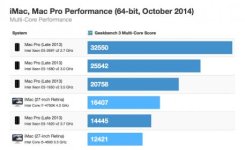
Multi-core perfomance still far behind the Mac Pro.
But you are comparing the highest priced MacPro ($8,000+) to the iMac which maxes out about $3499.
The iMac compares favorably with the fast 6-core MacPro at about $4300, and beats it in single core performance.
Thomas Smet
Veteran
But you are comparing the highest priced MacPro ($8,000+) to the iMac which maxes out about $3499.
The iMac compares favorably with the fast 6-core MacPro at about $4300, and beats it in single core performance.
And how many single core apps are you using these days that need 4.0ghz?
You are also making the mistake of only looking at a CPU score and not taking into consideration the 4x GPU performance of that 6 core MP. Most of the software we use now will make much more use of that extra GPU power than it would a 13% CPU boost.
And how many single core apps are you using these days that need 4.0ghz?
You are also making the mistake of only looking at a CPU score and not taking into consideration the 4x GPU performance of that 6 core MP. Most of the software we use now will make much more use of that extra GPU power than it would a 13% CPU boost.
I was comparing CPU only. I know FCP X is GPU accelerated, but nearly all the Adobe GPU accelerated software is Nvidia card specific, and AMD chips populate the MacPro 2013.
What other software are you referring to is AMD GPU accelerated, rather than Open CL specific and AMD based?


Thomas Smet
Veteran
I was comparing CPU only. I know FCP X is GPU accelerated, but nearly all the Adobe GPU accelerated software is Nvidia card specific, and AMD chips populate the MacPro 2013.
What other software are you referring to is AMD GPU accelerated, rather than Open CL specific and AMD based?
Premiere CC has worked with OpenCL since 2011. Used it on my 2011 17" MBP. A lot of the Adobe software now works with OpenCL and is no longer Nvidia specific. Even Davinci Resolve now uses OpenCL. But yes you are correct that there are still programs and plugins that use CUDA only. This is why unfortunately if you need CUDA buying a Mac is now a really bad idea. the CUDA future on a Mac is now pretty much dead. Which means the future of CUDA in general could now be pretty much dead. Considering OpenCL works on Nvidia cards it is only a matter of time before developers stop catering to CUDA and embrace OpenCL. The future is OpenCL. If you need it now however you are SOL on the Mac side.
Still those benchmarks look amazing until one factors in that difference is only 13% faster than the base 4 core MP. That isn't a huge amount in the daily reality of actually getting work done. In fact I doubt many could even tell the difference in day to day operations and renders will only get finished a tiny bit faster. I'm talking shaving off a couple of minutes maybe. the MP offers so many other things like 3 separate thunderbolt buses if you plan on using a couple of different thunderbolt devices. The single thunderbolt bus on the iMac can get saturated pretty fast for a serious 4k editor. Considering most of the software like FCPX or Premiere CC does work with OpenCL the MB should see a GPU advantage as well for a 4K editor.
Single core applications have a large advantage but most of the single threaded applications we have left don't always need a lot of power. There may be a few special case functions like some filters in Photoshop that are still single threaded but for the most part an editor is likely never going to experience the single thread performance advantage. Even if they do use Photoshop a lot they are likely not doing huge print projects which is where the filters can struggle a bit.
Nicholas Natteau
Veteran
Thank you all very much for your feedback.
Quick question: How much faster is a maxed out iMac Retina 5K likely to be than my current 2012 iMac that has these specs?
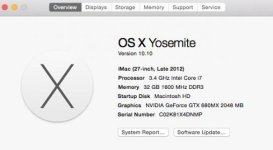
And would I see a noticeable performance improvement in programs like Premiere Pro and After Effects by upgrading from those current specs to a maxed out iMac Retina 5K with these specs?
Or would I see no improvement at all?
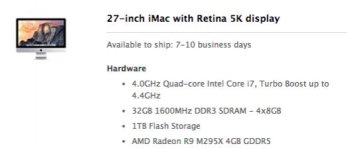
Quick question: How much faster is a maxed out iMac Retina 5K likely to be than my current 2012 iMac that has these specs?
And would I see a noticeable performance improvement in programs like Premiere Pro and After Effects by upgrading from those current specs to a maxed out iMac Retina 5K with these specs?
Or would I see no improvement at all?
Last edited:
Thomas Smet
Veteran
I have that same same 2012 iMac. Would you see an improvement? yes of course you would. By how much is really the question here. Is an 18% difference measurable to you? Some people think that is a lot. I tend to think it isn't a lot in real world usage. You would rarely if ever notice the difference. Rendering may be 18% faster but that isn't a lot really. A render that takes 120 minutes would take about an extra twenty minutes on the 2012 iMac. Is that a lot to you? Does your business depend on getting that 2:20 render done in 2:00?
Will the GPU be better than what you currently have? That is hard to say really. Yes the GPU is faster but it is also driving 4x the amount of pixels so performance may actually go down a bit. Hard to say until we see some real world usage. Don't just look at synthetic benchmarks but how it actually affects day to day work.
All software works different and sometimes a CPU and GPU will have a different reaction to a piece of software. For example a particular program may actually see an 18% increase in performance while another program may only see a 10% increase. This is why synthetic benchmarks are a bit flawed. It only gives us a snapshot of what that CPU or GPU could in theory be capable of doing. The reality is that it fluctuates. It is really about ratios and you have to look at what software you currently use and find out if a new system actually helps with that software. I have seen GPU benchmarks show a particular GPU to be 2x faster than another one but in Apple Motion the playback framerate only went from 27fps to 29fps. Clearly it wasn't 2x faster in this situation.
What will the new iMac give you? A darn good looking screen and maybe a tiny bump in CPU performance but maybe a tiny drop in GPU performance. I would wait to see just how well specific software works with the new iMac before suggesting anybody buy one. Personally I am waiting for the generation 2 version that will hopefully have a much higher GPU or use one of the new Intel 6 core or 8 core CPUs.
Will the GPU be better than what you currently have? That is hard to say really. Yes the GPU is faster but it is also driving 4x the amount of pixels so performance may actually go down a bit. Hard to say until we see some real world usage. Don't just look at synthetic benchmarks but how it actually affects day to day work.
All software works different and sometimes a CPU and GPU will have a different reaction to a piece of software. For example a particular program may actually see an 18% increase in performance while another program may only see a 10% increase. This is why synthetic benchmarks are a bit flawed. It only gives us a snapshot of what that CPU or GPU could in theory be capable of doing. The reality is that it fluctuates. It is really about ratios and you have to look at what software you currently use and find out if a new system actually helps with that software. I have seen GPU benchmarks show a particular GPU to be 2x faster than another one but in Apple Motion the playback framerate only went from 27fps to 29fps. Clearly it wasn't 2x faster in this situation.
What will the new iMac give you? A darn good looking screen and maybe a tiny bump in CPU performance but maybe a tiny drop in GPU performance. I would wait to see just how well specific software works with the new iMac before suggesting anybody buy one. Personally I am waiting for the generation 2 version that will hopefully have a much higher GPU or use one of the new Intel 6 core or 8 core CPUs.

joe1946
Veteran
I agree, the 5K iMac is a bargain since it's the same price as the 27" Dell 5K monitor alone. I use a 28" 4K UHD Dell and 39" Seiki 4K UHD TV as monitors for my 6-core Mac Pro and I scale the desktop to make the text larger when browsing.Correct, but the conclusion of the article is quite interesting as well:
"What saving money with a powerful iMac with Retina 5K display does is gives you a fast machine to edit HD via Premiere Pro CC, Lightworks, Final Cut Pro X, and Avid, plus all the great graphics and animation apps, like Photoshop and After Effects. And with the money you saved not going the Mac Pro route, you can use it to buy software and even a new camera, too."
My limited budget doesn't allow me to afford a much more powerful macpro. So this could be a great solution for me as I also work a lot with graphics.
click here to view my 4K UHD desktop
screenshot of scaled 4K UHD desktop
Nicholas Natteau
Veteran
Thanks very much Thomas for taking the time to explain all of this. I completely agree that it would be wisest to wait for some real world tests.
So long as the iMac Retina is not a step backwards from my current iMac's performance in PPCC and AE, I'd happy. I work a lot with graphics, and being able to work on a much bigger retina screen really has me thrilled. But the last thing I'd want is to end up working on an iMac Retina that's actually slower than my current iMac just because it has to drive 4x the pixels. That would be a deal breaker for me. And I'd agree that next year's model will surely be even better performance wise.
So long as the iMac Retina is not a step backwards from my current iMac's performance in PPCC and AE, I'd happy. I work a lot with graphics, and being able to work on a much bigger retina screen really has me thrilled. But the last thing I'd want is to end up working on an iMac Retina that's actually slower than my current iMac just because it has to drive 4x the pixels. That would be a deal breaker for me. And I'd agree that next year's model will surely be even better performance wise.
Last edited:
Nicholas Natteau
Veteran
Hi joe, do you know what scale you have it set to in the scaled version?
Normally, you would see numbers in that window for scaling options as in 3840 x 2160, 1920 x 1080. But the window doesn't show numbers in the scaling options.
Normally, you would see numbers in that window for scaling options as in 3840 x 2160, 1920 x 1080. But the window doesn't show numbers in the scaling options.
Nicholas Natteau
Veteran
Some more detailed tests: skip to 8:50 to hear the tester's impressions of the iMac Retina running FCP X.
From what he's saying, FCP X was running quite well and that was with the lower end AMD R290 graphics card that has only 2GB of RAM
https://www.youtube.com/watch?v=8FU84dMvGXk
From what he's saying, FCP X was running quite well and that was with the lower end AMD R290 graphics card that has only 2GB of RAM
https://www.youtube.com/watch?v=8FU84dMvGXk
Thomas Smet
Veteran
Thats good to hear about the GPU. I'm sure it would be rare to find a process that will be slower on the retina iMac. I think it really comes down to how much value do you put on a 20% performance increase. It is a much tougher decision for you and I since we already have a top 2012 iMac that works exceptionally well for almost everything we throw at it. If it was showing its age I would reconsider but I'm still super happy with my iMac and don't really lose any sleep over the 10% - 20% difference in speed. The retina display could be great but having used retina on many devices now for awhile I can honestly say it is cool and looks great but it doesn't change what I do or how I work. The quality of my work is still the same. Don't get me wrong I do love retina but I don't find it a must in many situations.
joe1946
Veteran
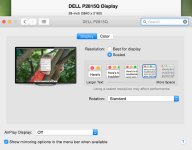
On my 4K UHD displays I set it to the second one from the right that is 6016x3384 scaled down to 3840x2160.Hi joe, do you know what scale you have it set to in the scaled version?
Normally, you would see numbers in that window for scaling options as in 3840 x 2160, 1920 x 1080. But the window doesn't show numbers in the scaling options.
Last edited:

Ran geekbench 3 on my Early 2009 mac pro and scored 14400. I know at least its cpu comparable to the currant e5-1620 mac pro. Im GPU'd up as well, so will hang on to this a bit longer.