I hooked up my camera to my Macbook Pro and copied and pasted the whole "No Name" drive. Using FCP 5.1.4 and the Panasonic P2 import function, I can successfully see and play the list of MXF files but I can't successfully transfer them. When I attempt to do so the circular arrow spins as if it's working but there is no action in the progress bar and, after a few seconds, it stops altogether and the exclamation point icon appears and it goes idle. Attempts to retry fail and unchecking the pulldown option in preferences has no effect. Same when trying directly from camera.

Navigation
Install the app
How to install the app on iOS
Follow along with the video below to see how to install our site as a web app on your home screen.
Note: This feature may not be available in some browsers.
More options
You are using an out of date browser. It may not display this or other websites correctly.
You should upgrade or use an alternative browser.
You should upgrade or use an alternative browser.
Red Exclamation Point of Death
- Thread starter adanac
- Start date
I read where FCP 5.1.4 does not work properly for some things (one post specifically mentions P2 Import failing in exactly the same way you describe) when using OSX 10.6 and up. Can't say for certain if this is your problem...
Anyway, first try some simple maintenance:
1. Run Disk Repair
2. Repair volume permissions (your computer)
3. Back up and trash FCP prefs (use Preference Manager of Final Cut Assistant to make this easier)
Failing that, use a 3rd party conversion software to transcode it to a codec 5.1.4 can import and edit easily. http://www.pavtube.com/hd-video-converter-mac/ - this software offers a free trial period, which is always nice. Google for other options.
This page describes using it in conjunction with P2 and Final Cut Express:
http://video-editor-share.com/?tag=convert-p2-mxf-to-fce
Failing that, buy FCPX.
Anyway, first try some simple maintenance:
1. Run Disk Repair
2. Repair volume permissions (your computer)
3. Back up and trash FCP prefs (use Preference Manager of Final Cut Assistant to make this easier)
Failing that, use a 3rd party conversion software to transcode it to a codec 5.1.4 can import and edit easily. http://www.pavtube.com/hd-video-converter-mac/ - this software offers a free trial period, which is always nice. Google for other options.
This page describes using it in conjunction with P2 and Final Cut Express:
http://video-editor-share.com/?tag=convert-p2-mxf-to-fce
Failing that, buy FCPX.
Last edited:

wgzn
Veteran
adanac, seriously man, all your failed transfer / capture posts are getting a bit tedious. ive sent you at least one PM asking you specific questions about your setup, as well as given you my personal email address. if you dont give us the info we need to help you, youre just gonna keep flailing in the wind...

chromeboy007
Well-known member
WRITE-PROTECT YOUR CARD.
COPY AND PAST, THEN IMPORT.
PLEASE!
You will be in business in no time! I have done it over a dozen times.
COPY AND PAST, THEN IMPORT.
PLEASE!
You will be in business in no time! I have done it over a dozen times.

videoatlanta
Well-known member
Importing straight into the edit from the camera is not advised.
Use P2CMS to off load and Verify your card media onto the computer.
Back up your card media.
THEN, L&T into the edit.
If you have a problem clip. Go to the camera and choose repair clip on the card.
Use P2CMS to off load and Verify your card media onto the computer.
Back up your card media.
THEN, L&T into the edit.
If you have a problem clip. Go to the camera and choose repair clip on the card.
Is that a guarantee? I just tried EXACTLY that and no luck.
WRITE-PROTECT YOUR CARD.
COPY AND PAST, THEN IMPORT.
PLEASE!
You will be in business in no time! I have done it over a dozen times.
Like it or not, that's the workflow. Many people have been using it for nearly six years. If it's not working, there are problems either with incompatible software (what's your OSX version?), with your hardware (never seen a corrupt P2 card, even at a news station using them hard, daily), or a misunderstanding in the process.
Try the third party transcode solution to get you working now.
For future projects, consider updating your software. OSX 10.7 + FCPX will run you less than $350... have you lost $350 of time and lost work already fighting with ancient software? Consider it.
Try the third party transcode solution to get you working now.
For future projects, consider updating your software. OSX 10.7 + FCPX will run you less than $350... have you lost $350 of time and lost work already fighting with ancient software? Consider it.
chromeboy007
Well-known member
Is that a guarantee? I just tried EXACTLY that and no luck.
Did you manage to paste all the files into your hard drive? Where did the 'no luck' occur?
When I say import, I'm not talking about the P2 import thing. I'm talking about the straight up Import -> Folder (or Files if you want to import them individually). Like you are importing any other folder. Do not use Import -> Panasonic P2. It doesn't work.
Last edited:
chromeboy007
Well-known member
See this screen shot:
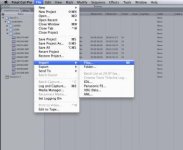
The only draw back is that you will have to resync the audio with the video. But on the plus side, the video files are natively compatible, so no transcoding needed like FCP 6 or 7.
The only draw back is that you will have to resync the audio with the video. But on the plus side, the video files are natively compatible, so no transcoding needed like FCP 6 or 7.
chromeboy007
Well-known member
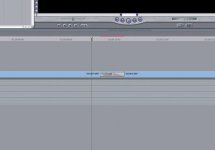
screen shot: MXF timeline colour is grey:
groveChuck
U-matic Member
Truth.Like it or not, that's the workflow
Good question that hasn't been asked yet.Many people have been using it for nearly six years. If it's not working, there are problems either with incompatible software (what's your OSX version?)
Unlikely, but possiblewith your hardware (never seen a corrupt P2 card, even at a news station using them hard, daily)
Certainly... possibleor a misunderstanding in the process.
Should work, but in this case (obviously) there are no guarantees.Try the third party transcode solution to get you working now.
Brilliant! A current OS and NLE version! Why didn't I think of that? Or why not try it now, on this project???For future projects, consider updating your software. OSX 10.7 + FCPX will run you less than $350... have you lost $350 of time and lost work already fighting with ancient software? Consider it.