Recording Voice Over - What gear to buy.

tokun1

Well-known member
Hello Group!

I'm looking to start recording voice over directly into my computer (using FCPX or Audacity). I have a Sennheiser MK66 mic, but I need an XLR to USB adapter (I think that's what I need) so that I can record right into the computer/software. Any suggestions on what to buy or what I need would be most appreciated!

Thanks!
 
Hi Paul, thanks for the reply, that's great, however, is there a cheaper option, just to run the mic straight into the computer then edit/adjust in post audio?
 
A cheaper solution would have been to buy a mic that has a USB interface built-in so that you don't need the adapter. You can look into those and see if you want to go that way. https://www.sweetwater.com/insync/usb-microphone-buying-guide-2/

But if you want to use the Sennheiser, then you need to have the adapter. It has a mic preamp and a analog to digital converter that is needed to digitize the analog signal into something suitable for the USB interface.
 
Be sure that you have a solid mic stand with a shock mount.

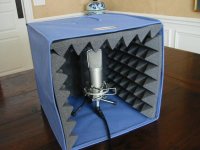
V.O. is usually pretty dry, so you may want to consider some sound treatment to cut down on the room ambience. Something like this may be helpful.

Soundproof-Booth-Portable4.jpg

A closet full of clothes can do the job, too.


You also need to know how to "work" the mic for that nice V.O. sound.

Most important is the performance of the V.O. - the tonal quality of the voice, the pacing and the delivery.


And remember - not everyone is Don LaFontaine.
 
Yes, I'm taking the plunge into the v.o. world, that's great advice, do you have a mic preference? thanks Bob!
 
I use the RØDE NT1A with a Focusrite Scarlett 18i8 interface and Genelec studio monitors.

The RØDE NT-USB is similar to the NT1A (not quite as good, but a very usable VO mic) that connects straight to a computer. It also has a built-in 1/8” stereo headphone jack that can monitor direct from the mic, from the computer, or a mix of both. It also comes with a pop screen.

A good USB mic can be a decent way to jump into VO recording, but I highly recommend using a traditional mic with a USB interface (like even the most basic Focusrite Scarlett) because it gives you something else that can be very helpful: outputs for studio monitors. Yeah, that’s another thing to have to buy, but your computer’s built-in speakers (if you have them, such as with an iMac or a MacBook) aren’t going to give you much in the way of accurate or even useful monitoring. Multimedia speakers won’t cut it, either.

And headphone monitoring is very misleading when it comes to processing and mixing audio. Great for listening during recording, terrible for mixing.

My suggestion would be:

RØDE NT1A (comes with shockmount and pop screen)
Focusrite Scarlett 2i2 (or Solo, if you want to cut a little cost)
A pair of JBL 305P mkII monitors
A sturdy mic stand.

There are some workable mics that are less expensive, like the Audio Technica AT2020, but they don’t all come with shock mounts and pop screens. By the time you buy the AT2020 and the additional shockmount and pop filter, you’re paying about the same as the NT1A.
 
+3 for FocusRite, Rode, and Audio Technica for best bang for buck.

Also helpful to learn EQ, dynamics, expander, noise gate, and compression. This will help you shape the sound for your voice+mic+room, including allowing you to record high quality VO at your desk while watching the video. Garageband, Logic X, Audition, Pro Tools all have good tools for VO. Reaper can work as well, though you might need to grab some free/low-cost VST plugins.

A good pair of headphones is useful for critical listening (and live monitoring while recording). You can spend a small amount of money on headphones which will outperform monitor speakers costing much more. There's even tech now to simulate speaker systems over headphones to aid in mixing from 2.0 to 5.1 to 11.2 etc. https://www.pro-tools-expert.com/ho...phones-the-headphone-monitor-plug-in-shootout . Tracker for even better realism: https://www.waves.com/hardware/nx-head-tracker

Hardware solution: https://www.kickstarter.com/projects/1959366850/realiser-a16-real-3d-audio-headphone-processor . I experienced the product (including the sampling of the ear canal) and spoke with the developers of this product at CanJam last year. It's probably the best simulator of any speaker/room to headphones (with a 3D tracker too) available. Not just my perception, people were taking off the headphones (HD800-S) and listening to the multi-speaker system and could not tell the difference! A good friend who does audio/music exclusively for a living uses the HD800-S and ordered the Realiser A16 (and mixes in a room built for mixing, using dampening material all over and with speakers in walls/ceiling etc.). While he has an excellent mixing room, he can't change the configuration (speakers in walls). So the Realiser will allow him more mixing flexibility.

I mix on low-cost Tannoy 501a's after selling much more expensive Mackie and Event monitors. The current model is the Tannoy 502, and while they do hiss a little (so do the 501a's), the sound quality and accuracy blew away much more expensive monitors when compared side-by-side (including for example Adam Audio, which look cool but didn't match the Tannoy's when demo'd). Process: mix on monitors, check on headphones, check on iPhone (speaker and headphones), and sometimes check on living room system (Yamaha RX-A3010 + Polk RT2000p speakers (+ matching center & rear/sides)).

Recommendations in order of increasing cost: Sony 7506, Audio Technica ATH-M50(x), Focal Listen (big jump in quality), and of course Stax (massive increase in quality over any dynamic headphones, including the Sennheiser HD800-S (which are very good!). Sennheiser Orpheus electrostatic sound better? Yes, but unless listening side-by-side it's hard to tell (+ $50K for the Orpheus)). You can get the Stax SRS-3100 from eBay (from Japan) for under $750, 3D printed adapter plates from: https://socas3d.com/products/socas-padmid-for-stax-l300-l500-l700 , earpads of your choice from Amazon (affects sound as well as comfort (I settled on felt with holes), and a Japan => US power converter (or appropriate one for your country), creating headphones which sound as good and comfortable as $3000+ electrostatic headphones. The more expensive electrostatics win the fashion award over the homely L-series Stax.

Could you mix on these for multichannel/3D projects? Possibly: https://www.audeze.com/products/mobius-series/mobius-headphone

VO is typically mono, though there could be opportunities with multichannel/3D/HRTF projects.
 
I don't think there are many who would endorse a ME66 as a voiceover microphone. The sound is tinny and harsh, and the narrow shotgun pattern makes it hard to handle in close-up VO work. Large-diaphragm dynamic (e.g. Electro-Voice RE20, Shure SM7b, Heil PR40) or condenser (Rode NT1, A-T 4040, or the sky's the limit with Neumanns and such) microphones are the standard in voiceover, broadcast and music studio vocal recording.

I'd get the mic, and room acoustics, sorted out before starting to worry too much about monitoring and processing.

- Greg
 
In my experience, which is having voiced just over 87K commercials and narrations over the last 40+ years of professional VO work, setting a mic on the hard surfaces at your desk and computer monitor while your computer is whirling away, is one of the worst positions for voice over work. But thats just my thoughts.
 
David, your cpu comment is mostly true. However, when I purchased a trashcan MacPro a few years ago, I was pleasantly surprised to find it is quiet enough to be able to record right next to it. My older MacPro towers were both quite noisy.

Best Regards,
Grant
 
SSD's make things much quieter that spinning hard drives these days.

But I still dislike having the hard surfaces right next to a mic.
 
SSD's make things much quieter that spinning hard drives these days.

But I still dislike having the hard surfaces right next to a mic.

Agree re: acoustically reflective surfaces near mics, including desks, monitors, and walls. Best acoustic space in my office is the green screen studio area (hanging cloth, foam pads, carpet, and other items to break up reflections, and have used it to record VO work using the Schoeps CMC641 boomed from above (female speakers)). In rush projects where I did the VO work, I did some at the video workstation desk and had to use EQ to deal with reflections / resonance. With something like a low sensitivity (relative to LDC) dynamic super-close mic'd for proximity effect (e.g. Shure SM7B with a pop guard), due to the massive signal to noise ratio, room effects are less of an issue. Watch a Joe Rogan or similar 'talk radio' style production with the SM7B pointed up on flat surfaces in a somewhat noisy space (including with computers around), and the results are good enough for YouTube:


Using an expander/noise-gate + EQ can make the SM7B in this situation sound more "VO" with character and less background noise (basically gone, without using NR).

For those on a budget and want the SM7B sound for < $100 with a bit of post EQ:


Note the SM57 and SM7B share the same basic diaphragm design (as does the SM58; different packages, costs, applications and 'filtering' (sound/color)).
http://blog.shure.com/faq-whats-the-difference-between-the-sm58-and-the-sm57/
https://blog.shure.com/whats-the-difference-between-shure-sm57-and-sm7b/ (SM7B is packaged for low-end response and also includes switches for tuning (vs. EQ in post))

Sometimes I'll pull out the SM57 or MXL R144 ribbon (both under $100) and compare with the higher end mics. Each mic colors/filters in its own way; it can save time getting a good mic matched for the performance vs. doing EQ in post. When there's more time to tune, EQ can really help dial in the sound, regardless of what mic was used.
 
I'm looking to start recording voice over directly into my computer (using FCPX or Audacity). I have a Sennheiser MK66 mic, but I need an XLR to USB adapter (I think that's what I need) so that I can record right into the computer/software. Any suggestions on what to buy or what I need would be most appreciated!

Do you expect to mostly be recording your own voice, just a few regulars, or anyone who comes into your studio? Mainly VO for corp/doc video, or also for adverts, radio, and such?

I ask because if you're just recording yourself, then you can get by with just one mic. Otherwise you might want to consider getting a couple/few different mics. Different voices are more easily (and more pleasingly) recorded with different mics.

Also, if you're talking about the Sennheiser ME66/K6, I don't know how well it will work. I had one of those 15+ years ago; sold it (not a fan of it). But for VO it might be OK with the right positioning and technique. And I see the Sennheiser MKH-416 used a lot for VO work. Sounds great with lots of voices, but requires a bit of careful placement & spacing to work well...not tons, but some. So anyway, perhaps you can make the ME66 work for you.

To dig deeper into choosing a (or a few) VO mics, check out these comparisions. If nothing else, they might help narrow down your search to just a few to demo.

What Is The Voice-over Microphone Everyone Should Own?
(From last year. Looks like a decent evaluation)
https://www.pro-tools-expert.com/ho...the-voice-over-microphone-everyone-should-own

The Transom Studio Mic Shootout: Blindfold Test
(From 2005, but pretty comprehensive and well done, though obviously missing a few of the latest low-cost mics)
https://transom.org/2005/transom-studio-mic-shootout/

As for a XLR-->USB adapter, I use a Focusrite Scarlett. Bought it seven or so years ago. Back then it really seemed to be a step ahead of other affordable USB audio interfaces. Scarlett's are still great, but looks (and sounds) like many competitors have caught up. The least-expensive Scarlett device looks to be $110. If you can only spend $40-$60, looks like there are a few options that are probably OK, though I can't vouch for them.

Here's a big-old list of the options from a reputable (and low-cost) online audio/music dealer:
https://www.sweetwater.com/c695--USB_Audio_Interfaces/low2high

Also, if you don't already have some, get some good headphones to wear while recording. So you can hear any bumps or other problems right away. I always prefer to mix on speakers, but use headphones when on the road and am in a hurry...however, that's for basic stuff and I'm familiar with how my usual headphones (Sony 7506) influence sound.

Well there's more info than you want. And it's ALWAYS easier to spend someone else's money. But bottom line is you can probably get something that'll get you going for under $60.

And as always, great techique as a VO artist and recording engineer will make up for not-top-line equipment. :-)
 
Great, thanks for all of the info JCS!

You're welcome! If you want to get started lowest cost, get this: https://www.amazon.com/Focusrite-Scarlett-Audio-Interface-Tools/dp/B01E6T56CM/ along with your MK66 and the audio filters available in FCPX and see how it sounds. For $50 more the 2-channel Scarlett is worth it in case you want to use two mics at once (or do mid-side, stereo, etc.) or easily switch recording between two mics without having to unplug/plug. You can also get some interesting effects by blending two mono mics to mono. You can get the MK66 mounted in such a way to avoid a pop guard, and as long as no reverberation issues, it can work perfectly fine and even sound "VO" with appropriate EQ/filtering in FCPX (Audacity can do sample level editing if you need it).
 
Back
Top