FS7: Recording bitrate confusion

tomk358

Well-known member
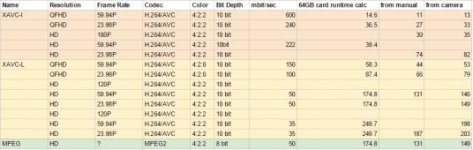
I'm trying to make myself a spreadsheet that shows codec, bit depth, color sampling, resolution, framerate, bit rate, and minutes of recording per 64gb card.

I started by looking for bitrates and doing the math to convert to mins/64gb card. I'm no mathematician, here's what I did:

for example: 600mbit/second times 60 seconds = 36000mbits/min
divide by 8192 (mbits in a gigabyte) and you get 4.394 GB/min
divide 64GB by 4.394 and you get 14.6minutes on a card.

That was working ok till I came to some modes where the bitrate isn't listed- like 1080p S&Q 180P in intra and 120P in long. Then I went and compared what I'd calculated to the numbers listed in the manual for record times, and they didn't match up so well. Their approximations were quite a bit lower than my math.

Finally, I gave up and put a blank 64gb card in the camera, and manually switched through the various codecs, resolutions, and frame rates.

This processes yielded a 3rd set of numbers, which were closer to my mathematically generated numbers, but still not matching. What gives?


I also noticed that some times switching codecs or resolutions required a full-reboot, while other times it didn't. If I had to guess it was when going from 4:2:2 color sampling to 4:2:0, but I couldn't confirm this, as I didn't find a list of exactly which codec/resolution ranges were 4:2:0.

What is more confusing is that when switching to S&Q mode, the record times didn't change, which I find suspect- you'd think S&Q would max out the bit-rate, or at least max it out for the given resolution...


Anyone have any experience with this?
 
Last edited:
I can't answer all of that, but a couple things I do know:

- Sony's math is conservative, intentionally. In practice, you'll get more.
- While I'm not absolute on this, I expect the cards have a a degree of error correction and self adjustment of available space. If and when sectors go bad, they're removed from usable space. Over time, a card may therefore decrease in usable time.
- In my experience reboots happen when the timebase changes. If your 4k mode and 1080 mode are both 23.98, there may not be a reboot.
- Currently we have two audio channels on the FS7, but it looks like we'll get 4 in future firmware. This may further alter space usage.
- I think you may need to do a recording with S&Q for the available time on the cards to adjust.
 
That explains the discrepancy. I did more math, and most of Sony's numbers are adjusted by a factor of around 1.3, they are not consistent, but at least that makes some sense.

So can anyone tell me the actual bitrate of S&Q 180 in HD intra, and S&Q 120 in long GOP HD 50 and 35?

Also, why does the manual list L-25 as one of the long gop options, when I can't choose that on the camera?
 
- Currently we have two audio channels on the FS7, but it looks like we'll get 4 in future firmware. This may further alter space usage.


The camera already records either 4 or 8 channels of audio (depending on the codec) so I doubt that firmware 2.0 will make any difference in the recording times. What is changing is our ability to control what gets recorded to channels 3 & 4, but they are already there.

Sony's specifications for the record times are all over the map. Some are too low, some are too high. When I questioned Juan at Sony about this a few weeks ago, when I was working on my book, he blamed it on Japan and said they wanted to be conservative. But some of their published numbers are not conservative -- just the opposite. It is a mess, along with a lot of other stuff in their publications that is incorrect. I got tired of proofing their mistakes and stopped reporting stuff I ran into. They can hire their own proof readers and fact checkers.

I tried to come up a formula that could be used in my book for calculating estimated record times on a card, but there were too many variations to make it workable. There is no logic to it. If I remember correctly, it would have taken 5 different equations to cover the various codecs. I gave up and just went with a chart on page 49 for the most popular codecs.

BTW, XAVC-L 25 is only available for 60i and 50i so that's why you can't find it. Steer clear of it.
 
Last edited:
Doug,

You may be entirely right on the audio thing, but I would think if the track is empty, with no actual audio in it, it would get compressed better, but i suppose that depends entirely on the codec.
 
You're right, the bit rates are variable so you can never give precise numbers for the recording times. But with that said, I've found that the capacities that the camera shows in the viewfinder are a pretty good estimate. And in some cases those numbers are wildly different than Sony's published numbers. So when in doubt about how much time I will get on a card, I go by what the camera says.
 
So can anyone tell me the actual bitrate of S&Q 180 in HD intra, and S&Q 120 in long GOP HD 50 and 35?

The bit rate (quality) of the footage should not change with faster capture rates. If you think of each frame of video as a bucket, the bucket is the same whether you are filling 24 buckets per second or 180 buckets per second. And if it takes 50Mbps to fill 24 buckets @ 24 fps, then the camera must be able to record 250Mbps (5 x 24) to fill 120 buckets at 120 fps. But each individual bucket is still the equivalent of a 50Mbps bucket unless you use a different codec. The difference is that you are filling the buckets with a fire hose instead of a garden hose. I hope that makes sense.
 
The bit rate (quality) of the footage should not change with faster capture rates. If you think of each frame of video as a bucket, the bucket is the same whether you are filling 24 buckets per second or 180 buckets per second. And if it takes 50Mbps to fill 24 buckets @ 24 fps, then the camera must be able to record 250Mbps (5 x 24) to fill 120 buckets at 120 fps. But each individual bucket is still the equivalent of a 50Mbps bucket unless you use a different codec. The difference is that you are filling the buckets with a fire hose instead of a garden hose. I hope that makes sense.


Sounds like we are kind of getting "hosed" here!
 
Back
Top