Bern Caughey
Veteran
Audio recording is not my forte, & I almost always have a SoundPerson to handle the task. Previously I’ve only recorded Scratch Tracks on the GH cameras, but recently had a couple of close calls, & now want backup on my cameras, plus the ability to occasionally capture dialogue without the assistance of a Recordist.
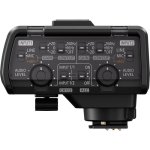
To this end I just picked up the DMW-XLR1 Microphone Adapter, & am thinking of using a XLR Splitter to record a normal track through Input #1, & a Safety Track through Input #2, but have some questions I hope to get answered before running tests later today.
When utilizing a Shotgun Mic that requires Phantom Power is it safe to set both Input #1, & Input #2, to +48V, or would that damage the Mic?
Does a simple XLR Spitter ‘Y’ Cable such as Hosa’s significantly degrade the audio signal?
Would adding another XLR Splitter to send the audio to two GH5(s) be feasible, especially is both cameras had their own Spitters attached so they could record normal, & Safety Tracks? If it is possible would all four Inputs be set to +48V?
Also wonder if anyone’s used a XLR Spitter when receiving Line Level from a Mixer, or is that analogous to wearing Suspenders, & a Belt?
To this end I just picked up the DMW-XLR1 Microphone Adapter, & am thinking of using a XLR Splitter to record a normal track through Input #1, & a Safety Track through Input #2, but have some questions I hope to get answered before running tests later today.
When utilizing a Shotgun Mic that requires Phantom Power is it safe to set both Input #1, & Input #2, to +48V, or would that damage the Mic?
Does a simple XLR Spitter ‘Y’ Cable such as Hosa’s significantly degrade the audio signal?
Would adding another XLR Splitter to send the audio to two GH5(s) be feasible, especially is both cameras had their own Spitters attached so they could record normal, & Safety Tracks? If it is possible would all four Inputs be set to +48V?
Also wonder if anyone’s used a XLR Spitter when receiving Line Level from a Mixer, or is that analogous to wearing Suspenders, & a Belt?