Recommendation(s) for defishing Rokinon 7.5mm video footage?

GrahamH

Well-known member
My Rokinon 7.5mm arrived recently, and I've had good success defishing my still images using Hugin http://hugin.sourceforge.net/

I've spent a while this evening on Google investigating defishing video footage shot with the lens on my GH2, and there do seem to be options (avisynth plugins, etc). Does anyone have a recommendation for a method that has worked well for them on a PC?
 
Last edited:
Nothing? Wrong forum perhaps ...

Anyway, in case others stumble on this thread later, the workflow I am using for the time being is to convert my GH2 footage to Cineform avi, pull that into Photoshop CS5 Extended as a video layer, apply the Fisheye-Hemi Fullframe plugin ( http://www.imagetrendsinc.com/products/prodpage_hemi.asp ), and render out to a new clip.

Fisheye-Hemi implements a Panini transform similar to that provided by Hugin, but without the option to tweak parameters. It's an OKish interim solution.
 
Hey, any updates on this? Mind posting a few clips? I'm considering this lens and your thread was the first thing that popped on google :)
 
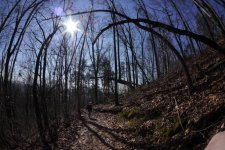
I don't have any decent video to post as yet, but here are some "before and after" stills to give you an idea of the distortion correction possibilities. These are all done using Fisheye-Hemi in Photoshop - they all are resized so that will have impacted their resolution.

Tick_original.jpgTick_collection.jpgTrail_original.jpgTrail.jpgKestral_original.jpgKestral.jpg
 
Wow, that's kind of blowing my mind. Especially that first one, the photo after defishing looks great.

I'm loving my m4/3 setup but still am not liking how far back I have to get with the 2x crop factor, in fact I find that I can't get far enough back to where I want my composition most times. (Using a 25mm lens now)
 
My Rokinon 7.5mm arrived recently, and I've had good success defishing my still images using Hugin http://hugin.sourceforge.net/

I've spent a while this evening on Google investigating defishing video footage shot with the lens on my GH2, and there do seem to be options (avisynth plugins, etc). Does anyone have a recommendation for a method that has worked well for them on a PC?

Cumplepop have a FCP X plugin that corrects GoPro footage. Take a look and see if it works for you:-

http://www.crumplepop.com/fisheyefixer/
 
Thanks for that - I'm on PPro on a PC, but nevertheless that link is good to know about.
 
I can't help but think video could take a massive resolution hit by doing this.

If you have After Effects you could try using the warp tools to deform the edges in a way to compensate for the fisheye lens. Basically warp the video in the opposite direction of the lens curvature. A major pain but it may work with what you already have. Once you figure out just the right combination of warping and scaling you can save the effect as a preset in AE and use it for all your fisheye footage from that lens. Since the lens curvature never changes it will always work.
 
You can create a lens correction preset and apply it to a video in Lightroom. This is what I plan to do once I buy a fish-eye lens.
 
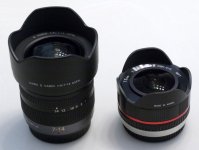
So how does a de-fished 7.5mm Rokinon compare to the Panasonic 7-14mm zoom?

Obviously it's a lot smaller and cheaper, but I am wondering what focal length the de-fished 7.5mm matches up with on the 7-14mm zoom?
 
So how does a de-fished 7.5mm Rokinon compare to the Panasonic 7-14mm zoom?

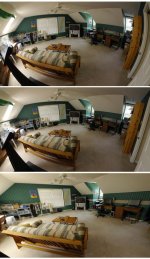
The Rokinon is quite a bit wider - 5.5mm-ish, perhaps? In the composite below (click the thumbnail if necessary), the first image is the Rokinon, the second is the Rokinon defished with Fisheye-Hemi, and the third is the Lumix at 7mm. This is on a GH2 in 16:9 mode - on an AF100 or G6 the FOV would be a little tighter because those cameras lack the GH2's multi-aspect sensor.

Fish2.jpg
Fish.jpg
 
For a minute I thought I had found a no-hassle solution - Defishr, which is a standalone app by ProDAD. It actually does a decent job of defishing video clips. BUT it wants you to install its own video codec pack (and wouldn't open any video format I tried without doing so) ... sorry but that's not going to happen, at least not on my main NLE compter. Just say no to installing mystery codec packs.

Secondly, as far as I could tell it will only export to compressed mp4 - which is a second big strike against it IMHO.
 
I've used Rokinon 7.5 profiles found on dpreview, and it defishes the image but there's no way you can defish it without losing image quality in the corner, it has to stretch them out and if you don't crop them, it look unnatural. But it's really no big of an issue.

For video, I don't get why people bother with plugins, simple Premiere defish filter takes care of it, basically pinches the footage until it's "rectilinear".
 
For video, I don't get why people bother with plugins, simple Premiere defish filter takes care of it, basically pinches the footage until it's "rectilinear".

This is quite an old thread - I don't recall the version of Premiere I had back then having that filter.
 
BUMP. What is the best current way in Premiere CC 2015 to Defish 7.5mm or other? I tried the VIDEO EFFECTS >> DISTORT >> LENS DISTORTION and set it to -25... looks pretty good but is taking an ungodly amount of time to render... like 1 hour for a 10 sec clip? I'm on a 3.4 i5 with 16GB ram.
 
Last edited:
Back
Top