
Navigation
Install the app
How to install the app on iOS
Follow along with the video below to see how to install our site as a web app on your home screen.
Note: This feature may not be available in some browsers.
More options
You are using an out of date browser. It may not display this or other websites correctly.
You should upgrade or use an alternative browser.
You should upgrade or use an alternative browser.
Re: Trying to achieve taxi driver look
- Thread starter Alexa
- Start date


monte
Bag of Douche
Re: Trying to achieve taxi driver look
Re: Trying to achieve taxi driver look
Well first off taxi driver is a movie I wanted to get some of the same sorts of skin tones and the overall look of this movie.
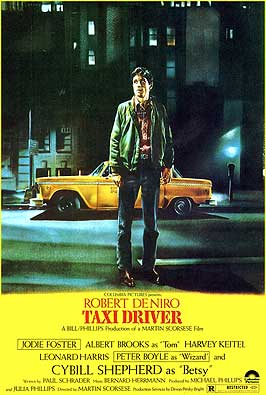
I wanted people to tell me what they thought, or if they had any ideas on how to get it closer to the original look.

And just for fun i tried to recreate the backround in this picture, i know it's not quite the same... but i tried my best so :-*

Re: Trying to achieve taxi driver look
Well first off taxi driver is a movie I wanted to get some of the same sorts of skin tones and the overall look of this movie.
I wanted people to tell me what they thought, or if they had any ideas on how to get it closer to the original look.
And just for fun i tried to recreate the backround in this picture, i know it's not quite the same... but i tried my best so :-*
Re: Trying to achieve taxi driver look
Re: Trying to achieve taxi driver look
I like shots one and three except for the black fringe around the talent. I'm guessing he was blue screened in? I'm like Pooh in as much as I don't fully understand the question. Of course it doesn't help that I have'nt watched Taxi Driver for a very long time so can't recall the look.
Re: Trying to achieve taxi driver look
I like shots one and three except for the black fringe around the talent. I'm guessing he was blue screened in? I'm like Pooh in as much as I don't fully understand the question. Of course it doesn't help that I have'nt watched Taxi Driver for a very long time so can't recall the look.


Kirk Gillock
Rebel with a cause
Re: Trying to achieve taxi driver look
Re: Trying to achieve taxi driver look
Try this Monte. Use color balance to ADD more green to the background. (Same as the Taxi Driver poster.) This will also help in hiding the greenscreen effect. Then adjust the contrast of the background. Maybe the actor too. This will bring out the darks more and make everything POP! Very dramatic.
Example:

Hope this helps. Now do it, do it!
Re: Trying to achieve taxi driver look
Try this Monte. Use color balance to ADD more green to the background. (Same as the Taxi Driver poster.) This will also help in hiding the greenscreen effect. Then adjust the contrast of the background. Maybe the actor too. This will bring out the darks more and make everything POP! Very dramatic.
Example:
Hope this helps. Now do it, do it!
BLUESPIDER
DVXuser Ninja
Re: Trying to achieve taxi driver look
Re: Trying to achieve taxi driver look
I can see alittle green spill on the edges. You should use a spill suppressor to get rid of that green around the edge. You did this in AE right? Honestly I've never seen Taxi driver, so I really don't know exactally what you want. It looks intresting. Are yoiu going for a process look? ?
Re: Trying to achieve taxi driver look
I can see alittle green spill on the edges. You should use a spill suppressor to get rid of that green around the edge. You did this in AE right? Honestly I've never seen Taxi driver, so I really don't know exactally what you want. It looks intresting. Are yoiu going for a process look? ?
Aaron Lavinsky
Well-known member
Re: Trying to achieve taxi driver look
Re: Trying to achieve taxi driver look
with the picture you will want to cc the subject a bit more to blend in with the background. he just doesent seem to fit very well.
also, try lighting his head and shoulders a bit, if hes in NYC there are lights pretty much everywhere...just look at the taxi driver picture you posted
Re: Trying to achieve taxi driver look
with the picture you will want to cc the subject a bit more to blend in with the background. he just doesent seem to fit very well.
also, try lighting his head and shoulders a bit, if hes in NYC there are lights pretty much everywhere...just look at the taxi driver picture you posted

Re: Trying to achieve taxi driver look
Re: Trying to achieve taxi driver look
Taxi Driver was desaturated in post, especially the ending. Censors thought it was too violent and Scorsese desaturated the blood in the end.
It looks like color keying may be more trouble than its worth. I would stick to a live location.
Easiest way to get that look would be to find a city, any city and look for streetlamps, and locations that fit the mood of Taxi Driver. You could probably find a safer more suburban location and dress the location up a little with some discarded newspaper, and use a hose to slick down street for a more noirish look.
If you can get your hands on a fog machine you could add that Elysian hellish look of taxi driver. And you could give a cab driver ten bucks to continuously drive by and park in your location to get a more realistic look.
Your keying effort is valient, but it just seems too CGI and non organic to me.
Re: Trying to achieve taxi driver look
Taxi Driver was desaturated in post, especially the ending. Censors thought it was too violent and Scorsese desaturated the blood in the end.
It looks like color keying may be more trouble than its worth. I would stick to a live location.
Easiest way to get that look would be to find a city, any city and look for streetlamps, and locations that fit the mood of Taxi Driver. You could probably find a safer more suburban location and dress the location up a little with some discarded newspaper, and use a hose to slick down street for a more noirish look.
If you can get your hands on a fog machine you could add that Elysian hellish look of taxi driver. And you could give a cab driver ten bucks to continuously drive by and park in your location to get a more realistic look.
Your keying effort is valient, but it just seems too CGI and non organic to me.

PC
Active member
Re: let this thread die, dont postplease
Re: let this thread die, dont postplease
I have one suggestion to u on doing such composit shots. Try to get some object from the BG image come in the forground of the subject.It make ur shot look more convincing ie. The composited character will look more part of the scene.
Re: let this thread die, dont postplease
I have one suggestion to u on doing such composit shots. Try to get some object from the BG image come in the forground of the subject.It make ur shot look more convincing ie. The composited character will look more part of the scene.
DVX100Shooter
Veteran
Re: let this thread die, dont postplease
Re: let this thread die, dont postplease
you can always remove this from the forum if you dont want anybody posting to it.
Re: let this thread die, dont postplease
you can always remove this from the forum if you dont want anybody posting to it.