
ectobuilder
Veteran
Re: Pansonic GX80/GX85 Bugs List
First of all my initial impressons of this camera is that it is the most usable mirrorless/dslr camera for video I've come in contact with. The various ways to access features quickly and quietly is simply amazing. However the camera isn't without its quirks and as I encounter them I will list them here. Anyone with solutions to these quirks/bugs please post your solutions!
ISSUE 001: While connected to an external monitor when I set [Monitor info. Disp]="OFF", the overlays are still displayed!
ISSUE 002: While connected to an external monitor when I press the [DISP] button several times to cycle through various display modes, I come accross a mode where the rear LCD of the GX85 goes blank (I'm assuming to save energy). But when this mode is activated, [Shutter] and [Aperture] are no longer accessible. Only [ISO] is accessible.
ISSUE 003: When [Monitor Luminance]="L1", the monitor will dim after 30 seconds even while recording. You need to be interacting with a function on a camera in order to avoid this dimming. This is annoying as your exposure looks as if it went down 2-stops. If [Monitor Luminance] is set to the standard brightness however, then dimming doesn't happen.
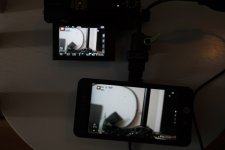
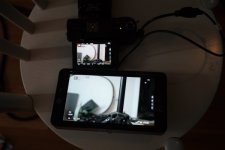
This is a shame because the "L1" brightness appears to be ~800 NITS. Here is are pics side-by-side with a SmallHD 501 (400 NITS) and a SmallHD 702 Bright (1000 NITS)
Versus SmallHD 501 (400 NITS):
Versus SmallHD 702 Bright (1000 NITS):
ISSUE 004: When you cycle through the [DISP] button several times to cycle through various display modes, you will eventually come across a mode where the electronic level is active. Normally when you cycle past this mode on most cameras, the electronic level will go away. Not in this case, it stays active until you disable it by going into the menu or accessing it via the function buttons. Very annoying indeed. The grip side of the camera has such little real estate that you will accidentally hit this button and therefore will have to eventually deal with the electronic level bug.
ISSUE 005: This may be unique to only my camera. The image sensor on my copy is very dusty. I have two stubborn pieces of dust that just won't go away. I've used 24 swabs so far and still no effect.
First of all my initial impressons of this camera is that it is the most usable mirrorless/dslr camera for video I've come in contact with. The various ways to access features quickly and quietly is simply amazing. However the camera isn't without its quirks and as I encounter them I will list them here. Anyone with solutions to these quirks/bugs please post your solutions!
ISSUE 001: While connected to an external monitor when I set [Monitor info. Disp]="OFF", the overlays are still displayed!
ISSUE 002: While connected to an external monitor when I press the [DISP] button several times to cycle through various display modes, I come accross a mode where the rear LCD of the GX85 goes blank (I'm assuming to save energy). But when this mode is activated, [Shutter] and [Aperture] are no longer accessible. Only [ISO] is accessible.
ISSUE 003: When [Monitor Luminance]="L1", the monitor will dim after 30 seconds even while recording. You need to be interacting with a function on a camera in order to avoid this dimming. This is annoying as your exposure looks as if it went down 2-stops. If [Monitor Luminance] is set to the standard brightness however, then dimming doesn't happen.
This is a shame because the "L1" brightness appears to be ~800 NITS. Here is are pics side-by-side with a SmallHD 501 (400 NITS) and a SmallHD 702 Bright (1000 NITS)
Versus SmallHD 501 (400 NITS):
Versus SmallHD 702 Bright (1000 NITS):
ISSUE 004: When you cycle through the [DISP] button several times to cycle through various display modes, you will eventually come across a mode where the electronic level is active. Normally when you cycle past this mode on most cameras, the electronic level will go away. Not in this case, it stays active until you disable it by going into the menu or accessing it via the function buttons. Very annoying indeed. The grip side of the camera has such little real estate that you will accidentally hit this button and therefore will have to eventually deal with the electronic level bug.
ISSUE 005: This may be unique to only my camera. The image sensor on my copy is very dusty. I have two stubborn pieces of dust that just won't go away. I've used 24 swabs so far and still no effect.
Last edited:

