GH2 Re: HDFury for HDMI capture?

Re: HDFury for HDMI capture?

Hi.

Long time lurker, but long time user of both a GH1 and GH2. I thought I’d pass along some observations I’ve made with some recent HDMI testing I’ve done. Maybe it will help someone out. I know many of your posts have helped me out.

I just purchased Veescope Live to use the scopes for a keying project I have coming up. I’m using it with a Matrox MX02 Mini and a 2010 Mac Pro hexacore and the GH2.

My initial plans were to record in camera to one of the hacked settings, but I noticed that Veescope Live can record directly to disk to Prores HQ. So just to confirm what I’ve read online, I tried recording directly via the GH2’s HDMI out.

As expected it outputs 8-bit at 60i and there are issues even when you do 2-3 pulldown on the footage. I know there is a long AVISynth thread about HDMI capture, but I’m on a Mac and there just seem to be a lot more steps than I’m interested in doing. So instead I followed the steps posted on ablecine.com here for 2-3 pulldown in Apple’s Compressor. http://blog.abelcine.com/2011/08/19/simple-workflow-for-removing-23-pull-down/

This is where I tried something different. I recently retired an HDFury 2 from an older component only HDTV. The specs for the HDFury 2 are here. http://www.hdfury.com/products/hdfury-ii/specs/

Since the Matrox MX02 Mini can capture via component too, I connected the output of the GH2 to the HDFury 2 to convert the HDMI to Component. It seemed to work without issue. So I captured the footage to Prores HQ via the component capture and followed the Compressor steps posted in the ablecine.com blog link above to remove the 2-3 pulldown.

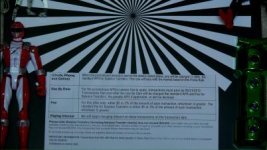
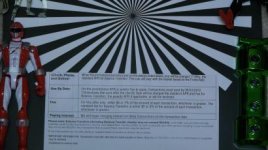
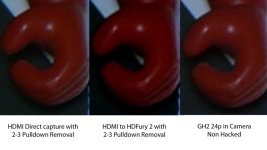
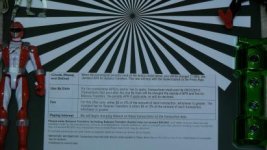
It seemed to work for the most part. At least the weird interlacing issue even after pulldown removal seems to be gone. In the picture I attached, I first notice the difference in the PowerRanger’s hand and face. Otherwise some of the issues with the reds still seem to be there, plus there is a shift in gamma, but that may be addressable in camera, 5DtoRGB or in post.

I just hoping someone more familiar with this may experiment and come up with a valid workflow.

Here are the settings I was using.

GH2
Lumix 14-140mm lens
f/5.8 50 ISO 400
24p Smooth -1 -1 -1 -1
indoor white balance

Veescope Live’s input was set to Matrox MX02 Mini 1080i 59.94 YUV 8-bit

Edit: Sorry, the pictures I originally posted were so compessed you coul't see the details. Just veiw the Flickr ones for now. I’ll post the videos if I can get a recommendation where to post them. They are about 400mb each.

Edit: Added photos on Flickr http://www.flickr.com/photos/53780076@N08/7122338285/in/set-72157629920240125/

Again I’d like to thank the GH1 & GH2 community for all of their work.
 

Attachments
  • GH2_hdmi_proreshq_2-3Remove.jpg
    GH2_hdmi_proreshq_2-3Remove.jpg
    21 KB · Views: 0
  • GH2_HDFury2_proreshq_2-3Remove.jpg
    GH2_HDFury2_proreshq_2-3Remove.jpg
    21.2 KB · Views: 0
  • GH2_24p_in_camera.jpg
    GH2_24p_in_camera.jpg
    21.1 KB · Views: 0
Last edited:
Thanks a lot for these tests. Do you think the footage looks normal to your eye and not have aliasing or any other problems? The images do look promising.
 
Hi.

I'm glad could contribute.

I just started testing this on Saturday morning and posted here in the afternoon. But my first impressions is that using the HDFury got rid of the aliasing/artifact issue you normally see with direct HDMI capture after the 2-3 pulldown. It actually produced a very nice looking image.

The problem I see is that it wasn't truly WYSIWYG. The gamma shift, made it appear that the contrast was turned up a bit via the HDFury 2. Where as recording directly via HDMI was almost identical gamma wise to the AVCHD recording in camera. But keep in mind the HDFury 2 I have is a few years old. I believe there is both an HDFury 3 and HDFury 4 now with more controls and features. So someone with a newer HDFury or has more experience with the Matrox MX02 may get better results.

I most likely will be doing some keying tests soon for the project I have coming up, so I'll record a few samples of green screen shots for testing. I'll proceed with whichever workflow pulls the best key for me.

For now I posted the video samples of this on youtube. http://www.youtube.com/watch?v=9FjpCwrwjTk&feature=youtu.be

BTW, I didn't mention it before, but I did hit record on the GH2 prior to hitting record on the computer when capturing the HDMI output. There does seem to be a shift there prior to hitting record too.
 
The gamma is not a problem for cinema production. The only problem is to get as clean source image as possible and free of any artefacts. By looking at your crops the HD Fury version indeed appears to be the cleanest one, but even that might benefit from beefier colors that can be had by using a CC20M or CC30M color correction filter in front of the lens. You could still white balance in camera to neutral colors if you do not want to color correct later.

If that could be captured flawlessly it would probably become the new "ruler of the wasteland", if you don't mind using a cinematic quote from a 80'ies hit movie. I suppose the analog capture limits you to studio work only?
 
I did test the HDMI Fury 2 also. It can work with either external power or be powered off of the HDMI device it is connected too.

In the case of my previous component TV I had to use the external power adapter. As for the GH2, the HDFury 2 will work with off of the GH2's HDMI power even when the GH2 is running on its battery. So in that case if one has a portable recorder that supports component inputs, then this setup could leave the studio.
 
This is very interesting potential solution to a known problem. So it appears there is some sort of copy protection scheme that ruins the HDMI output as such. Of course. I found a blog article about the HDMI Fury 2: http://elephantav.wordpress.com/tec...-adapt-an-older-hd-capable-tv-to-accept-hdmi/

Basically in the article it is found that the output of HDMI Fury 2 is of high quality. Some analog artifacts will be inevitable. In theory it might even be possible to take the Y component from the internal AVCHD file and beefier colors from the analog version. This certainly calls for a more attention.
 
Aki thanks for posting the article. At the time I bought it, the HDFury 2 was the best, cost effective solution for using HDMI products with a component HDTV. I'd be curious to see the results someone else may get if they do use a dedicated component recorder.

At least there are devices such as the Matrox MX02 line and the BlackMagic Intesity Shuttle that can do component recording while connected to a laptop computer. So that could be of use to someone too.
 
This is a very interesting thread- My friend just purchased a GH2 and I'm the resident tech guy for further productions we're planning in the near future. We will be looking into doing projects that will require heavy keying, and from all I've read, recording directly via HDMI then re-processing via AVISynth looses the 4:2:2 advantage.

Wondering how the thread starter (Media_Alchemist) did with his green screen tests using this method? It is most certainly a reasonable option given the cost of external HDMI recorders, and I would LOVE to see some sample green screen footage if any is available! Even 5 seconds uncompressed would be wonderful.

Love how the community is so creative and is looking for solutions for getting the most out of the GH2!
 
Just had a thought- I don't have any of the equipment necessary to test this theory, but what about using a HDFury to convert to analog component output, then a component to HDMI converter to go back to HDMI, then capture with a device like an Atmos Ninja or the likes? I checked on the blackmagic intensity- it is very specific about what laptop it can be used with, need an SSD to record at 1080p, etc- just as well get a dedicated hard disk recorder. There's a KanexPro YPbPr to HDMI converter on B&H that meets HDMI 1.3 spec- reviewer said it worked nicely with an Atmos Ninja and a Canon XH-A1.
 
Last edited:
Just to update. When I did my test using the HDFury 2 vs GH2 hacked footage for keying, I was getting about the same results. Plus I was using one of the more conservative hacks, Cake 2.3 I believe.

In my case given the limitations of the of running the cables for both video and audio to my workstation, I just proceeded with just moving forward just using the hacked footage. I still do recommend using Veescope Live to use the scopes and preview a key live. That way you can adjust your lighting on the spot, and IMO seems to be the real issue in most cases.

It seems to be undocumented, but it seems to support any capture device connected to your computer. At least it does with my Matrox MX02 Mini.

http://www.dvdxdv.com/NewFolderLookSite/VeeScope/Products/VeescopeLive.overview.htm
 
Alchemist-
Makes sense, esp if you didn't see any appreciable quality increase. Have you tried actually keying the footage you shot yet? I'm a bit worried about keying 4:2:0 footage ( I went through the absolute nightmare of keying HDV footage for a 42 minute film) and I know that what the GH-2 will provide, esp hacked, will be far superior, but I want to have an idea of what kind of results to expect. If at any point you could post (or message me to send a file) a sample of your keyed footage, it would be greatly appreciated!

BTW, the film can be seen here: Lovleighton Manor

Project was intended for DVD distro, even though it was shot on HDV, edited at 720p (from HDV crappy 1440x1080) then final output to 480p. We never mastered out a 720p version- given the problems that were due to technical and complete noob mistakes, 480p covered up all kinds of mistakes. So the version on Vimeo is only at 480p, so sit back a bit, if you don't mind!
 
virgilr-
The GH2 footage actually keys pretty well. At least it does with most of the current NLEs out there. I know its 4:2:0 but from my experience its mostly about getting the lighting right. I can't show you the work related stuff I did, but I do have a few test shots I did with my kids I may be able to post soon.

BTW, I believe Driftwood came out with a Crossfire hack optimized for Green Screen work. You might want to try that one out. I may try that one too when I get a chance.
 
Here is a quick example of my first green screen test I did with my daughter with an unhacked GH2 back in the Fall.

I used a 20mm f1.7 pancake lens, some cheap home depot shop lights, and the Yoostar greenscreen. This was before I had the VeeScope Live to work with, so I just used the in camera histogram, and the blinking overexposure meter. The keying was with Premiere CS5 and Ultrakey.

I didn't really spend anytime fixing the spill or color correcting. I just wanted to see how far I could get before learning how to use Ultrakey with no prior experience.

Maria-Mars_wo_key-sm.jpg
Maria-Mars_w_key-sm.jpg
 
Alchemist- Looks like the footage held up OK! I'll be happy to see (once I get my hands on the camera and can set up/ light a green screen) how things go with complex source, like hair, fabric, etc, and of course how the footage pans out when in motion, but looks like it will be useable. Was this sample pulled from hacked footage or stock firmware? Thanks for posting the stills!
 
This sample was done with unhacked stock GH2 firmware.

During my keying tests with the HDFury 2 capturing via HDMI vs Cake 2.3 looked and keyed about the same. On the most troublesome shots to key sometimes the HDMI keyed slightly better, but I mean slightly. Then I would take the same Cake 2.3 in camera footage and transcode it with RGBto5D to ProRes 422 HQ.

That ProRes ProRes 422 HQ file would key just as well as the HDMI to HDFury 2 footage. So for my setup it wasn't worth the extra hassle. Plus the HDMI chroma bug is still there even with the HDFury 2 recording. Maybe it would be better to record with something with built in pulldown like the nanoflash has.

As for other GH2 keying examples, I've ran across a few online. Here are some of them. I believe these were all made with unhacked GH2s too.

Courtesy of Lars Peter Lueg.
http://vimeo.com/25459746

Courtesy of Benjamin Duplaix.
http://vimeo.com/23584714

Courtesy of Benjamin Karl.
http://vimeo.com/24466545

I've found this workflow here to be useful. This was posted by vempire. Hope it helps.

http://www.personal-view.com/talks/...reen-shots-when-shooting-with-the-gh2#Item_18
 
Thanks again for your info, alchemist! I've seen all those clips- still, nobody working with actors with wispy/long hair, etc, and in the Duplaix scene I noticed some problems in the hair in the key, but that so gets down to the quality of the green screen lighting, believe me I've had that experience!

Just wondering- are you using the free version of 5DtoRGB? I'm working/will always be on a PC, and they haven't released the pay/updated version for win x64 yet. I tried to open a clip from a gh-1 that was in an interlaced wrapper, and the free version of 5DtoRGB hangs up when trying to transcode.

Lastly-wondering if you took a look at the video link I posted for the film Lovleighton manor? Love any feedback on that project.
 
I mostly work on a Mac now. But I still do some things in Windows. I did start out using the free version of 5DtoRGB, I liked the results so much that I use the paid version now. I haven't been keeping up with 5DtoRGB in Windows, so I really can't advise there. I've heard about Windows users using Cineform though. So you may want to look into that.
http://gopro.com/3d-cineform-studio-software-download/

I have some keying tests of my daughter with her helmet off. She has long wavy hair. Those shots are tougher to get a clean key, but I've had some success via trial and error. I'll post a couple of pictures when I get a chance.

With work and family time has always been an issue for me to work on my personal projects. That's why I tend to use my kids a lot for test projects. They have fun and I get try out new ideas. I did skim thru Lovleighton Manor, your grading does do a good job blending your subjects into the background.

Your right about SD hiding a lot of issues. I ran into the same things working with SD footage too. My only criticism would be that what is posted online seems to be very dark in some scenes. This is where using the GH2 would really be an improvement, both in dynamic range and detail. Plus with the high bitrate hacks or external recording, you could really push it in grading.
 
Alchemist- thanks again for the screen grab! Looks like you got a decent key pull, even with that shadow around your daughter! As for Lovleighton, you're right- it was graded a bit dark- it was graded for DVD to TV viewing- looks quite good on most consumer grade LCD televisions with no color tweaking, etc- wanted something we could send to friends and family that would look decent without them knowing what to do! Thanks for having a look. There was a ton of re-lighting in After Effects, since it was lit very flat, and I had to do my best to get the footage to integrate with the 3D backplates.
 
Back
Top