FS7: Raw to the Odyssey 7Q

crow

Member
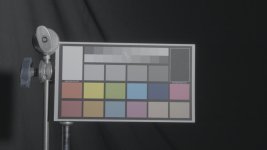
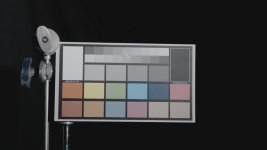
I've noticed something odd with our FS7 when used with our Odyssey 7Q. I'm plugging the Extension unit to the FS7, and the 7Q gets its feed from the RAW out of the extension unit. It doesn't look like Slog3 footage. It looks like the waveform has been stretched, with the blacks and whites getting clipped. I did a simultaneous record to internal XAVC and 4k Raw > HD ProRes, and I'm attaching both images below (the images are both completely uncorrected).


Both the Camera and Odyssey are on the latest firmware. The camera is set to do Sgamut3/Slog3. As best I can tell, all LUTs and Looks are turned off (although I was under the impression that this would not affect the RAW output). When plugged in, the Odyssey is correctly identifying the incoming source as 4k RAW Slog3.


Any thoughts?


Raw recorded by the 7Q as HD ProRes
4K Raw to HD ProRes.jpg


XAVC recoded internally
Internal.jpg
 
Last edited:
Raw footage has to be interpreted. Exactly how did you frame grab the raw image? (What software, etc). The internally recorded image is a video stream with a defined gamma curve (S-Log3), but your software package for the raw may be using a different base gamma setting.

EDIT: When I wrote the above I had not read OP post correctly. OP is recording the 4k raw signal as ProRes 1080p.
 
Last edited:
We recorded the raw signal that fed the 7Q as HD ProRes. So the 7Q is doing the raw to ProRes conversion. Both files were opened in Resolve, where we grabbed the above images. The HD proRes file looks the same in AfterEffects also.
 
We recorded the raw signal that fed the 7Q as HD ProRes. So the 7Q is doing the raw to ProRes conversion. Both files were opened in Resolve, where we grabbed the above images. The HD proRes file looks the same in AfterEffects also.

Apologies then!

However, the point stands the raw footage has to be interpreted to generate the 1080p ProRes image. I would thoroughly check the O7Q menus to see what LUT or gamma is being applied.
 
I wonder if Olof or Josh Becker can Chime in as they also have the 7Q + Back Unit.

I'm about to buy the FS7 and back unit and I would probably not get the back unit if the 4K2HD is not outputting a Log file.
 
I wonder if Olof or Josh Becker can Chime in as they also have the 7Q + Back Unit.

I'm about to buy the FS7 and back unit and I would probably not get the back unit if the 4K2HD is not outputting a Log file.
I actually haven't gotten around to using my 7Q with the RAW out yet. Maybe I'll hook them up real quick and do a test run.

crow, were you in Slog3 or Slog3.cine? Because I believe the 7Q is designed only for Slog3 (not the Slog3.Cine option). Could be something to do with that? You're right that there is no way to apply LUT/Look to RAW out. It's purely RAW. Maybe Mitch or someone has more info.
 
were you in Slog3 or Slog3.cine? Because I believe the 7Q is designed only for Slog3 (not the Slog3.Cine option). Could be something to do with that? You're right that there is no way to apply LUT/Look to RAW out. It's purely RAW. Maybe Mitch or someone has more info.

Hey Josh, sorry for the knob question as I haven't got my FS7 yet. So is Slog 3.cine is the fixed ISO 2000 mode where you can apply the Arri LUT to it, correct? Seems like it would be a major drawback to not be able to use that mode with the 7Q.

So if using the 7Q to record from the FS7 in S-Log 3, do you have to record in custom mode? This would be fine except the preset WB doesn't function properly because of the magenta shift, which could be a problem.
 
We shot the examples in the above set with S-gamut3/Slog3. We have since tried S-gamut3.cine/SLog3 with similar results.
We have also recorded set up for RAW only output, in addition to RAW+internal recording. No change.
 
We shot the examples in the above set with S-gamut3/Slog3. We have since tried S-gamut3.cine/SLog3 with similar results.
We have also recorded set up for RAW only output, in addition to RAW+internal recording. No change.

Hmmm... this is not good as it makes the 7Q somewhat useless on the FS7 since most people, myself included, want a flat, S-Log image.

More growing pains. I wonder what Mitch has to say.
 
Resolve has never done a great job at interpreting full range and video range footage. It might be as simple as setting that manually in Media per file.
 
I don't have a field experienced answer but the output of the camera extension in this test is FS raw, correct? Slog3/cinegama3 is applied in camera to the in camera recording. I would not actually expect FSraw to have have the SLog3 or any Log curve on it. I believe the camera is likely similar to the FS700 and F65 in that it outputs a linear raw image, not log... So while somewhat desaturated it is no where near as flat as log.

i would ask this question. If you own an FS700 with the raw output recorded to the O7Q in raw to pro res how does that look?
 
I'm coming late to the party, but John is on the right track. The FS7/700, F5, F55 and F65 output a linear raw signal. In the case of the FS7/700 that is a 12-bit linear raw and 14-bit linear raw on the CineAlta side.

Hence, there is no logarithmic curve applied to the raw output. In the case before us, the 7Q is doing a debayer of the linear raw and transcoding to ProRes. Had you recorded uncompressed linear raw to the 7Q and opened that file in Resolve, you could choose whatever debayer quality you liked as well as whatever gamma in which you wished to view the clips. Raw and Log are not equivalent in the Sony world. Arri Raw applies a logarithmic curve as does Canon.

If you, for example, debayer the raw footage in Resolve, you could immediately begin to apply linear corrections to that footage since it already is linear-- meaning you don't need to move log space into linear space, usually done by applying a de-logging LUT. You could always select a log gamma in Resolve but then would need to apply a LUT to bring it back into the linear space where it was in the first place.

Since your ProRes has been converted from linear raw, it won't look like log footage. Thus you could immediately begin to grade that ProRes footage as if you had debayered linear raw files in Resolve. The difference, of course, is that you are now working in a ProRes 422 or 422HQ world.

The 7Q is the way to go if you want 4K ProRes since the internal ProRes when unlocked in a forthcoming FS7 firmware update will only be HD, not 4K.

Ned Soltz
 
I think the issue is, it's a raw image, which doesn't have a log lut applied like the internal XAVC. You can apply the log curve in post to the raw data, which is what the camera does internally, so in the 4k2hd mode the 7Q would have to apply a S-Log lut to the raw input before converting to ProRes, does it have that option in burning luts?
 
It should be S-Log and flat. On the FS700, it's 12 bit linear RAW and CD just baked S-Log 2 as the profile for both RAW and Pro-Res and it looked great and super flat.

From what I've heard, RAW from the FS7 is almost identical to the FS700. I'm surprised this got passed Convergent quality control. Nobody wants a non-flat image from the 7Q. That's pretty useless IMO.

I've heard from someone else who has a 7Q that they got the same result - flat XAVC image and crushed 7Q image.
 
I just did a quick test. Same results. Camera is in RAW+XAVC-I mode, Slog/SGamut3 (not CINE gamut). Odyssey7Q is set to 4K RAW to HD ProRes mode under the FS7 camera option. No LUTs applied anywhere (VF, sdi, etc., LUT not enabled on 7Q... just mentioning it just in case anyone asks, good to be detailed when troubleshooting!

XAVC:
387U+

Tr5y+


7Q RAW to HD ProRes:
10WCl+

1cLE9+


This is me just totally spit-balling... but the highlights and shadows don't seem to actually move up or down. It's just the center of the curve... Is it applying the wrong curve to the Slog3 input?
 
I've brought this to the attention of our engineers. They are aware of something strange going on with the FS7 settings which are then interacting only with the Odyssey7Q. There were similar growing pains with the FS700. Sony does things in very particular ways, and it is a bit unlike other manufacturers. To be fair, they all have their oddities, and it is our job to navigate them as best as possible.

Based on these images, it is clear that the Odyssey ProRes files is closer to a REC709 curve and the XAVC more LOG-like.

We have found that setting the camera to "No LUT" yields a different result to the SDI outputs than selecting S-Log3 as the LUT. The the latter case the image on the Odyssey better matches the viewfinder, with the LUT being set to "OFF". Again, individual camera-design quirks we need to understand. This is different than other cameras where the LUT set to "OFFO yields a LOG image. Sony is doing something... else. We are not sure at this time and are trying to work with them, but it is the holidays at the moment.

There is a difference between the LUT set to "Off" v. set to "S-Log3". We need to get further details on this from Sony.

We will compare the outputs to the internal recording, and we will sort this out. Sony chose to route signals and initiate functions in a different way on the FS7 compared to the FS700, so we are finding that we need to change the way we do our job to account for it.
 
Hey Mitch,

Any ETA on this 7Q gamma fix? I'm getting my FS7 tomorrow and I'd love to be able to use the 7Q with it soon.

Can you guys do a firmware patch? Or do we have to wait a while for a full firmware release.

Thanks.
 
Hey Mitch,

Any ETA on this 7Q gamma fix? I'm getting my FS7 tomorrow and I'd love to be able to use the 7Q with it soon.

Can you guys do a firmware patch? Or do we have to wait a while for a full firmware release.

Thanks.
First we have to get the issue sorted properly with Sony, corrected, and then fully tested. Then we can see where we are in the schedule.

Please recognize something here: While not ideal, the game is not being corrupted. There are no damaging artifacts, no clamping of the exposure range, no introduction of noise or other oddities. The midrange gamma is off but the image is highly gradable and the results can look quite lovely. We fully acknowledge that this needs to be corrected but one can very successfully shoot with this combination of gear and get great results.
 
Please recognize something here: While not ideal, the game is not being corrupted. There are no damaging artifacts, no clamping of the exposure range, no introduction of noise or other oddities. The midrange gamma is off but the image is highly gradable and the results can look quite lovely. We fully acknowledge that this needs to be corrected but one can very successfully shoot with this combination of gear and get great results.

Thanks Mitch. So, for now, should we still expose s-log3 as we normallly would (e.g., 41% for middle gray)?
 
I think you should test for yourself to be sure you like the results. But yes, I have found this works quite well. I must caution that I have only had limited time with the FS7 at this point.
 
Back
Top