
So my cool shoot got axed at the last second because the production company could not secure the permit, so I spend the last two days pixel peeping like a mad man.
First of all, the 4K2HD looks GREAT. I LOVE it, but I am having trouble now converting 2K and 4K RAW in Resolve using the new settings and the new, just released S-Log LUT. I wanted to see what your experiences are, and see if I am missing something.
I used the recommended settings listed by CD for transcoding the 2K RAW and 4K RAW to Pro-Res. I am on an 2013 iMac with Mavricks OSX.
-Decode Quality Full Res.
-Decode using CinemaDNG Default
-White Balance As Shot - GREYED OUT
-Color Space Rec709 - GREYED OUT
-Gamma Rec709 - GREYED OUT
-Select Highlight Recovery - Off - NOT NEEDED
——————
I got the new S-Log LUT a day early emailed from Andy @ Convergent Design and I have since tested the one posted on the CD website with the same off results.
I just did it as before in Resolve 1) Import the footage into the Media Bin 2) Right click then apply the NEW 3D S-Log LUT. I noticed pretty quickly that the color RED and possibly some other colors were off. But the Reds were really off approaching the pink spectrum.
The STRANGE thing is, the OLD Resolve BMD settings and the OLD LUT works much better on the footage with the new firmware. At least the colors are pretty much right, although they don’t match the 4K2HD (but I would not expect the colors to match).
My question to you guys are:
1) Are you guys just using the OLD Resolve BMD settings and the old S-Log 2 LUT to transcode the new 4K and 2K footage. I have got decent colors with the old BMD settings.
2) Have any of you tried the new DNG settings and the new S-Log LUT. My reds are just completely off and there is this slight magenta tint to everything.
3) Is your 4K2HD looking exactly like your transcoded RAW 4K / 2K RAW clips? Mine are very different. The 4K2HD does look very, very close to the AVCHD S-Logs as CD mentioned it should. Andy @ CD told me that the new Resolve settings should make the RAW files look identical to the 4K2HD.
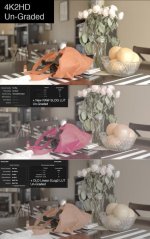
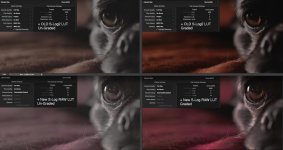
Take a look at the images I attached. I’m wondering if I am missing a setting or if there is a bug with the new recommended settings and S-Log LUT. On the Dog image, the top row with the OLD BMD settings are more accurate. The bottom dog row is with the new settings and there is a serious magenta shift.
DVXuser uploads the images smaller, so here's links to a larger size if the ones below are too small
www.builtbyugene.com/misc/dog2.jpg
www.builtbyugene.com/misc/Test.jpg
First of all, the 4K2HD looks GREAT. I LOVE it, but I am having trouble now converting 2K and 4K RAW in Resolve using the new settings and the new, just released S-Log LUT. I wanted to see what your experiences are, and see if I am missing something.
I used the recommended settings listed by CD for transcoding the 2K RAW and 4K RAW to Pro-Res. I am on an 2013 iMac with Mavricks OSX.
-Decode Quality Full Res.
-Decode using CinemaDNG Default
-White Balance As Shot - GREYED OUT
-Color Space Rec709 - GREYED OUT
-Gamma Rec709 - GREYED OUT
-Select Highlight Recovery - Off - NOT NEEDED
——————
I got the new S-Log LUT a day early emailed from Andy @ Convergent Design and I have since tested the one posted on the CD website with the same off results.
I just did it as before in Resolve 1) Import the footage into the Media Bin 2) Right click then apply the NEW 3D S-Log LUT. I noticed pretty quickly that the color RED and possibly some other colors were off. But the Reds were really off approaching the pink spectrum.
The STRANGE thing is, the OLD Resolve BMD settings and the OLD LUT works much better on the footage with the new firmware. At least the colors are pretty much right, although they don’t match the 4K2HD (but I would not expect the colors to match).
My question to you guys are:
1) Are you guys just using the OLD Resolve BMD settings and the old S-Log 2 LUT to transcode the new 4K and 2K footage. I have got decent colors with the old BMD settings.
2) Have any of you tried the new DNG settings and the new S-Log LUT. My reds are just completely off and there is this slight magenta tint to everything.
3) Is your 4K2HD looking exactly like your transcoded RAW 4K / 2K RAW clips? Mine are very different. The 4K2HD does look very, very close to the AVCHD S-Logs as CD mentioned it should. Andy @ CD told me that the new Resolve settings should make the RAW files look identical to the 4K2HD.
Take a look at the images I attached. I’m wondering if I am missing a setting or if there is a bug with the new recommended settings and S-Log LUT. On the Dog image, the top row with the OLD BMD settings are more accurate. The bottom dog row is with the new settings and there is a serious magenta shift.
DVXuser uploads the images smaller, so here's links to a larger size if the ones below are too small
www.builtbyugene.com/misc/dog2.jpg
www.builtbyugene.com/misc/Test.jpg
Last edited:


 ) and I've been doing it wrong. I was under the impression that the Rec709 was a completely different process.