GH3 Quick GH3 audio recording question

aonavy

Well-known member
Quick question/thoughts

I own a GH2 and I when Im recording, I pair it with a zoom H1 for audio. Should I still run the same setup with GH3 or just record directly to the camera and leave out the Zoom? The GH3 has more audio functions that I think will be fine, but want a 2nd opinion

I use a shotgun mic fyi

Thanks in advanced
 
the gh3 & gh2 have a lower noise floor (less background hiss) than the h1 - i would go straight into camera
 
the gh3 & gh2 have a lower noise floor (less background hiss) than the h1

From my tests the Zoom H1 is slightly better when it comes to noise floor, but for the convenience of not having to sync the audio I would record straight into the GH3.

Both the GH2 and GH3 have a nasty built-in AGC circuit, so to minimize this you want to set the camera's audio level as low as possible and feed the camera a strong audio signal.

By strong audio signal, I mean -30 db to -15 dB, which is much stronger than the normal -50 dB MIC level. This will often mean an external MIC pre-amp like a JuicedLink unit or a good mixer.
 
Thanks for the input. I dont have amp. I use a shotgun mic. I guess ill have to play around with the setting to get it right

It would be nice not to carry the zoom around with the camera.

Thanks for the information you provided...both of you

From my tests the Zoom H1 is slightly better when it comes to noise floor, but for the convenience of not having to sync the audio I would record straight into the GH3.

Both the GH2 and GH3 have a nasty built-in AGC circuit, so to minimize this you want to set the camera's audio level as low as possible and feed the camera a strong audio signal.

By strong audio signal, I mean -30 db to -15 dB, which is much stronger than the normal -50 dB MIC level. This will often mean an external MIC pre-amp like a JuicedLink unit or a good mixer.
 
From my tests the Zoom H1 is slightly better when it comes to noise floor, but for the convenience of not having to sync the audio I would record straight into the GH3.

Both the GH2 and GH3 have a nasty built-in AGC circuit, so to minimize this you want to set the camera's audio level as low as possible and feed the camera a strong audio signal.

By strong audio signal, I mean -30 db to -15 dB, which is much stronger than the normal -50 dB MIC level. This will often mean an external MIC pre-amp like a JuicedLink unit or a good mixer.

sorry yes you're probably right, forget that i use a mix pre-d between the mic and gh2/3 to get over the agc problem , whereas i normally go direct to the H1 with rode lav mic

aonavy - which shotgun mic do you use? As The Dingo mentioned to get the best sound from the gh2/3 you want the cameras audio level at its lowest
 
I have to say the audio in the GH3 really is much much better than the GH2 with loud recordings at least. I also have a Zoom digital recorder which I generally use however, at least once I've been saved by the GH audio.

A music producer pointed me to this great product for working quickly to beef up sound, this can be used to give especially music recorded on the GH3 some extra punch.

http://www.ikmultimedia.com/products/cat-view.php?C=family-t-racks

I had a recording direct from a mixer and actually dropped it in favour of the audio from the GH3 (on lowest volume settings) at a recent live recording, I then beefed it up with T-RacKS.

 
Last edited:
When you use an external recorder, you can set it to record at a higher bit-rate than your camera is capable of. Most people set their recorders to record 24-bit 48kHz WAV files. One of the benefits of doing this, aside from improved audio quality, is getting more headroom.

However, if you're more comfortable using just the camera and mic alone, then that's probably what you should do. It doesn't matter that it's a $35 mic. What matters is if you're satisfied with the finished product. However, no matter if you're using an external recorder or just the camera, I would advise that using headphones when you work is really important, and the headphone output is one of the biggest selling points about the GH3 for me. I've had problems in the past where the 1/8" connector of the mic didn't get seated properly into the camera (even though it appeared to be seated properly). If you're not listening on headphones, you're asking for trubs.
 
very good point! Thanks

When you use an external recorder, you can set it to record at a higher bit-rate than your camera is capable of. Most people set their recorders to record 24-bit 48kHz WAV files. One of the benefits of doing this, aside from improved audio quality, is getting more headroom.

However, if you're more comfortable using just the camera and mic alone, then that's probably what you should do. It doesn't matter that it's a $35 mic. What matters is if you're satisfied with the finished product. However, no matter if you're using an external recorder or just the camera, I would advise that using headphones when you work is really important, and the headphone output is one of the biggest selling points about the GH3 for me. I've had problems in the past where the 1/8" connector of the mic didn't get seated properly into the camera (even though it appeared to be seated properly). If you're not listening on headphones, you're asking for trubs.
 
One of the benefits of doing this, aside from improved audio quality, is getting more headroom.

...This is true for higher end recorders, but with most low-cost consumer recorders their high noise-floor obliterates any real advantage of using 24-bit.

In theory 16-bit recordings can have a dynamic range of 96 dB ( 6 dB per data bit ), but the reality of less than perfect hardware/software implementations this actually works out to about 80+ dB, which is still greater than the noise-floor of most low-cost recorders. ( depending on the pre-amp setting these recorders have self noise-floors between -50 dB to -80 dB )

I still recommend using the 24-bit formats when they are available only because they will ensure greater audio integrity when processing recordings with your audio editor.
 
sorry if this is lightly off topic but has got me thinking.....
using the H1 as a bit bucket - with my mix pre-d i only have the unbalanced mic out which i normally connect to gh2/3 - i have used this mic out from mix pre-d into the H1 and set the H1 input level to 37 (read somewhere that that was best for low noise floor to signal ratio) - I then use the mix pre-d's pre amp to boost the signal to get decent levels (normally about 3 oclock on the mix pre dial)
Is this the best way to get a decent recording or should i be feeding the H1 a line level from the mix pre-d and adjusting with a pad?
 
someone call the cops..this thread has been hi-jacked

lol


sorry if this is lightly off topic but has got me thinking.....
using the H1 as a bit bucket - with my mix pre-d i only have the unbalanced mic out which i normally connect to gh2/3 - i have used this mic out from mix pre-d into the H1 and set the H1 input level to 37 (read somewhere that that was best for low noise floor to signal ratio) - I then use the mix pre-d's pre amp to boost the signal to get decent levels (normally about 3 oclock on the mix pre dial)
Is this the best way to get a decent recording or should i be feeding the H1 a line level from the mix pre-d and adjusting with a pad?
 
sorry if this is lightly off topic but has got me thinking.....
using the H1 as a bit bucket - with my mix pre-d i only have the unbalanced mic out which i normally connect to gh2/3 - i have used this mic out from mix pre-d into the H1 and set the H1 input level to 37 (read somewhere that that was best for low noise floor to signal ratio) - I then use the mix pre-d's pre amp to boost the signal to get decent levels (normally about 3 oclock on the mix pre dial)
Is this the best way to get a decent recording or should i be feeding the H1 a line level from the mix pre-d and adjusting with a pad?

Connect the 1/8" Tape Out on the MixPre-D to the Mic/Line 1/8" input on the H1 with a regular stereo 1/8" male to stereo /18" male cable. Turn the Input Level on the H1 down to Line. That should sound better. Do a little test between the two and decide for yourself.
 
This might interest you:

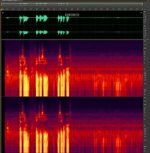
I tested my GH 3 using mic level 10, Rode videomic Pro set for "0" gain and low cut filter on (right channel) and also internal mic (left channel) via Juicedlink DS214. I was sitting behind the camera speaking in my basement cave.

Here is the PNG screen grab of the Audition file showing what happened with Juicedlink AGC disable turned OFF and with AGC disable ON.

AGC Disable OFF: AGC OFF.jpg AGC Disable ON: AGC ON.jpg

Here is a link to a short movie so you can hear for yourself. I boosted the gain on the "disable ON version" so the voice was about the same level as the other clip, to level the playing field (the AGC Disable signal to channel 2 results in reducing the gain in the camera. I could have put more gain on the Juicedlink or the Rode mic but I didn't). The room tone after the voice is much quieter with the AGC Disable turned ON.

http://youtu.be/l5w2RBbV_o0

The quietest is with the external mic, AGC disable ON. Next best was external mic without AGC disable. The internal mic is not represented in the sound recording (you can see it on the screen grab), but it was noisier than the other two methods.
 
Last edited:
This might interest you

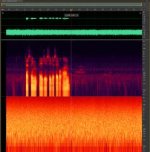
Now what happens when you set the GH3 audio level to 1, and use the JuicedLink to boost the mic gain as much as necessary. ( AGC disable = OFF )

This is what I've been recommending for optimal GH3 audio, which will limit the GH3 AGC circuit to about +3 dB.
 
Now what happens when you set the GH3 audio level to 1, and use the JuicedLink to boost the mic gain as much as necessary. ( AGC disable = OFF )

This is what I've been recommending for optimal GH3 audio, which will limit the GH3 AGC circuit to about +3 dB.

So I have posted a quick YouTube video to answer the question. Yes, audio level 1 is best in my opinion as well.

http://youtu.be/_w5wPf7bvVE

The AGC defeat is of some small benefit when the camera audio level is set to 1. The benefit increases as the audio level goes up to 10 then 19.
 
It would be great to hear a high quality lav mic with agc disable ON as there is still noise with the Rode shotgun. I am trying to determine if its possible to get high quality audio into the GH3 without recording audio to a separate recorder.
 
Back
Top