
Ok I had captured some footage after the thread got locked and deleted. For those that weren't following, there was a thread in the main section that theorized that using a purple/magenta filter could improve the image in the GH1 / GH2 because you'd artificially add more blue and red info to the channels that were weakest on these cams. I bought a cheap plastic filter and tried some shots and liked how it graded back to normal outdoors, but I didn't have a pro NLE to test it out til now. I just signed up for Adobe Cloud and I haven't used Adobe since an old bootleg of Premiere that I stopped using 4 years ago when I went legit and bought Vegas Studio  .
.
How can I see the red/blue channels to see if the image has improved? Here are the raw mts files for you to play with if you want.
3500K with purple filter
http://www.mediafire.com/?5pz5fhu0scd38cp
3500K with filter and WB sliders top right to tone down purple
http://www.mediafire.com/?vqw5k6u6c2xfc9k
3500K no filter
http://www.mediafire.com/?u89vuhu8ioe0gsu
Auto WB no filter
http://www.mediafire.com/download.php?4w5nge1g3vsnw5l
Auto WB with filter
http://www.mediafire.com/download.php?bg65c8t9b2io556
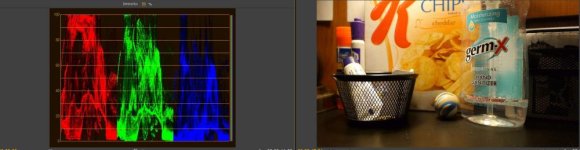
I loaded the files into Premiere and took a look at the RGB Parade monitor...am I reading that right? The clips with the filter seem to have bigger blue waves and does that mean more info in the blue channel? What do you guys who have more experience think?
AutoWBwFilter
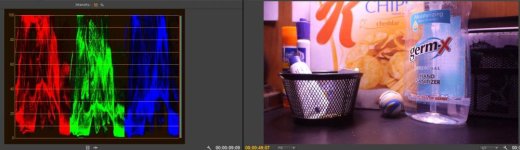
AutoWBnoFIlter
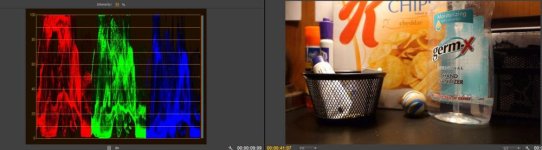
3500kFilterWB
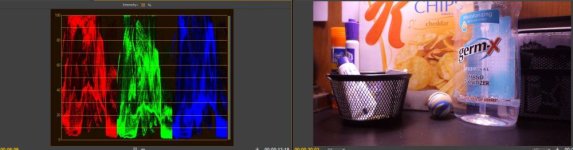
3500kFilter
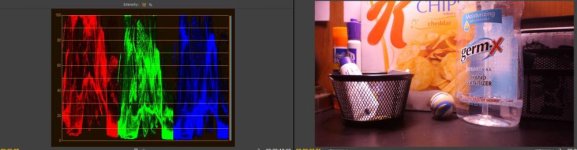
3500kNoFilter
.How can I see the red/blue channels to see if the image has improved? Here are the raw mts files for you to play with if you want.
3500K with purple filter
http://www.mediafire.com/?5pz5fhu0scd38cp
3500K with filter and WB sliders top right to tone down purple
http://www.mediafire.com/?vqw5k6u6c2xfc9k
3500K no filter
http://www.mediafire.com/?u89vuhu8ioe0gsu
Auto WB no filter
http://www.mediafire.com/download.php?4w5nge1g3vsnw5l
Auto WB with filter
http://www.mediafire.com/download.php?bg65c8t9b2io556
I loaded the files into Premiere and took a look at the RGB Parade monitor...am I reading that right? The clips with the filter seem to have bigger blue waves and does that mean more info in the blue channel? What do you guys who have more experience think?
AutoWBwFilter
AutoWBnoFIlter
3500kFilterWB
3500kFilter
3500kNoFilter