FS7: punch in on resolve UHD

Lenilenapi

Carbonite Member
I'm new to Resolve , and have 12.5 light.
I simply want to take a scene shot in UHD , punch in on it and export that to HD .
The basic idea of getting a closer shot out of the 4K for HD editing.
Seems simple enough but I haven't the foggiest idea how to do it .

Please be specific about where the tools are cause I can't find many.


Help would be greatly appreciated.
Thanks
 
You can punch in on a clip in the edit - inspector or on the colour page

eeither can be copied to other clips

or dig in the preferences (little cog) and there is something like "scale media to fit" check box - uncheck that before importing should do the whole lot?
 
Sorry I can't seem to find where you punch in on the clip.

FCP you go to the motion tab set a size percentage then move it around.

I've seen cropping and transform in Resolve but that leaves you with weird frame proportions.

This has to be simple ut I keep missing it
 
Oh dear just figured it out - dumb little me. I needed to highlight the clip in the timeline first. Then the inspector appeared and in the transform window I just used zoom and position. Well that was a wasted day!
Well here's another dumb question. I have 2 monitors and want to look at the edit window (what's it called in resolve? would've been the canvas in FCP) in the second monitor so I can see it large while working on with the tools on my other monitor. Can't see how to do that in Resolve
 
You can't feed full-screen video to a computer monitor. You can put your scopes on a second monitor, but not the video picture itself. You're going to need a Blackmagic device that can convert Thunderbolt to HDMI and/or SDI in order to use a real video monitor for proper grading.

I have all three of these for different situations and they work well.

https://www.bhphotovideo.com/c/sear...Search=yes&sts=ma&typedValue=&Top+Nav-Search=

https://www.bhphotovideo.com/c/prod...sign_BDLKULSDEXPRESS_UltraStudio_Express.html

https://www.bhphotovideo.com/c/prod...bdlkulsr4k2_ultrastudio_4k_thunderbolt_2.html

This last one is great and well worth the money. I have it feeding my 17" Sony OLED HDSDI monitor, a 40" Bravia, and a 7" Leader Waveform monitor all at the same time from a MacBook Pro. Works great with Premiere as well.
 
Damn - I figured out how to punch in on the time line so now I want to render it out as an HD MOV. I set it up as an export on the deliver page . Hit add to render cue and the program crashes.
What am I doing wrong. I've done other renders from Resolve MXF to Pro Res UHD . Ive got an IMAC with 4G Cuda card & 32G memory 3.5Ghz
 
I wasn't asking how to connect my SDI monitor, but how to see my edit window full size while editing . Different questions Doug.
 
You can't get full screen on a two (computer) monotor set up lIke you could with Fcp7 without an external monitor -

apple f makes playback full screen though

about the only imperfections of resole are the screen layout options and the lack of Z to zoom the timeline size

Did you see the no scaling on input option - which is what you would need for 4k to be punched in at default?
 
After banging my head against the wall for hours I tried changing the fie name on my export to remove a % character. Export is now running, Hope it is OK. Jesus I hate learning new software!
 
Yes I'm sad to say I am old enough. But still not apparently smart enough!

Hey at least I did think of it eventually
 
Last edited:
I have spent almost a week on the BM Resolve forum (my thread there has now 191 posts :)) trying to get some knowledge from the insiders there on whether or not BM is going to change this unfortunate screen(s) layout any time soon, to make life easier for Windows users. The outcome is that the necessity to buy a BM monitoring device (a PCIe card, or Thundebolt external box) is simply a smart marketing plot by BM: "want to use the free Resolve version? Fine, but at least pay us for the hardware!" I gave up, and - only having a HDMI 2.0 monitor - I ended up forking $1,500 on he highest Decklink model - the 4K Extreme 12G with mezzanine HDMI 2.0a card. Now I can work with both the grading/CC controls AND scopes on my single UI monitor, and the highest quality 10 bit preview on my "Quantum Dot" SUHD 49" Samsung TV. It's capable of Rec2020, HDR and Deep Color, so it really is working great - but the price to pay for such a working setup has been dear :(. Plus, of all the functionalities of my Decklink 4K Extreme 12G, I'm only using the HDMI out port (do not do capture at all, and only have HDMI monitor connectivity)!
And since I now have HDR monitoring option, I said what the heck - and a Studio version dongle is currently on its way to me from eBay (some $600 rather than 1,000). And to think that Mac users can have 10-bit preview from their UI (provided they're using a 10-bit capable card, like any Quadro), plus they can buy Studio license for just $500...

Piotr

PS. As to the OP question, I find Sam's solution the most straight-forward one; make your Project/timeline HD and set no scaling to fit in the Project Properties...
 
Oh dear just figured it out - dumb little me. I needed to highlight the clip in the timeline first. Then the inspector appeared and in the transform window I just used zoom and position. Well that was a wasted day!
Well here's another dumb question. I have 2 monitors and want to look at the edit window (what's it called in resolve? would've been the canvas in FCP) in the second monitor so I can see it large while working on with the tools on my other monitor. Can't see how to do that in Resolve

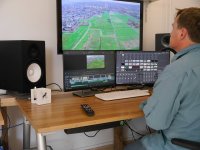
You mean this setup?

This is done with a cheap 4K capture card from Davinci (intensity pro). Also works wit catalyst. The big screen is a 4K samsung TV. The other two dell ultrasharp monitors are linked to the normal videocard.
3monitors.jpg
 
Last edited:
Back
Top