Pulses, or spikes in AVCHD 24pN mode

cbrandin

Well-known member
I'm trying to determine the effect of the pulses, or spikes, that appear with EyeStream have on image quality. I think the term "pulse" has been used to describe a couple of different things. What I mean is this kind of pulse (look at the huge P frame right before the I frame):


or, an alternative version that has two I frames in a row:

RogueIframe.jpg


Has anybody been able to associate these with anything visible?

Chris
 
The use of the term "pulsing" with video is (at least in my experience) the phenomenon of an image cyclically pulsing out of focus and then back in focus. Every half-second or so, the image twitches to blurry and then fixes itself right away. I don't know if that would have any correspondence with what you're describing.
 
That's certainly a technically accurate term for what's happening in the data stream, yes. I think the connotation of the "pulse" is that it's cyclical, like a heartbeat, whereas a spike doesn't have any connotation of repeatability. So yes, I think we'd have a clearer discussion if we talked about spikes in the data rate.
 
Oh, just wrote a post in the other thread about this (http://www.dvxuser.com/V6/showpost.php?p=2027210&postcount=62). I've been calling this problem you've posted screenshots for "rogue I/P frames." I don't think there are any visual effects for this type of situation, but more of a functional one -- camera will freeze when bitrates are pushed past a certain (card-dependent) point. Also, I've only seen this exclusively when 24p/25p patch is used.
 
Right - thanks for the clarification. I've looked at the spiked clips and I can't "see" anything different in the image. I've never had it produce a write error - then again, I'm using class 10 cards.

It might be interesting to see if, when a write error occurs, if the last frame is a spike, or if the last frame is the tenth P frame after an I frame (indicating that the failure occurs right before a spike would appear).

I'm going to try this out.

Chris
 
I think I like your suggestion of "Rogue Frame" better than mine. "Spike" just implies big, where "Rogue" implies big and wrong.

So how about we settle on "Rogue Frame"?

Chris
 
Oh, just wrote a post in the other thread about this (http://www.dvxuser.com/V6/showpost.php?p=2027210&postcount=62). I've been calling this problem you've posted screenshots for "rogue I/P frames." I don't think there are any visual effects for this type of situation, but more of a functional one -- camera will freeze when bitrates are pushed past a certain (card-dependent) point. Also, I've only seen this exclusively when 24p/25p patch is used.

That jibes with what I've seen as well. I just looked at two of my clips that are detail shots of the back of a dollar bill and they showed no visual pulsing or intermittent visual artifact of any kind. They looked great actually. Super stable and crisp. These were two out of seven clips (five clips were sized zero due to camera/card write failures) where I was able to get failures with static highly detailed shots and the 24P (no 60i wrapper) hack.

Anybody interested in looking at these for themselves can find the clips here:
http://www.jayandwanda.com/gh13/
 
Right - thanks for the clarification. I've looked at the spiked clips and I can't "see" anything different in the image. I've never had it produce a write error - then again, I'm using class 10 cards.

It might be interesting to see if, when a write error occurs, if the last frame is a spike, or if the last frame is the tenth P frame after an I frame (indicating that the failure occurs right before a spike would appear).

I'm going to try this out.

Chris
I've seen rogue frames only when native 24p/25p patch is used. I have a Sandisk Extreme 30MB/s card so PTool's "C" settings will work for most footage (including, if I recall correctly, a static star chart test -- I have testing notes at home). It is when I push bitrates up to 60,62,70 level that things get interesting. When filming "regular" scenes the camera records. However, when shooting a star chart on tripod it will freeze instantaneosly. When it does, there are no files written to card and therefore nothing to analyze. I have never been able to produce a "write speed error" when using native patch. It either freezes at high rates or records at lower ones. The first time I've seen a "write speed" error was when shooting static star chart at 60,62,70 settings and no native patch applied. But then, there were no rogue frames observed on the stream, just normal large I-frames and smaller P-frames. What I should test next are smaller increments of bitrate to see if I can find a breaking point on static star chart.
 
Last edited:
It sounds like there won't be any straightforward way to determing if the rogue frames are causing write errors if I understand what you are saying. Are you saying that when you get write errors the clip is not saved up to that point?

Chris
 
I have never recovered a clip after getting the write error. The write error could be the SD controller but I don't know enough about that to say. Just seems right.

The spikes I have a feeling is another thing because I don't know of anybody able to recover a clip after a write error to examine it.

Right. All I have is clips of the same shot that I stopped before they failed. These are clips that managed to make it to the card while the other virtually identical clips before and after them were failing. So it is reasonable to assume that their structure is similar but not exactly like the failed clips.
 
Do you suppose the rogue frames might be the result of the CODEC not conforming to the limiting bitrate setting?

Chris
 
I did some analysis and discovered something interesting. If you add up the number of bits contained in an I frame plus the following 11 P frames (assuming you have a GOP of 12) - lets call that a segment. A segment containing a rogue frame is almost exactly twice the size of the segments around it. It's as if the rogue frame consists of the last P frame of the current segment with data that consists of the entire bit allocation for an entire segment all rolled into one P frame.

Is an entire segment being rolled into one frame by mistake? I guess I could check this by filming a clock and seeing if 1/2 second is missing. The other StreamEye captures that show an extra I frame instead of a huge P frame come from version 1.1 of the program, which may be interpreting the same anomaly in a different way than the 3.1 version.

I suppose I don't have to use a clock, something swinging should do - after all, 1/2 second missing should be pretty visible.

Chris
 
Do you suppose the rogue frames might be the result of the CODEC not conforming to the limiting bitrate setting?

Chris

I think it could be because AVCHD lite doesn't truly conform to AVCHD specs anyway. This LITE stuff could simply just be buggy when operated outside of it's normal conditions. Vitaliy has reported many times that things are hard coded in the firmware. This is likely because of size limitations and/or performance limitations of the hardware/firmware. Most software engineers will write code that has error handling and dynamic processing that can take multiple conditions and deal with them. That is, unless, they are working within constraints that limit what they are allowed to do. In all likelyhood they hard coded this stuff because they had a set and small amount of onboard memory to utilize. This and they likely fulfilled the design requirements and did not plan on future improvements and/or feature additions. In either case, hardcoded firmware won't deal with changes as well as we hope because it simply can't. Some of the limitations are seen easily when we start changing things like Native 24p and getting really strange I/P frame anomalies which for all purposes should not be there. That means that we aren't understanding the process which the firmware is taking the native sensor stuff and interlacing it. I'm not sure what Vitaliy did, maybe he can explain it to us(I would like that), but with most software hacks, he likely just jumped a routine that he identified as the interlacing routine.

I see a growing trend here and it's not good for progress. I've seen a lot of posts from people who apply the hack to this camera and somehow expect things to work correctly after changing some numbers and doing some test shots. The idea of this hack has gone from being a test to being somehow a commodity. From that, we've received a growing number of "why isn't XXXX setting doing what I want, what do I do about it?" and less of "i'm seeing a problem with XXXX setting and here is my proof".

I'm not convinced that changing one number in a table doesn't throw the whole camera for a loop. So far it's shown to have some resiliency in dealing with all the stuff we've tried on it but without some kind of higher level help, we aren't going to get much further than "supposedly stable settings" that might hitch up at some point when we don't want them to.

What we need to do is get our hands on some AVCHD LITE documentation and see if we can figure out what they might be doing and what might cause the I/P frame problems. From there we can work backwards into the firmware and possibly shed some light on it for Vitaliy.

Remember, we are all a team in this. Vitaliy is a busy guy and we need to take on some more of the research work for him so he can focus on figuring out the firmware.
 
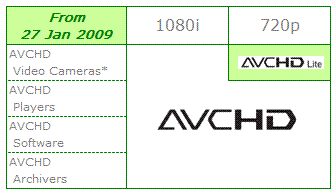
AVCHD Lite, as far as I know, is fully AVCHD-compliant, but doesn't allow for 1080i/p. It's a 720p-only implementation. But AFAIK, there is no change in bitrate or GoP size or anything else...
LiteChart.GIF
 
I agree. But I think this is the right sub-forum for us to do this research, and when we have results/proof we present it in the tester's forum.

Chris
 
Do you suppose the rogue frames might be the result of the CODEC not conforming to the limiting bitrate setting?

Chris

Maybe the rogue frames are by design. But the higher bitrates and 24pN wrapper amplify how large these frames can become which creates the throughput problem.
 
AVCHD Lite, as far as I know, is fully AVCHD-compliant, but doesn't allow for 1080i/p. It's a 720p-only implementation. But AFAIK, there is no change in bitrate or GoP size or anything else...
LiteChart.GIF

True. But the GH1 was not announced as using AVCHD Lite. It was called simply AVCHD. I don't know if they've changed their usage since then though.

From Wikipedia on AVCHD:

AVCHD Lite

AVCHD Lite identifies a subset of AVCHD format, in which HD-recording is limited to 720p/30.[25] The name was used first in marketing literature for the Panasonic DMC-ZS3/DMC-FT1/DMC-TZ7 digital cameras, announced in January 2009. The 720p/30 video is recorded in the normal AVCHD 720p/60 format, but every other frame is duplicated, resulting in thirty actual frames per second. This frame rate limitation stems from the capabilities of the camera sensor, it's not a limitation of the format (as normal full-fledged AVCHD is used as the storage format). Panasonic's Lumix GF1 Micro Four Thirds, Lumix DMC-FZ35/38 and Lumix DMC-TZ10/ZS7 cameras all shoot video in the AVCHD Lite format.
 
Last edited:
Back
Top