GH4 Pullingl up the blacks?

ralfmouth

Well-known member
I'm having a hell of a time pulling up blacks with the GH4. This reveal snapshot is hard for any camera. Macroblocking is what's making the shadows crawl around (noise is mostly subdued by the 4K > 1080p converstion). If anybody has favorite export settings or color correction techniques (Premiere Pro) in these situatuations to minimize macroblocking that would be great. I tried RGB curves, Luma curves, shadows & highlight effect but once you raise the blacks that's it. Maybe NeatVideo but I would have to re-license it. Thank you.
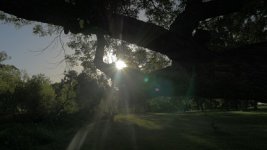
P1010616.mov.Still001.jpg

custom settings:
4K > 1080p
cine-d
-5
-5
-5
-0
-0
highlight -4
shadow +4
 
My preferred method is to open the aperture up two stops and then push the blacks down. Use a polarizer to preserve the blue sky and to cut glare from the leaves and grass. I've also moved away from using the highlight/shadow controls. I find that a really flat middle doesn't make things look better, and they do nothing to help where you really need them--at the extremes of the range. The -5 contrast curve does help there. And I'm still evaluating Cine-D vs. Natural. I'm tending toward Natural, but I have by no means given up on Cine-D nor Cine-V.
 
So, you're shooting a silhouette and you want detail in the blacks with a 420 8 bit Jpeg? That would be difficult even with a 16 bit RAW still.....
 
I agree a polarizer would have been awsome here but I'm just trying out the camera right now. As for shooting flat, so far it doesn't seem to help much with raising blacks in post. There's so much macroblocking/noise/de-saturation i'm inclined to leave blacks alone.
 
So, you're shooting a silhouette and you want detail in the blacks with a 420 8 bit Jpeg? That would be difficult even with a 16 bit RAW still.....

Just looking to see how others handle these situations (for instance raising the export bit-rate seems to reduce macrobocking). And this isn't camera specific really. The bigger conundrum is I'm not seeing much benefit in shooting flat. Surely more detail is being recorded in the extremes, but when pulling it out, it still looks bad to me (it's a 4k clip).
 
Are you shooting 16-235? I think it helps a lot in retaining detail at the top and maybe just a bit at the bottom.

I believe that with this cam 0-255 is spreading the 100mbps codec too thin and loosing detail. The codec seems to do a better job with the narrower color range. Expending bit rate to data below 16 and above 235 is pointless for me, as I like a contrasty image and just will crush and squish in post to 16-235 roughly anyway.

What ever the GH4 is doing, it seems to like keeping lots of information in the highlights and throw out information in the shadows. It is behaving very differently than simple levels adjustments in post when switching between 0-255 and 16-235 recording. There is definitely something going on with data allocation in this cam.

Cheers,
Pete
 
My only thought on something like this is that you need a camera with a significantly larger dynamic range.

What you really need is a waveform monitor to figure out what to do with the dynamic range you actually do have. And a polarizer. You'd be amazed how much DR is wasted "protecting" the wrong parts of the image. And how much money is wasted buying more camera when all that's really needed is more lighting and/or more filtration. It's amazing what you can do when you cheat...
 
Are you shooting 16-235? What ever the GH4 is doing, it seems to like keeping lots of information in the highlights and throw out information in the shadows. It is behaving very differently than simple levels adjustments in post when switching between 0-255 and 16-235 recording.

Thanks for the tip. It was 0-255 but it sounds like I will be trying 16-235 for sure. Except I thought both formats just remapped the same luminance values differently (meaning 16-235 actually has less information or "steps" able to be pulled out in post).

My only thought on something like this is that you need a camera with a significantly larger dynamic range.
Just saw this: GH4 with 13 stops at low ISO only.

What you really need is a waveform monitor to figure out what to do with the dynamic range you actually do have. And a polarizer. You'd be amazed how much DR is wasted "protecting" the wrong parts of the image. And how much money is wasted buying more camera when all that's really needed is more lighting and/or more filtration. It's amazing what you can do when you cheat...

I'm slowly coming to a compromise between dynamic range & noise/grain.
Along with higher bit-rates, exporting with constant bit rate seems to help noticeably with the macroblocking. With pans, tilts, slide moves anyway.
The variable bit-rate option seems to lower quality.
 
Last edited:
Trying to get shadow detail under a tree on a bright sunny day with the sun in the shot is about the most extreme test of dynamic range as you can get. Even film would have difficulty lifting shadow detail from a shot like this. This is where reflectors and silks come in handy. Or HDR.
But if I HAD to recommend a less noisy solution to retain shadow detail in the shot, I'd say shoot at 200 ISO, Cine-D with Contrast at -5 and set iDynamic to standard. Yes, you will get noise, but probably less noise than you would get by lifting the shadows in post.
But, honestly, without filling in those shadows with some actual light, it is unfair to expect noise-free shadow detail in a shot like this.
 
...meaning 16-235 actually has less information or "steps" able to be pulled out in post...
That's exactly what I think is working well here. Less range is being sent to the codec. This is giving more bit rate per "step" and thus what it does end up with has more information allocated to it. Obviously a 100mbps output in 4k is severely limited relative to 200mbps in 1080. If we had 20 stops of dynamic range and a 4.4.4 500mbps output we could leave all kinds of room for adjustment in post. It seems logical when you have a bit rate limit like this, that getting closer to what you want for final output might be the wiser choice. To my untrained eye this seems to be the case so far from my testing, but like always everyone else's milage might vary.

Cheers,
Pete
 
Less range is being sent to the codec. This is giving more bit rate per "step" and thus what it does end up with has more information allocated to it.

But what is that "more information" if there are fewer steps to represent the image? If I shot a 12-bit 4:4:4 uncompressed image that, for hypothetical reasons, could only represent the image as 1 of 3 values -black, gray and white, then what would be the point of a high bitrate uncompressed image?
8-bit limits you to 256 values per channel and setting the luminance value to 16-235 limits it to 219 values per channel. With so few values distributed to the dark shadows of a high contrast image, having "more bitrate" won't matter. When you start lifting shadows, you'll just have a higher bitrate version of ugly banding.
 
Less range is being sent to the codec. This is giving more bit rate per "step" and thus what it does end up with has more information allocated to it.

Does 16-235 actually clip the sensor's dynamic range, because it makes more sense to me to simply remap the full range of luminance values to whatever bits are available.
 
Does 16-235 actually clip the sensor's dynamic range, because it makes more sense to me to simply remap the full range of luminance values to whatever bits are available.
No, it does not clip the sensor's dynamic range. You are correct in that It remaps the range of the sensor so that the darkest black falls at 16 and the brightest white falls at 235, which is the broadcast legal range for NTSC video.
 
The only reason I can see to use 16-235 is if what you shoot will go straight to broadcast without any CC and legal limiting in post. Otherwise use 0-255 to have more luma steps for post processing.

And as dvbrother has already said, not even a film negative handles shadows very well when aiming straight into the sun and exposing for it as in the example image. Hell, not even the human eye can handle that which is why images with the sun in background and a filled-in foreground object mostly look very artificial. A cool look sometimes though.

cheers
 
But what is that "more information" if there are fewer steps to represent the image? If I shot a 12-bit 4:4:4 uncompressed image that, for hypothetical reasons, could only represent the image as 1 of 3 values -black, gray and white, then what would be the point of a high bitrate uncompressed image?
8-bit limits you to 256 values per channel and setting the luminance value to 16-235 limits it to 219 values per channel. With so few values distributed to the dark shadows of a high contrast image, having "more bitrate" won't matter. When you start lifting shadows, you'll just have a higher bitrate version of ugly banding.
Sorry dv, I guess I didn't make it very clear what I was referring to here. Speaking theory here, not just the GH4. With an uncompressed image we have room to do what ever we want with it in post. With a high bit rate 10 bit 4.2.2 encoding we would have quite a bit of room to adjust in post. On the GH4 we have 4 times the pixels for 4K in 8 bit 4.2.0 at only 100mbps. There simply isn't enough data rate to spread around. When we have a lot of movement and/or high detail, the codec and bit rate can't handle that much information and data is thrown out, thus leaving macro blocking and poor representation of low signal to noise ratio areas.

From my testing, the GH4 in 4K mode gives much cleaner images out of it's limited 100mbps when only spreading those bits around to only those 219 steps. In this particular example, where we have an extremely high contrast scene, using 0-255 stretches the bitrate so thin you get a very poor image. Adding -5 highlights and +5 shadows, doubles down on the problem by forcing more data rate to the area's it already can't handle. Then to compound that we try to bring more out of it in post and gives us a complete pos image.

In any case the whole point I'm trying to make is that the concept of "shooting flat to save room to adjust in post" is a very poor idea with the GH4 in 4K mode.

Cheers,
Pete
 
c3hammer, I am still skeptical that reducing the image from 256 steps to 219 gives cleaner images. You have done tests that confirm this?

However, I totally agree that cranking highlights/shadows to -5/+5 is a bad idea because it introduces severe noise in the source image and flattens things so much that the extreme curve that must be added in post to an 8-bit image introduces unwanted artifacts. Same deal for iDynamic and lifting the Master Ped to +15. All these things flatten the image but at the cost of ruining it. Trying to treat it like a Red or an Alexa doesn't play to the strengths of the camera.

When the Shogun arrives, we'll see if that philosophy changes when we have a 10-bit 4:2:2 Prores image to work with.

I will say that I have found Cinelike-D at 0 Contrast or Natural at -5 Contrast to be a good choice for later grading, at least in Premiere or any system that can grade in 32-bit float. The extra room in the highlights and shadows provided by those settings have helped my GH4 images, but mostly because I am not trying to lift the shadows but to darken them when I add the requisite S-curve.
 
Here's a gif animation that shows the difference I'm getting in the wave form between 0-255 and 16-235 with cineV. I will state that I'm a fan of the contrasty, over saturated, over sharpened image, though. That's why I've been shooting in Cinelike V

http://www.c3di.com/c3films/cineV-0_255-vs-16_235.gif

These two images are not exactly the same as I was moving on a stabilizer, but I think they are still representative of how the GH4 is protecting the highlights better with less clipping in 16-235. The 0-255 has much harsher roll off and harder clipping right at 255. The shadows are smoother in appearance to my eye, even though the wave form doesn't show any real difference just location relative to 0 IRE.

To my eye the shadows have more detail and are cleaner which doesn't make any sense and is the reason I think 16-235 is more sensibly using the 100mbps.

Here's my only real example so far, but you can see how in the final output after adding some s-curve to bring up the contrast and saturation the highlights and shadows are pretty clean.

http://youtu.be/8A5chlSqu7Q

It would be interesting to see the OP's original shot using a bunch of these different settings. I may have to try this again with some back lit leaves and flowers to see if my hunch holds up or if I'm just talking crap :)

Cheers,
Pete
 
From my testing, the GH4 in 4K mode gives much cleaner images out of it's limited 100mbps when only spreading those bits around to only those 219 steps. In this particular example, where we have an extremely high contrast scene, using 0-255 stretches the bitrate so thin you get a very poor image. Adding -5 highlights and +5 shadows, doubles down on the problem by forcing more data rate to the area's it already can't handle.
H.264 encoding doesn't work the way you may think it does. The GH4 digitizes its RGBG sensor channels to 12-bit precision. In video mode, it debayers the RAW data, applies the tone curve settings, and converts to YUV format. Internally, the YUV data is always scaled to the equivalent of 16-235 range, at 16-bit signed precision or better. The H.264 encoder then transforms the YUV data into 8-bit macroblock spatial frequency components, at quality levels quantized to fit within the available bitrate. There are no "pixels" in the encoded H.264 data, 16-235 or otherwise, it's all 8-bit macroblock components.

When you select the 16-235 option, the GH4 scales its RGB data to fit within this range (but does not reduce its internal data precision to 8-bit). The H.264 encoder then sets a metadata flag in the video file that instructs H.264 decoders to scale their RGB pixel output to the same 16-235 range. Whether this makes any difference at all depends on the bit-depth of the decoder. If you edit in a 16 or 32-bit video editor, the decoded 8-bit 4:2:0 YUV data will be converted into high-precision RGB data, and there will be no perceptible degradation in image quality. If you had originally selected the GH4's 0-255 mode, the decoder would scale its high-precision RGB data to that range instead.
 
Back
Top