Pros/Cons of Anamorphic Adaptor vs Letterbox Matte

carbon3c

Active member
I'm considering a GH1, primarily for indie shorts. I love the 2.39:1 ratio, but was wondering about the advantages and drawbacks of using either the LA7200 anamorphic adapter, or simply creating a Letterbox Matte in After Effects.

From what I've read, the anamorphic adapter on the GH1 has the following limitations:
- can't go faster than F4 (frame edges become distorted)
- can't go wider than 14mm/16mm (vignetting)
- no filters
- 2.35 ratio, not 2.39
- $800+ (new)

Creating a matte in AE doesn't take much time, but I would need a way of marking the LCD and/or viewfinder. Does the GH1 allow you to set custom markers?

Does anyone know which solution puts more detail on screen and creates a better looking image?
 
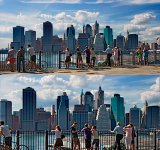
Way different beast.

With an anamorphic lens you get a wider horizontal FOV.
With letterbox you get a narrower vertical FOV.

Sounds the same but it isn't.

Frank
 

Attachments

  • Untitled-1.jpg
    Untitled-1.jpg
    135.4 KB · Views: 0
Last edited:
-anamorphic adapter change per pixel aspect ratio, but use full frame
-will do image wider than lens, to what it is attached (vignete i depend on lens angle and anamorphic adapter size itself ... same principles as for backfocus and image circle, as anamorphic attachment is the same lens - so it have backfocus on attachment side, but primary lens act as image sensor - think in that way will be easier to understand)
-mainly in front of anamorphic adapter you cant attach filters, but can before it.
-2.35:1 - not so bad as it is the CinemaScope ratio for anamorphic widescreen films ...
-in software solutions you will crop image, with anamorph - stretch horisontaly full frame, so details retain more in case of anamorph usage
 
Last edited:
Sounds the same but it isn't.

Frank

How exactly?

With the adapter, if I move the camera closer to the subject to approximate the same frame as using a letterbox matte, how would they differ?

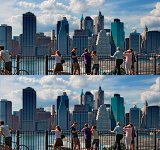
To simulate this, I took your sample images, blew up the first one and cropped to size, and they look nearly identical. I did not modify the bottom image.
 

Attachments

  • Untitled-1b.jpg
    Untitled-1b.jpg
    360.7 KB · Views: 0
wider lens

wider lens

Way different beast.

With an anamorphic lens you get a wider horizontal FOV.
With letterbox you get a narrower vertical FOV.

Sounds the same but it isn't.

Frank

Understood, but its said that cannot be used lenses too wide, regarding that, what if we use a very wide lens (without an anamorphic lens) and crop the frame in post? We will get it wider (both vertical and horizontal) and can just adjust the ratio later.

The more wider we get with the anamorphic, more we lost not using very wide lens directly in the camera and also lost quality (sharpness, distortion, color, contrast..)

I really think that anamorphic images are VERY beauty in large screens, but my question is: Is it worthy? To put an expensive glass in front of your lens to get a little more horizontal resolution while we could do it with minimal image loss (and less money) using a very wide lens, since our cameras are now 16:9 against the elder 4:3.
 
DaLiV -- so I'm using more pixels with the adapter, so there is more detail. But isn't each pixel less accurate? Just trying to understand. I wonder if anyone has any samples other than the one Frank provided for comparison.
 
with anamorph - accuracy loss by horizontal axis, as on one pixel projected more informationб so you will see picture that have squeezed big information to one point
when software crop and resize - you loose vertical axis (take off scalp and legs from peoples)

2.37 (as one of standarts persist UW-UXGA) = 2560x1080 - real thing, exist commercial products
with anamorph : 1920x1080 -> resize 1920*1.3(3) = 2560x1080
software crop+resize : 1920x1080 -> crop to 1920x810 -> resize to 2560x1080

so when software - you loose 270 pixels of information firstly and then stretch each pixel in both directions (each pixel is included in interpolation by vertical and by horisontal), with anamorphic lens each pixel is already have vertcal size and interpolation iz only by horisontal axis (point of information loss : 4 points projected to 3 pixels and in software you only stretch back that 3 pixels to 4).

so you can see in software way you loose much more information, then by squeezeng on anamorphic optics ...

P.S. sorry for language.

P.P.S. if your end file resolution is FullHD 1920x1080 then software way possible is more right - you will only crop (only need to think about that when filming)
 
Last edited:
mine samples will be only in next month (while have no GH1)
i've soligor 1.33 anamorphic adapter, howewer thread size is 52, so first use will be with kit lens (need downstep rings) and minimal zoom seems without vignetting will be at 20mm (approximation)
 
How exactly?

With the adapter, if I move the camera closer to the subject to approximate the same frame as using a letterbox matte, how would they differ?

.

The image I used was not a real anamorphic one.
I just pulled a random photo from Google and did a manual resize in PS to illustrate the effect.

In the real world you can move the camera farer away and crop of course, but you loose detail and vertical resolution. On the other hand, that´s what a 2 perf on film is.

Thou the look of a -far away and cropped - image will be different to a real anamorphic.

I would love to have a set of anamorphics. Keeping the vertical resolution and also get a wider FOV is like having the cake and eating it.

Frank
 
I would just like to add my own two cents to this. Or rather, ask my own two cents :D

I'm quite confused on how these adapters work. Obviously, if I stick an anamorphic adapter on the end of my GH1, my final image out of the camera is still going to be 1920x1080. The adapter will have no affect on the actual resolution of the image, correct?

If this is the case, which I'm sure it is, how is the image going to be "widescreen anamorphic", ala 2.39:1 (or 2.35:1 or 2.37:1)?? Does the anamorphic adapter create stretched pixels, much like HDV uses 1440x1080 1.33 pixel size to create 1920x1080?

I guess my main point of confusion is that in the end your image size is still going to be 1920x1080, and not an anamorphic size like 2048x858 (which I believe is digital cinema 2k, 2.39:1, yes?). I'm really confused, any clarification would be absolutely lovely!
 
1. yes - anamorph lens - that is magnifyyng lens, which was bended only by 1 axis
2. anamorphic adapter make optical projection of wider area to one pixel. it do squeezed pixels ... get media player in which you can control aspect ratio, take a look on media 1920x1080 with changed aspect ratio to 4:3 - the same visual effect will be with anamorphic adapter (except size not lowered, but remain same)
3. you will not get "Digital Cinema 2K", but best will be "look like" with minimal distortions, and which can be used on real 2k equipment (mentioned in post before), not only squeezet to FullHD television with black stripes at top and bottom

+ one note
2048×858 is smaller then 2560x1080 - may crop if you want ... however possible sensor in GH13 will be set to appropriate mode, and then you will have natural 2k with standart angle (horisontal FOV with anamorph adapter is wider then only base lens used, so without anamorph adapter looks like with anamorph + zoomed)

+FYI: 2k versions:
Full Aperture Native 2K 2048 × 1556 1.32:1
Academy 2K 1828 × 1332 1.37:1
Digital Cinema 2K 2048 × 858 2.39:1
Digital Cinema 2K 1998 × 1080 1.85:1

+ google for "2.39:1 LCD" - you will find only FullHD 21:9 ...
 
Last edited:
Thanks Postmaster and DaLiV for the help.

To recap: if my final output is 1920 x 1080, and I want Cinemascope (2.39:1) format, I'm not losing anything or degrading the quality of the image if I use a matte to create the letterbox.

I'll lose the anamorphic lens flare, but otherwise, the image should be as good or better than using the anamorphic adapter.

If I use the adapter and the pixels are stretched by 1.33 horizontally and then I resize to 1920, then I'm degrading the image.

Is that right?

I'll also be limited by the constraints I listed on my first post, if I use the adapter.

The tricky part is taping the LCD to mark the top and bottom of frame, and of course, there's no way to tape the EVF.
 
If I use the adapter and the pixels are stretched by 1.33 horizontally and then I resize to 1920, then I'm degrading the image.

Is that right?
not right . you not resize to 1920, but from 1920 to 2560
pixels remains the same, wider angle image projected on each pixel

1920/2.39 = 803.347, so with any standart lenses you can simple crop image size to 1920x804, without any adapters and that will be desired "cine-look" 2.39:1. (only remember about planned crop when filming material ... attach 2 horisontal threads in front of lcd for easier composition 12.7(7)% from top and same from bottom )
Or you can use anamorph adapter and get 2560x1080
 
Last edited:
not right . you not resize to 1920, but from 1920 to 2560

Yes, to account for the compressed pixels coming from the adapter, but then I have to take that 2560 image and resize to 1920 for my final output.

That brings me to another question, if I did want to output a copy for use in a theatre, you said the correct format would be 2048 x 858. But when I do the math, it comes to 2048 x 857. Why am I off by 1 pixel? Is 858 the accepted standard for 2k cinemascope?

Another thought -- If I create a 2k output from a standard 1920 x1080 image, it upscales the image 6.66 percent in both directions. That seems better than the 33 percent horizontal upscale by the anamorphic adapter. That detail will still be lost when you downscale 2560 to 2k, just not as noticable.
 
You don´t resize at all.

You change pixel aspect ratio (PAR).

The size of the image is still 1920 x 1080 after that.

If you do so, you don´t degrade quality. Cinemascope done that for ever.

If you crop the image, the size will be 1920 x 800.

Frank
 
Note for Postmaster : currently seems not present tool, that without reencoding change header in stream for PAR or DAR correction in streams from GH1 (mpeg-ts + avchd) , as there seems not inserted any header about that currently...
that is reason why i'm mention stretching, but possibility persist
 
Last edited:
You change pixel aspect ratio (PAR).
Frank

Thanks, I forgot about PAR.

If you do so, you don´t degrade quality. Cinemascope done that for ever.
Frank

Cinemascope was traditionally done on film, which stores a lot more information so the compression doesn't get noticed. It seems that storing 2560 pixels worth of information onto 1920 pixels would have some impact. I don't have any experience with it to know for sure.

Going back to my example of using the adapter in one shot (closer to subject), and then a regular lens (farther from subject) in another shot, so the frame widths are identical -- it seems the regular lens would give a higher quality digital image because the adapter image is compressed.
 
Back
Top