
Navigation
Install the app
How to install the app on iOS
Follow along with the video below to see how to install our site as a web app on your home screen.
Note: This feature may not be available in some browsers.
More options
You are using an out of date browser. It may not display this or other websites correctly.
You should upgrade or use an alternative browser.
You should upgrade or use an alternative browser.
Proper exposure without zebra or false color tool in manual mode
- Thread starter Borut
- Start date

cyvideo
Veteran
That's a rule of thumb that's worked well for me over the years, 10 IRE = 1 stop. Below I outline a procedure I've used for years setting up studio and OB cameras in the 709 world. Seeing that the original OP has an earlier 709 JVC it may be of some help to him.You could use your X-Rite patch with the XL1, since that delivers at the 95 IRE. Or your other whites, and then stop down one stop (10 IRE = 1 stop).
To state that one should work to any specific zebra value is a little misleading, as it avoids other image control aspects that can affect the look of your exposure. Zebras are purely an electronic measuring point. Zebras are not indicative of what is happening to your exposure below the defined Zebra point level. Especially with earlier cameras that had far more limited dynamic range. Not knowing what adjustments the OP has on his JVC, it would be hard to offer any specific advice for his situation.
Suggested guide points to be considered in trying to get the best 'look' exposure from his camera are below, along with an attached JPG showing the difference in image levels that lead to quite different image results. Under the images are the corresponding waveforms as displayed in Resolve. These waveforms indicate clearly the major difference in levels as we progress up from 40 IRE to 90 IRE.
Most video cameras, especially earlier ones, running in the 709 world utilise a knee. You may well have your peak Zebras set to 90 IRE for your peak white reference, BUT the look and quality of the image exposure below 90 IRE can look anywhere from decent to absolute c**p if your skin tones are going into severe compression as in the left image when the knee is set too low with an aggressive slope. If you are going to set a white peak reference of 90 IRE then you really need to set up the camera on a WFM and place a person in the scene be it a lit studio or outdoors and then adjust the knee and slope so you get the maximum image quality and smoothest exposure transition roll off between about 60 IRE and your defined white point maximum of 90 IRE.
Chris Young
Attachments

Thank you for your suggestion. Really good idea, thank youYou could use your X-Rite patch with the XL1, since that delivers at the 95 IRE. Or your other whites, and then stop down one stop (10 IRE = 1 stop).
Do you have any recommendation for a knee point? Or would you recommend auto knee function? Knee point can be set from 80% to 100% in my JVC camera. The default value is 100%.That's a rule of thumb that's worked well for me over the years, 10 IRE = 1 stop. Below I outline a procedure I've used for years setting up studio and OB cameras in the 709 world. Seeing that the original OP has an earlier 709 JVC it may be of some help to him.
To state that one should work to any specific zebra value is a little misleading, as it avoids other image control aspects that can affect the look of your exposure. Zebras are purely an electronic measuring point. Zebras are not indicative of what is happening to your exposure below the defined Zebra point level. Especially with earlier cameras that had far more limited dynamic range. Not knowing what adjustments the OP has on his JVC, it would be hard to offer any specific advice for his situation.
Suggested guide points to be considered in trying to get the best 'look' exposure from his camera are below, along with an attached JPG showing the difference in image levels that lead to quite different image results. Under the images are the corresponding waveforms as displayed in Resolve. These waveforms indicate clearly the major difference in levels as we progress up from 40 IRE to 90 IRE.
Most video cameras, especially earlier ones, running in the 709 world utilise a knee. You may well have your peak Zebras set to 90 IRE for your peak white reference, BUT the look and quality of the image exposure below 90 IRE can look anywhere from decent to absolute c**p if your skin tones are going into severe compression as in the left image when the knee is set too low with an aggressive slope. If you are going to set a white peak reference of 90 IRE then you really need to set up the camera on a WFM and place a person in the scene be it a lit studio or outdoors and then adjust the knee and slope so you get the maximum image quality and smoothest exposure transition roll off between about 60 IRE and your defined white point maximum of 90 IRE.
Chris Young
I also dont understand the white clip setting. It can be set to 100% or 108%. The default value is 108%. Would you perhaps recommend 100%?
Thank you in advance and sorry for lack of knowledge about these advanced functions
cyvideo
Veteran
Dragging back through my memory banks here. The 5100 series JVC were from memory, a 3 x 1/2" chip DV camera. Most of those 1/2" three chippers had a capacity to handle about 400% dynamic compression. Most of the Sony 1/2" cameras back then, similar tech to the JVCs seemed to work best with the knee set manually, not auto knee as hey can tend to 'pump' under certain conditions, giving you a fluctuating exposure. Manually set the knee to about 85 IRE, as that keeps the start of compression reasonably above skin tone levels and yet gives you 15 IRE to compress your highlights into if your clip is set to 100 IRE. If you are not doing broadcast work where really 100 IRE should be used, set the clipper for 108 as that will give you 23 IRE in which to compress the highlights. Which will give the highlights a softer compression curve.Do you have any recommendation for a knee point? Or would you recommend auto knee function? Knee point can be set from 80% to 100% in my JVC camera. The default value is 100%.
I also dont understand the white clip setting. It can be set to 100% or 108%. The default value is 108%. Would you perhaps recommend 100%?
Thank you in advance and sorry for lack of knowledge about these advanced functions
The reason why the 100 setting is in there is that the broadcast transmission chain from studio through to the satellite was all based on the 0/100 IRE, i.e. the 1 volt Peak to Peak video level that broadcasting was designed to work with. Though, in post, you really need to massage that 108 IRE highlight level back to the 100 IRE level using curves. Most TVs and video software encoders are designed around the 0/100 IRE level and are expecting to see your peaks at 100 IRE. In 8-bit terms that is video levels of 16-235, black to white or in 10-bit levels 64-940, black to white.
Here is a link to an old tips sheet that may help you understand the settings a little better. It's a Sony tip sheet, but the principal remains the same for basically any 709 camera that is using a knee function.
Chris Young
https://www.sony-asia.com/microsite/professional/xdcam/_creativeshootingtechniques/CSTGB05-0.pdf
Last edited:
Dear Chris,Dragging back through my memory banks here. The 5100 series JVC were from memory, a 3 x 1/2" chip DV camera. Most of those 1/2" three chippers had a capacity to handle about 400% dynamic compression. Most of the Sony 1/2" cameras back then, similar tech to the JVCs seemed to work best with the knee set manually, not auto knee as hey can tend to 'pump' under certain conditions, giving you a fluctuating exposure. Manually set the knee to about 85 IRE, as that keeps the start of compression reasonably above skin tone levels and yet gives you 15 IRE to compress your highlights into if your clip is set to 100 IRE. If you are not doing broadcast work where really 100 IRE should be used, set the clipper for 108 as that will give you 23 IRE in which to compress the highlights. Which will give the highlights a softer compression curve.
The reason why the 100 setting is in there is that the broadcast transmission chain from studio through to the satellite was all based on the 0/100 IRE, i.e. the 1 volt Peak to Peak video level that broadcasting was designed to work with. Though, in post, you really need to massage that 108 IRE highlight level back to the 100 IRE level using curves. Most TVs and video software encoders are designed around the 0/100 IRE level and are expecting to see your peaks at 100 IRE. In 8-bit terms that is video levels of 16-235, black to white or in 10-bit levels 64-940, black to white.
Here is a link to an old tips sheet that may help you understand the settings a little better. It's a Sony tip sheet, but the principal remains the same for basically any 709 camera that is using a knee function.
Chris Young
https://www.sony-asia.com/microsite/professional/xdcam/_creativeshootingtechniques/CSTGB05-0.pdf
Thank you very much for the detailed explanation. Now I finally understand what the knee point does. It functions like a kind of virtual increase of the dynamic range. I will definitely set the knee point to 85 IRE and see the results. Thank you also for explanation regarding the white clip function.
Regarding the pictures of the girl you sent me, what do you think is the approximate value of the knee point for the one on the left-hand side and for the one on the right-hand side (e.g., is the first one 80 IRE and the second one 90 IRE)? How will changing the knee point value affect my exposure when using the X-Rite ColorChecker or reflected bright whites? If I set my exposure to the white card which has 95 IRE of declared reflectance and set my zebra to 95 IRE, will the exposure still be correct if I set the knee point to 85 IRE?
Thank you so much for your help; I really appreciate it.

Peter C.
Veteran
I was watching a review of the different versions of the Atomos V. The latest has the ability to do false color on a scale with 55% gray in the middle and then the colors are broken up as stops of exposure. I might not be explaining correctly but you get the gist.
For myself I've been doing it long enough with using a camera that I know what's good. I usually throw in a zebra value a little bit above the area I want exposed so as soon as I see it I know its starting to be over exposed. But it depends on the situation. For interview with no windows I'll hit the exact exposure I want but with windows I'll dial it back much in the same way audio is done to leave head room and in post you can bring up a little to the perfect exposure.
For myself I've been doing it long enough with using a camera that I know what's good. I usually throw in a zebra value a little bit above the area I want exposed so as soon as I see it I know its starting to be over exposed. But it depends on the situation. For interview with no windows I'll hit the exact exposure I want but with windows I'll dial it back much in the same way audio is done to leave head room and in post you can bring up a little to the perfect exposure.
cyvideo
Veteran
Yes. As Doug Jensen quite often expresses on here that if your peaks are set for about 90-95 IRE that then will generally look after the rest of the image. However, as I expressed, how your image will look below those IRE levels is dependent on any given camera and its knee and slope settings below that 95 IRE point. This applies of course to cameras running in Rec 709 color space that utilise a knee circuit.Dear Chris,
Thank you very much for the detailed explanation. Now I finally understand what the knee point does. It functions like a kind of virtual increase of the dynamic range. I will definitely set the knee point to 85 IRE and see the results. Thank you also for explanation regarding the white clip function.
Regarding the pictures of the girl you sent me, what do you think is the approximate value of the knee point for the one on the left-hand side and for the one on the right-hand side (e.g., is the first one 80 IRE and the second one 90 IRE)? How will changing the knee point value affect my exposure when using the X-Rite ColorChecker or reflected bright whites? If I set my exposure to the white card which has 95 IRE of declared reflectance and set my zebra to 95 IRE, will the exposure still be correct if I set the knee point to 85 IRE?
Thank you so much for your help; I really appreciate it.
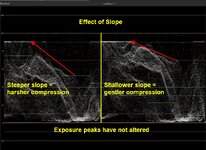
A suggestion. Set up your camera on a subject with say a white shirt on in a good wide dynamic range environment. Now expose till your Zebs hit the 95 IRE warning. Then, using a decent quality monitor, if possible, start adjusting the knee, starting around that 85 IRE point, adjusting up and down to get the best looking skin tones. Once you have settled on the best look you can get on the face skin tones now adjust the knee slope setting to get the most pleasant and natural look to the skin tone highlights rolling off as soft as possible. You will find with a bit of experimenting with knee vs slope combinations, you will come up with the best image you can get out of any given camera.
Chris Young
Attachments
I will try to set the knee point exactly as you said. Thank you very much.Yes. As Doug Jensen quite often expresses on here that if your peaks are set for about 90-95 IRE that then will generally look after the rest of the image. However, as I expressed, how your image will look below those IRE levels is dependent on any given camera and its knee and slope settings below that 95 IRE point. This applies of course to cameras running in Rec 709 color space that utilise a knee circuit.
A suggestion. Set up your camera on a subject with say a white shirt on in a good wide dynamic range environment. Now expose till your Zebs hit the 95 IRE warning. Then, using a decent quality monitor, if possible, start adjusting the knee, starting around that 85 IRE point, adjusting up and down to get the best looking skin tones. Once you have settled on the best look you can get on the face skin tones now adjust the knee slope setting to get the most pleasant and natural look to the skin tone highlights rolling off as soft as possible. You will find with a bit of experimenting with knee vs slope combinations, you will come up with the best image you can get out of any given camera.
Chris Young