
Navigation
Install the app
How to install the app on iOS
Follow along with the video below to see how to install our site as a web app on your home screen.
Note: This feature may not be available in some browsers.
More options
You are using an out of date browser. It may not display this or other websites correctly.
You should upgrade or use an alternative browser.
You should upgrade or use an alternative browser.
Proper Exposure with Slog2 and the Odessey 7Q
- Thread starter cuervo
- Start date

paulcurtis
Veteran
I have something that may help you, could be worth a try, i'll PM you.
cheers
paul
cheers
paul
Shizopolis
Member
As I understood from your talks there is nothing bad to exposure slog2 skin even at 70ire if shooting in controlled situations and if there is not much highlights. Right?
Last edited:
I think this is a really interesting topic, but it all took place before the 10bit ProRes was offered on the 7Q.
Do you also expose 4K2HD the way you would with RAW? They're both using Slog2 curve, i believe? Can you change cinegammas while using 4k2HD, or is it locked in to Slog2?
I just got my 7Q, waiting on the camera upgrade from Sony. But i'm playing with the False Color settings, and i thought i'd initially try for skin tones at 65%. After reading this thread, i wonder if i should just set my brightest spot in the scene under 109% and let the rest fall where it may.
I plan to shoot mostly in 4K2HD, but haven't heard much about exposure in that mode. Can't wait to try it out myself soon, but always up for any tips.
EDIT: I found this topic, which is very informative. http://www.dvxuser.com/V6/showthread.php?321988-Correct-exposure-for-S-log2
Do you also expose 4K2HD the way you would with RAW? They're both using Slog2 curve, i believe? Can you change cinegammas while using 4k2HD, or is it locked in to Slog2?
I just got my 7Q, waiting on the camera upgrade from Sony. But i'm playing with the False Color settings, and i thought i'd initially try for skin tones at 65%. After reading this thread, i wonder if i should just set my brightest spot in the scene under 109% and let the rest fall where it may.
I plan to shoot mostly in 4K2HD, but haven't heard much about exposure in that mode. Can't wait to try it out myself soon, but always up for any tips.
EDIT: I found this topic, which is very informative. http://www.dvxuser.com/V6/showthread.php?321988-Correct-exposure-for-S-log2
Last edited:
EDIT: After a bit of messing around, if you drop the gain a bit, the highlights recover nicely on 4K2HD and recover better on 4K2HD than AVCHD. I was just looking at the initial un-graded state of the .movs
4K2HD, should not be exposed the right IMO, because it cannot hold the highlights like RAW can. Look at the picture I attached.
Here's a link to a full sized .jpg since they come in small on DVXUser.
http://www.builtbyugene.com/misc/dr2.jpg
The AVCHD and 4K2HD were recorded at the exact same moment as I used Camera Trigger and the 4KRAW was recorded about 30 seconds later on a bright, cloudless day. I transcoded the RAW using Resolve with the OLD Resolve / BMD settings and the OLD LUT because the new Resolve / S-log LUT are not useable because of the issue with the color red, which I know is actively being fixed. I had to add a tweak to raise the gamma on the old Resolve / BMD settings because it starts a little dark.
The strange thing is that I noticed the AVCHD holds the highlights a bit better than 4K2HD. If you look in the white areas, it looks a little less clipped on the AVCHD.
So yeah, while 4K2HD is really good, RAW is still the ultimate (as it should be).
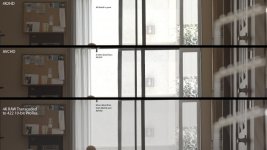
4K2HD, should not be exposed the right IMO, because it cannot hold the highlights like RAW can. Look at the picture I attached.
Here's a link to a full sized .jpg since they come in small on DVXUser.
http://www.builtbyugene.com/misc/dr2.jpg
The AVCHD and 4K2HD were recorded at the exact same moment as I used Camera Trigger and the 4KRAW was recorded about 30 seconds later on a bright, cloudless day. I transcoded the RAW using Resolve with the OLD Resolve / BMD settings and the OLD LUT because the new Resolve / S-log LUT are not useable because of the issue with the color red, which I know is actively being fixed. I had to add a tweak to raise the gamma on the old Resolve / BMD settings because it starts a little dark.
The strange thing is that I noticed the AVCHD holds the highlights a bit better than 4K2HD. If you look in the white areas, it looks a little less clipped on the AVCHD.
So yeah, while 4K2HD is really good, RAW is still the ultimate (as it should be).
Last edited:
hey gene,
did u get those pics mislabelled? it looks backwards..
Hi Cuervo,
Actually, they are labelled correctly. I will say that by dropping the gain a little bit, you can recover the highlights pretty well in 4K2HD. I guess it's just the initial unprocessed state that is a little blown out. Seems like range from RAW processed 4222 10-bit just comes out a little better initially without much tweaking.
4K2HD is really awesome though.

I have to second Cuervo. Image on top should be AVCHD
NO, it's not. It's correctly labeled as I've check a number of times as well as compared several different images between 4K2HD and AVCHD and it's the same across several different shots. At first I thought I was seeing wrong, but AVCHD holds the highlights better in it's initial state. Obviously, once you bring down the gamma and do a grade it's a different story and shifts heavily in favor of 4K2HD.
I think maybe Convergent just shifted the gamma a bit brighter in 4K2HD than they should have. But yeah, just the shift the Gain down a bit in 4K2HD and you're all good.
Also, if you look at the top image (4K2HD), it lacks the black aliasing issue on the extreme contrast between the window frame and the outside. You can clearly see that black aliasing issue on the image labeled AVCHD.
Last edited:
Alan Ting Judson
Well-known member
EDIT: After a bit of messing around, if you drop the gain a bit, the highlights recover nicely on 4K2HD and recover better on 4K2HD than AVCHD. I was just looking at the initial un-graded state of the .movs
4K2HD, should not be exposed the right IMO, because it cannot hold the highlights like RAW can. Look at the picture I attached.
Here's a link to a full sized .jpg since they come in small on DVXUser.
http://www.builtbyugene.com/misc/dr2.jpg
The AVCHD and 4K2HD were recorded at the exact same moment as I used Camera Trigger and the 4KRAW was recorded about 30 seconds later on a bright, cloudless day. I transcoded the RAW using Resolve with the OLD Resolve / BMD settings and the OLD LUT because the new Resolve / S-log LUT are not useable because of the issue with the color red, which I know is actively being fixed. I had to add a tweak to raise the gamma on the old Resolve / BMD settings because it starts a little dark.
The strange thing is that I noticed the AVCHD holds the highlights a bit better than 4K2HD. If you look in the white areas, it looks a little less clipped on the AVCHD.
So yeah, while 4K2HD is really good, RAW is still the ultimate (as it should be).
View attachment 85237
Are these before edited clip or after edit? if it is unedited, would like to see after edited especially on how much highlight can recover back for each.
Are these before edited clip or after edit? if it is unedited, would like to see after edited especially on how much highlight can recover back for each.
these are before edit, just from camera. The 4K2HD recovers highlights very well. I was able to being back the white blown out part very easily. Happily surprised.
my personal experience with FS700 raw and convergent design 7q
my personal experience with FS700 raw and convergent design 7q
I would like to share the tens of hours i spent testing sony fs700 slog raw with convergent design 7q.
I want to agree with phillip bloom who said that Slog is « noisy « and it is.
I red too, underexposure or misapropriate exposure will result in sévère punishments..aka grain and noise…i can confirm heavily.
Unless you are filming in studio with perfect lightning, taking a fs 700 in slog to film an évent like a wedding is about to take serious risks.
If the light change or some aerea are more dark the grain will come as a result
Area with shade etc..are not the cup of tea of Slog..
The slog will perform well in Bright sunny days etc…
..and that comes to my expérience about using sony Emount lens who have an auto iris and where the lens will adapt to light change in terms of exposure.
I have used the kit lens 18/200 and the carl Zeiss FE50mm f1,8
As for third party lens you loose totaly auto iris control and you are very subject to heavy risks of wrong exposure..and noise..as your control on exposure is purely manual and cannot be adapted fast enough..
About noise and exposure :
With 4k to Proreshq… too much overexposing will lead to overexposing purely and simply. The white will be too much and you will Blow out everything.
I will say depending of the intensity increasing of 1 stop max is doing the job. ,+ 07 stop is a value to consider
In this configuration the 4k to pro res Hq is the most risky mode in terms of attracting noise based on results.(but can deliver great images)
4k raw
would be the opposite..in the the way it is never" enough " exposed even when you think you are blowing the whites to hell.
when you apply the 3D lut slog in Da vinci resolve yoou always said you could have exposed more...because 4k raw is very dark
Based on expérience + 1,3 stop is the strict minimum, going to 1,7 to 2 f stop more is the way to be.
In terms of noise the 4k raw is the less risky mode but you are dealing with heavy files cinéma dng etc…
Also as security i led test using auto gain control with max gain 2500 iso.
Unless you are filming in very good constant light conditions i will not take the fs700 for everything in raw mode using SLOG. The risks of noise is serious.
Switch to HD and record with convergent design in 4,2.2 10 bit Proreshq. That will be much more safe less headaches
I had the opportunities to film with the odyssey 7q using a sony pmw200 and a sony a7 and the results were brilliant.
So where are the issues ?…..in the Slog… ? .in the convergent design 4k to pro res Hq…. ???
The Fs700 raw story is a dream on paper..beware the rose have big thorns…
Since july 20 th 2014 there is a firmware upgrade on the convergent design i had still not time to test..is is changing something..?
my personal experience with FS700 raw and convergent design 7q
I would like to share the tens of hours i spent testing sony fs700 slog raw with convergent design 7q.
I want to agree with phillip bloom who said that Slog is « noisy « and it is.
I red too, underexposure or misapropriate exposure will result in sévère punishments..aka grain and noise…i can confirm heavily.
Unless you are filming in studio with perfect lightning, taking a fs 700 in slog to film an évent like a wedding is about to take serious risks.
If the light change or some aerea are more dark the grain will come as a result
Area with shade etc..are not the cup of tea of Slog..
The slog will perform well in Bright sunny days etc…
..and that comes to my expérience about using sony Emount lens who have an auto iris and where the lens will adapt to light change in terms of exposure.
I have used the kit lens 18/200 and the carl Zeiss FE50mm f1,8
As for third party lens you loose totaly auto iris control and you are very subject to heavy risks of wrong exposure..and noise..as your control on exposure is purely manual and cannot be adapted fast enough..
About noise and exposure :
With 4k to Proreshq… too much overexposing will lead to overexposing purely and simply. The white will be too much and you will Blow out everything.
I will say depending of the intensity increasing of 1 stop max is doing the job. ,+ 07 stop is a value to consider
In this configuration the 4k to pro res Hq is the most risky mode in terms of attracting noise based on results.(but can deliver great images)
4k raw
would be the opposite..in the the way it is never" enough " exposed even when you think you are blowing the whites to hell.
when you apply the 3D lut slog in Da vinci resolve yoou always said you could have exposed more...because 4k raw is very dark
Based on expérience + 1,3 stop is the strict minimum, going to 1,7 to 2 f stop more is the way to be.
In terms of noise the 4k raw is the less risky mode but you are dealing with heavy files cinéma dng etc…
Also as security i led test using auto gain control with max gain 2500 iso.
Unless you are filming in very good constant light conditions i will not take the fs700 for everything in raw mode using SLOG. The risks of noise is serious.
Switch to HD and record with convergent design in 4,2.2 10 bit Proreshq. That will be much more safe less headaches
I had the opportunities to film with the odyssey 7q using a sony pmw200 and a sony a7 and the results were brilliant.
So where are the issues ?…..in the Slog… ? .in the convergent design 4k to pro res Hq…. ???
The Fs700 raw story is a dream on paper..beware the rose have big thorns…
Since july 20 th 2014 there is a firmware upgrade on the convergent design i had still not time to test..is is changing something..?
The other day we did at short test in a totally darkened room with a standard 3-point lighting. We used the 4k2hd with s-log 2, and while the talent we used was very sharp, the shadows in the background came out very noise too. Do you reckon we'd get better results in a situation like that not going with s-log, or at least going with the standard HD proreshq? I think we had the skintones in at around 59% give or take.
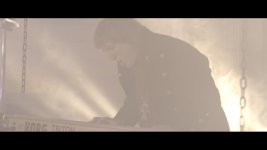
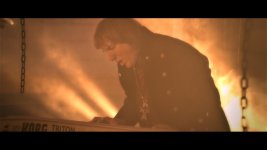
I just wrapped up my first project with the FS700 + 7Q combo and love it to death. I filmed the whole project in 4K2HD and below are some before after shots of some pretty extreme grades for this flashy rock video. You can see some shots are pretty darn overexposed and it was intentional to test the waters of seeing what I could get back. There was a lot I could get back. My confusion, or maybe I should say my relief, is that whether I overexposed a lot or only a little, I consistently kept feeling like I could push the grade where ever I wanted. I guess I am just trying to say the 4K2HD is still pretty gosh darn flexible on how much you can overexpose. At least that is my experience so far...







Mitch Gross
Veteran
We are looking into something like this.+1 rescator. I confirm everything you're saying. I would recommend C-D allow customizing the ISO setting up to 2 f/stops in Slog2. And, as you said, no ISO compensation in 4K2HDREC709, which is the easiest and most reliable to use.
I will add the following ...because EUREKA...!!!!
The punishement on misappropriate exposure are sévère and translate in noise and grains
I’ve been trhough all which is possible to read and honestly i cannot agree on everything.
I will speak on 4k to pro res HQ
Going to 85% white doesn’t work and will overexpose everything mostly. Things wills be washed out and not being able to be corrected in post.
The idea to set green between 30 and 50% on the odyssey 7q is a nice idea and a very good guide and match and confirm my discovery.
I finaly found what Works for real….to set the right exposure with zéro noise even the camera crosses darker area.
Of course if you use Emount lenses who have electronic iris it is then much more easier to control light change and adapt exposure automaticaly on the field(working in studio is another job)
On the FS700 you can adjust expsoure from -2 to + 2 stop using Emount lenses.
So I used the 18/200 emount kit lens and the Carl Zeiss FE 50mm F,18
(by the way the 18/200 for video is really not a bad lens...despite aperture limitations)
The way to go is to set the zébra of the fs700 and the odyssey 7q to 90% and not allow it to flash.
Just go to the limit just before flashing.
The results are awsome and even dark area are exposed properly.
In terms of exposure compensation this goes between -0,3 to + +0,7 stop based on my expérience and what my 90% indicated to me.
That distroy totally the ideas to overexpose so much the Slog in 4k to pro res Hq.
As for 4k raw this thing is very dark and i’ve not found the right way to expose it..but for sure it doesn’t work the same as the 4k to pro res Hq.
4k need at least overexposing +1,3 stop minimum
I will handle tests working with the zébra to find the good value of zébra to expose 4k with reliable results.
But 4k is less risky in terms of noise than 4k to pro res Hq but more risky in term to get dark images but involves to work with heavy files in dng and da Vinci résolve.
I start to believe the slog of convergent design you have to use in da vinci resolve is not really ok and produce too much dark image when applied.but i'm sure convergent will find a way very soon.
I hope this will help.
The punishement on misappropriate exposure are sévère and translate in noise and grains
I’ve been trhough all which is possible to read and honestly i cannot agree on everything.
I will speak on 4k to pro res HQ
Going to 85% white doesn’t work and will overexpose everything mostly. Things wills be washed out and not being able to be corrected in post.
The idea to set green between 30 and 50% on the odyssey 7q is a nice idea and a very good guide and match and confirm my discovery.
I finaly found what Works for real….to set the right exposure with zéro noise even the camera crosses darker area.
Of course if you use Emount lenses who have electronic iris it is then much more easier to control light change and adapt exposure automaticaly on the field(working in studio is another job)
On the FS700 you can adjust expsoure from -2 to + 2 stop using Emount lenses.
So I used the 18/200 emount kit lens and the Carl Zeiss FE 50mm F,18
(by the way the 18/200 for video is really not a bad lens...despite aperture limitations)
The way to go is to set the zébra of the fs700 and the odyssey 7q to 90% and not allow it to flash.
Just go to the limit just before flashing.
The results are awsome and even dark area are exposed properly.
In terms of exposure compensation this goes between -0,3 to + +0,7 stop based on my expérience and what my 90% indicated to me.
That distroy totally the ideas to overexpose so much the Slog in 4k to pro res Hq.
As for 4k raw this thing is very dark and i’ve not found the right way to expose it..but for sure it doesn’t work the same as the 4k to pro res Hq.
4k need at least overexposing +1,3 stop minimum
I will handle tests working with the zébra to find the good value of zébra to expose 4k with reliable results.
But 4k is less risky in terms of noise than 4k to pro res Hq but more risky in term to get dark images but involves to work with heavy files in dng and da Vinci résolve.
I start to believe the slog of convergent design you have to use in da vinci resolve is not really ok and produce too much dark image when applied.but i'm sure convergent will find a way very soon.
I hope this will help.
slipstrea808
Well-known member
Actually I don't remember anyone talking about overexposing the 4K to Prores. The 4K to Prores (4K2HD) can actually be exposed pretty normally. If I'm in Rec709 800% or SLOG2 I'll expose a bit to the right or use the onboard LUTs. They actually work decently well there.
It is the RAW stuff everyone feels strongly about ETTR is the correct choice. Good shots by the way! I wanna see the vid!
It is the RAW stuff everyone feels strongly about ETTR is the correct choice. Good shots by the way! I wanna see the vid!