Baluardo
Well-known member
Hi everybody,
I am learning more every day with the F3.
I still haven't consolidated a procedure to evaluate the right exposure.
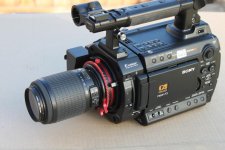
Thing is that I am using MTF adapter with Nikon lenses, so I am not really aware of what aperture I am at (unless the iris is fully open, and I am using a prime lens or I am at one end of a zoom lens).
Therefore using a light meter doesn't help too much sometimes.
What I do:
- Use the 100% zebras to check out for clipping
- Use the brightness indicator (or type1 zebras) trying to have 60-70 IRE on subjects (if applicable, like with talking heads)
- evaluation 'by eye'
- generically make sure that the histogram 'makes sense'
All of this still sounds a bit empyrical to me. I wonder if somebody can suggest a more 'procedural' way of doing it?
thanks!
Andrea
I am learning more every day with the F3.
I still haven't consolidated a procedure to evaluate the right exposure.
Thing is that I am using MTF adapter with Nikon lenses, so I am not really aware of what aperture I am at (unless the iris is fully open, and I am using a prime lens or I am at one end of a zoom lens).
Therefore using a light meter doesn't help too much sometimes.
What I do:
- Use the 100% zebras to check out for clipping
- Use the brightness indicator (or type1 zebras) trying to have 60-70 IRE on subjects (if applicable, like with talking heads)
- evaluation 'by eye'
- generically make sure that the histogram 'makes sense'
All of this still sounds a bit empyrical to me. I wonder if somebody can suggest a more 'procedural' way of doing it?
thanks!
Andrea
 Andrea