
Navigation
Install the app
How to install the app on iOS
Follow along with the video below to see how to install our site as a web app on your home screen.
Note: This feature may not be available in some browsers.
More options
You are using an out of date browser. It may not display this or other websites correctly.
You should upgrade or use an alternative browser.
You should upgrade or use an alternative browser.
Problem with RODE NTG-2 VERY low audio
- Thread starter shay_te
- Start date
Steve House
Veteran
Audio recording in general on DSLRs like your Nikon is pretty marginal at best. Serious workers usually use a separate recorder because of that.i am filled with PAIN,
the files on the camera sounds "ok" . not so clean .
(when i play back the video files from the camera)
when i am getting the video files to the computer i cant ear anything......
whats going on here.
How far did you have the microphone away from the person you're recording? You need to keep it within about 50 centimeters or less for good results.
Richard Crowley
Veteran
It seems very unlikely that the "not very clear" sound is caused by the 6 meter XLR cable. Whether it could be caused by the adapter depends on how it was wired.
The proper wiring for an adaptor like that is to connect the XLR pin 1 (ground) and pin 3 (-) to the 3.5mm sleeve (ground). And connect the XLR pin 2 (+) to the 3.5mm sleeve and tip (the right and left channel audio inputs). If your cable is wired any other way, that could explain the problem.
Also, you didn't reveal what camera you are using (or I missed it?) so it is possible that the "plug-in power" from the camera could be causing undesirable effects on the microphone. Adding a DC-blocking capacitor would solve that problem.. I have published some wiring diagrams on my website: http://www.rcrowley.com/CamAdapt.htm
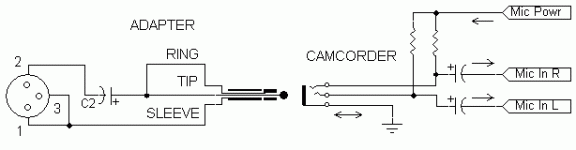
It sounds very likely that your adapter is NOT wired correctly. Please refer to the information above.
The proper wiring for an adaptor like that is to connect the XLR pin 1 (ground) and pin 3 (-) to the 3.5mm sleeve (ground). And connect the XLR pin 2 (+) to the 3.5mm sleeve and tip (the right and left channel audio inputs). If your cable is wired any other way, that could explain the problem.
Also, you didn't reveal what camera you are using (or I missed it?) so it is possible that the "plug-in power" from the camera could be causing undesirable effects on the microphone. Adding a DC-blocking capacitor would solve that problem.. I have published some wiring diagrams on my website: http://www.rcrowley.com/CamAdapt.htm
when i am getting the video files to the computer i cant ear anything......whats going on here.
It sounds very likely that your adapter is NOT wired correctly. Please refer to the information above.
hey thanks again , i have a nikon D7000 , i will ask him to check if the cable is wired same as in your diagram .
how come that i cana ear the audio in my camera when playing the files on the camera BUT can't ear anything when i put my video files in the computer ?
(trying playing it with window media player, media player classic, quick time, also just use the default exporter from adobe premiere )
any ideas
thank u again
how come that i cana ear the audio in my camera when playing the files on the camera BUT can't ear anything when i put my video files in the computer ?
(trying playing it with window media player, media player classic, quick time, also just use the default exporter from adobe premiere )
any ideas
thank u again
Richard Crowley
Veteran
If the adapter is wired incorrectly, you are recording the audio on the left channel, and the OPPOSITE of the audio of the right channel. When you play them back together, they CANCEL each other and you hear nothing (or very weak audio).
Unless I'm missing something, this is true only as long as they are summed to mono, either through a program or if you are listening on a single speaker taking both channels. Since it's recorded as a stereo track, it should be played as such. In that case it probably won't sound good, but it would give sound.If the adapter is wired incorrectly, you are recording the audio on the left channel, and the OPPOSITE of the audio of the right channel. When you play them back together, they CANCEL each other and you hear nothing (or very weak audio).
Do you have any program with a sound level meter? If it does not show anything when you play the file, something is probably wrong with the file itself, but if it does show activity, then something is either summing the two channels up or you have a problem with the audio path from the program to the speakers.
Richard Crowley
Veteran
Correct. And we must assume that they are being summed (or nearly summed by the screwy "enhanced" audio schemes in many modern computers). Certainly, it would be preferable for shay_te to play it back on something more analytic such as a proper video NLE application, etc. I don't know (or trust) any of those software players he mentioned to not play tricks with the audio.
But until we get the mic input adapter sorted out, that remains the #1 probable cause of this symptom. If you hang around here much you will recognize it is perhaps the #1 question in this and similar forums. And that also accounts for why shay_te hears only "weak" and not "cancelled" audio in his headphones when listening on the camera.
There are literally a dozen other factors that could be in play here, but let's sort them out beginning with the most likely.
But until we get the mic input adapter sorted out, that remains the #1 probable cause of this symptom. If you hang around here much you will recognize it is perhaps the #1 question in this and similar forums. And that also accounts for why shay_te hears only "weak" and not "cancelled" audio in his headphones when listening on the camera.
There are literally a dozen other factors that could be in play here, but let's sort them out beginning with the most likely.
Richard Crowley
Veteran
Perhaps. But It goes against my grain to propose an active device that costs several-100 $£€ when a properly wired $15 cable will do the job.
Richard Crowley
Veteran
What does "ear audio" mean? Do you mean "hear audio"? You can wire the adapter to send the microphone audio into either channel or into BOTH channels. I show how to do these variations on the web page I already cited.

Rick R
Veteran
"do i need to ear (hear?) audio on both audio channels"
-- Only if you would like to. It may make it easier to monitor if using a camera's headphone output.
A single dialog mic is usually only recorded to one track, even if there are many available. In post-production, it is normally panned/placed dead-center in the mix.
-- Only if you would like to. It may make it easier to monitor if using a camera's headphone output.
A single dialog mic is usually only recorded to one track, even if there are many available. In post-production, it is normally panned/placed dead-center in the mix.
ok , just got the cable an made a test , from very close, 1 meter , 2 meter , 3 meter (2 meter a bit low but still very clear) all are loud and clear,
also when playing the video file with media player classic and in adobe premiere.
i tested with the guy who made the cables and fix audio equipment the microphone ,
i must say with direct XML and phantom power and compering it with direct XML with internal battery it sounds very identical
(no mixer involved directly to a speaker )
wow guys you are great , special thanks to Richard Crowley, well done
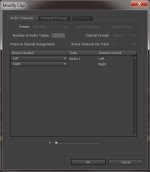
i have another small question , when i go to audio channels in adobe premier i see this screenshot, is it normal ?
the audio only on left channel ?
thank you guys you are great
also when playing the video file with media player classic and in adobe premiere.
i tested with the guy who made the cables and fix audio equipment the microphone ,
i must say with direct XML and phantom power and compering it with direct XML with internal battery it sounds very identical
(no mixer involved directly to a speaker )
wow guys you are great , special thanks to Richard Crowley, well done
i have another small question , when i go to audio channels in adobe premier i see this screenshot, is it normal ?
the audio only on left channel ?
thank you guys you are great
Rick R
Veteran
Difficult to tell without having the cable at hand to check the wiring.after testing the mic , the sound is not very clear
this can be cause of my 6 meter XML and the unbalanced connector ?
If you can post an audio clip, it may give us a clue to the problem.
"Perhaps. But It goes against my grain to propose an active device that costs several-100 $£€ when a properly wired $15 cable will do the job. "
While I concur with your thoughts at least a 'Beachtek' or Juiced link' box provides a solid anchor point for the audio cables, without a solid anchor point the next wave of questions on the forums is 'why is the 3.5mm input loose' or 'why is the audio going splat and dropping out' is there any fix?
While I concur with your thoughts at least a 'Beachtek' or Juiced link' box provides a solid anchor point for the audio cables, without a solid anchor point the next wave of questions on the forums is 'why is the 3.5mm input loose' or 'why is the audio going splat and dropping out' is there any fix?
@Rick R ,i just uploded a file u can get it here
https://www.dropbox.com/sh/dl3gb9wmwelzv43/DQSxqaRzW1
sorry the file is in Hebrew, i test from very close , 1 meter away from the microphone, 2 meter , 3 meter ,4 meter
(i am counting in hebrew there , if u prefer some other test i will gladly make one.)
@OzGizmo, thank you for your comment , 'Beachtek' or Juiced link' are to expensive for me at the point and they are not the only solution, not mention the microphone its self is not so cheap.
in either way i will need the same cable connected to my camera , from the microphone directly OR from the 'Beachtek'/'Juiced link'.
so i guess this help is still needed.
i think with the current setup i am not suffering from drops. it sounds ok i think.... i am no expert in audio . sorry.
my question was should the audio be on only one channel (in the screen shot only on the left one), i am asking if its a problem OR if its ok ?
again thank you so much for helping me with this.
https://www.dropbox.com/sh/dl3gb9wmwelzv43/DQSxqaRzW1
sorry the file is in Hebrew, i test from very close , 1 meter away from the microphone, 2 meter , 3 meter ,4 meter
(i am counting in hebrew there , if u prefer some other test i will gladly make one.)
@OzGizmo, thank you for your comment , 'Beachtek' or Juiced link' are to expensive for me at the point and they are not the only solution, not mention the microphone its self is not so cheap.
in either way i will need the same cable connected to my camera , from the microphone directly OR from the 'Beachtek'/'Juiced link'.
so i guess this help is still needed.
i think with the current setup i am not suffering from drops. it sounds ok i think.... i am no expert in audio . sorry.
my question was should the audio be on only one channel (in the screen shot only on the left one), i am asking if its a problem OR if its ok ?
again thank you so much for helping me with this.
Steve House
Veteran
...
@OzGizmo, thank you for your comment , 'Beachtek' or Juiced link' are to expensive for me at the point and they are not the only solution, not mention the microphone its self is not so cheap.
in either way i will need the same cable connected to my camera , from the microphone directly OR from the 'Beachtek'/'Juiced link'.
so i guess this help is still needed.
...
Not true. The Beach or Juicedlink accepts XLR balanced mic inputs and outputs the signal on a 3.5mm stereo plug that goes to the camera.