Problem with RODE NTG-2 VERY low audio

shay_te

Member
hey all.
i just get the RODE NTG-2, plunged it to my camera and try it ,
i was very disappointed that i could not ear anything ,also when i put my camera movie settings the audio to maximum .all i can ear is static noise and nothing recorded.
also connected the microphone to my PC , seems like the audio is very very low .

by RODE web site it need to work on a single AA battery.

did u see anything like it before . ?
thank you
 
it's a condenser mic that runs on AA power or Phantom power from your camera or recorder. It needs one or the other. Also, keep in mind that it's a low z mic so if you put it into a high z input you need an impedance matching transformer. Check the documentation.
 
Last edited:
you need to give full details. You have a microphone with XLR output, but you are plugging into a device with a different socket. Are you sure the cable you are using is wired correctly. If you are going to an unbalanced microphone input that uses a two circuit (tip and sleeve) connection then pins 1 and 3 of the xlr are connected to gather and pin 2 goes to the tip. If the camera is expecting a stereo input, then the connection is different again. So if you have checked the battery, then the only problem is going to be the wiring between the mic and the device - and it's easy to get it wrong as there really isn't a standard. There are two or three for different purposes.
 
here are the details

here are the details

you need to give full details. You have a microphone with XLR output, but you are plugging into a device with a different socket. Are you sure the cable you are using is wired correctly. If you are going to an unbalanced microphone input that uses a two circuit (tip and sleeve) connection then pins 1 and 3 of the xlr are connected to gather and pin 2 goes to the tip. If the camera is expecting a stereo input, then the connection is different again. So if you have checked the battery, then the only problem is going to be the wiring between the mic and the device - and it's easy to get it wrong as there really isn't a standard. There are two or three for different purposes.

ok this is the setup that i got ,
this is the XLR cable : Stagg SMC6 6 metr
http://www.amazon.co.uk/Stagg-SMC6-metre-standard-microphone/dp/B002PZXVRM
(the cable is balanced according to the seller details )

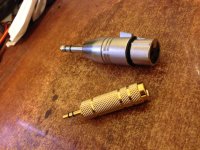
then i got this connector , see the attached image

the seller say i should have it balanced all the way to the camera

photo.jpg


thank you so much for helping .
 
this more than likely is not connected internally the way it needs to be in order to work with ANY camera or recorder or computer. if you have a diagram of how the XLR is wired to the TRS (1/4)? this will tell all... if you have a voltmeter to figure out how it is wired then we could deduce the issue.

there are several threads in the recent past where diagrams appear that show you the proper way it needs to be wired, so a search might be a life saver for you.

good luck
 
The problem is your adapters. You're taking a balanced mono signal and connecting it to a stereo mimi input. The adapters you have are connecting signal + to the left channel and the signal - to the right, resulting in the two channels being 180 degrees out of phase with each other. You need a proper adapter, preferably one like the Beachtek or JuiicedLink boxes that give you level controls, etc. The correct wiring for an adapter puts the XLR pin 2 on other the TRS tip and ring, XLR pin 3 on TRS sleeve, and depending on the type of input, XLR pin 3 connected to XLR pin 1. Your adapters are most probably putting pin 2 on tip, pin 3 on ring, pin 1 on sleeve - completely wrong - though obviously I can't tell for sure just looking at them.
 
Last edited:
what do u mean i need Beachtek or JuiicedLink boxes, but it need to work on a AA battery ?
why should i pay more 200$ when the microphone needs to work on a AA battery , also searching for the right box is a gambling game.
some forums sayes the RODE NTG-2 have the same problems also with the Beachtek.
but i dont have anymore money.

can u help me or give me a direction for what wiring do i need ,
so i can go to the store and get the proper one.
this way ill come to the store and say i need an X Y Z . so eazy :)

thank you
 
You are using the wrong connections. There are commercially-available adapters/cables which ARE wired correctly for what you are trying to do.
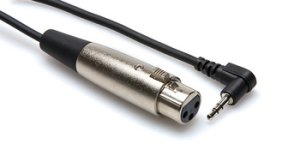
For example: Hosa XVM 110F

t350_110dddff3dcc1b2e03d507ed255e2e10.jpg

The adapters you are trying to use are correct if you were going into a monaural balanced input. But you are going into a stereo unbalanced input. Your symptoms are exactly what we would expect from that kind of wiring error. Hundreds of people before you discovered exactly the same thing, and dozens of them have come through here (and similar online audio forums) with the same symptoms, and they have received the same advice to resolve the problem.

That B&H photo product MAY be correct, but it doesn't give me any confidence from the description or the "reviews". You don't need a transformer here. You only need the cable wired properly for this particular combination of source and destination.
 
Last edited:
Yes, that cable will {EDIT: NOT!} work. If you are handy with a soldering iron (or you have a handy friend with a soldering iron) you can assemble an equivalent cable for a tiny fraction of the cost of that cable, not to mention shipping.

PS: It is to everyone's advantage to at least reveal what country your are in by completing your user profile. There are people here from all over the planet and we attempt to provide solutions that are appropriate to the location of the situation.

{EDIT} OzGizmo is correct. That BeachTek cable is the OPPOSITE of what you need. The BeachTek cable is intended to come out of a BeachTek box (3.5mm) and go into an XLR camera input.

The cable I cited as an example is available at B&H: http://www.bhphotovideo.com/c/produ...logy_XVM_110F_XLR3F_to_Right_Angle_3_5mm.html
 
Last edited:
Yes, that cable will {EDIT: NOT!} work. If you are handy with a soldering iron (or you have a handy friend with a soldering iron) you can assemble an equivalent cable for a tiny fraction of the cost of that cable, not to mention shipping.

PS: It is to everyone's advantage to at least reveal what country your are in by completing your user profile. There are people here from all over the planet and we attempt to provide solutions that are appropriate to the location of the situation.

{EDIT} OzGizmo is correct. That BeachTek cable is the OPPOSITE of what you need. The BeachTek cable is intended to come out of a BeachTek box (3.5mm) and go into an XLR camera input.

The cable I cited as an example is available at B&H: http://www.bhphotovideo.com/c/produ...logy_XVM_110F_XLR3F_to_Right_Angle_3_5mm.html

thank you so mush, i used your forum comment and go to a guy how is handing and fixing audio equipment for a living , a he made me a small cable. and its working now :)
i am just testing how good it will work :)
(the cable that he build for me is very short 10 centimeters, and i connect it to my 6 meter XML cable)
what is the maximum length of XLR cable recommended in my case ?
thanks you all again :)
 
With an unbalanced connection I'd be happy up to 20 or 30m. The only time it's likely to cause problems is when you use long unbalanced cables with equipment that is prone to radio frequency interference - probably a bit complex to get into here, but long cables that are unbalanced can sometimes be a bit susceptible to outside interference, but depending on where you are, you may be able to use even longer ones. With a more typical 10m cable, I doubt you'll have any trouble.
 
"What is the maximum length of XLR cable recommended in my case?"
For your unbalanced mic level configuration, "as short as possible" Generally recommended to be under 3 Meters or so, however your mileage may vary depending on many factors and much longer runs are not uncommon.
 
after testing the mic , the sound is not very clear
this can be cause of my 6 meter XML and the unbalanced connector ?
 
Back
Top